Introduction
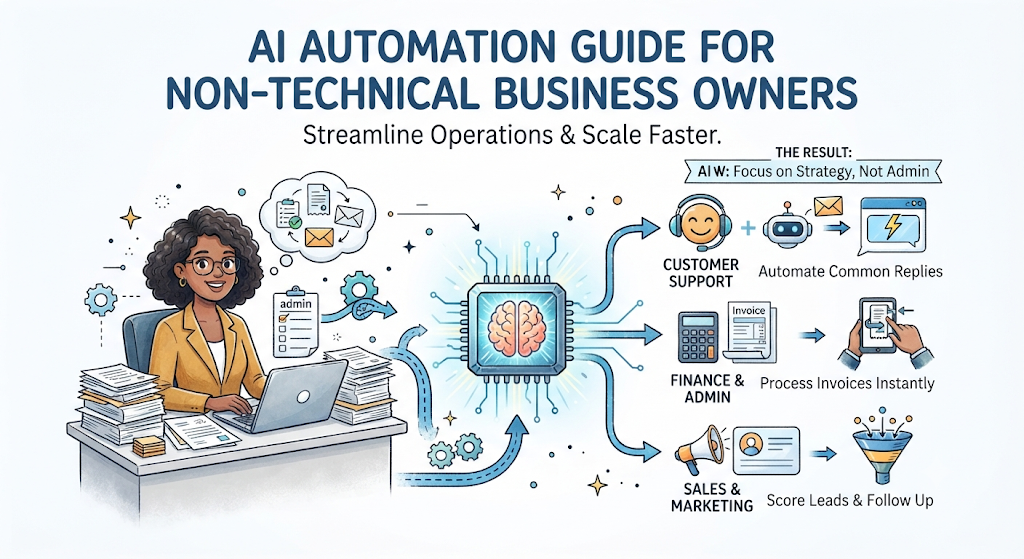
Running a growing business often feels like drowning in repetitive tasks. You spend hours copying data from invoices into spreadsheets, answering the same customer support emails, or manually updating your project management boards. These tasks do not grow your business, but they consume your day.
In the past, solving this problem required hiring expensive software developers or buying complex, rigid enterprise systems. Today, modern AI tools have changed the rules. You no longer need to know how to code to make software work for you.
This guide explains how non-technical business owners can safely and effectively introduce AI automation into their daily operations. You will learn what AI automation actually is, how to choose the right processes to automate, where projects typically fail, and how to build a simple framework to get started without wasting money or risking your data.
What Is AI Automation?
AI Automation is the combination of traditional software automation (which follows strict, rule-based instructions) and artificial intelligence (which can understand context, read unstructured text, and make decisions).
Simple Meaning
Think of traditional automation as a digital assembly line that only moves items if they fit an exact shape. Think of AI automation as having a smart, tireless digital assistant who can read a messy customer email, figure out what the customer wants, draft a helpful reply, and update your records automatically.
Why It Matters
Standard automation fails when data is messy or unpredictable. Real-world business data is messy: customers spell names wrong, invoices arrive in different formats, and support tickets use varied language. AI bridges this gap by adding comprehension. It allows you to automate tasks that previously required human judgment.
Example
Imagine a customer fills out a contact form on your website asking about your return policy.
- Without automation: Your support team reads the email, looks up the policy, writes a response, and logs the inquiry in a spreadsheet.
- With AI automation: An AI tool reads the incoming message instantly, recognizes it as a return inquiry, drafts an accurate response based on your handbook, and flags it for a quick human review before sending—saving 95% of the time.
How AI Automation Works
To manage AI automation effectively, you do not need to understand machine learning algorithms. You simply need to understand how data moves from one place to another through three basic steps: Trigger, Processing, and Action.
1. The Trigger
Every automation starts with an event. This is the spark.
- Example: A new lead fills out your web form, a payment is processed on Stripe, or a new email arrives in your inbox with an attached PDF invoice.
2. The Processing (AI Layer)
This is where artificial intelligence steps in. Instead of just moving raw data blindly, the AI analyzes it.
- Example: The AI reads the PDF invoice, extracts the vendor name, total amount, and due date, and checks those numbers against your purchase order for discrepancies.
3. The Action
Once the AI processes the information, it executes the final task.
- Example: The tool updates your accounting software, moves the invoice into a paid folder, and sends a confirmation message to your Slack channel.
Why AI Automation Matters for Business Owners
Business growth usually brings operational drag. As order volume, client inquiries, and administrative overhead increase, hiring more staff for repetitive tasks eats into your profit margins.
AI automation addresses this challenge by driving efficiency across four operational pillars:
Speed and Responsiveness
Customers expect fast replies. AI automation can answer common inquiries within seconds, even outside business hours. Faster response times directly correlate with higher conversion rates and better customer retention.
Error Reduction
Human fatigue leads to typos, missed follow-ups, and data-entry mistakes. Automated workflows execute steps identically every single time. If an invoice requires a 10% tax calculation, the system will apply it accurately across 10,000 transactions.
Cost Control
Instead of hiring entry-level staff solely for data entry or sorting files, you can deploy AI tools that cost a fraction of a monthly salary and operate 24/7 without burnout.
Strategic Focus
When your team is freed from routine administrative duties, they can redirect their energy toward revenue-generating activities like closing high-value sales, improving product quality, and nurturing key client relationships.
Important Factors to Understand Before You Start
Before choosing tools or building workflows, you must evaluate several foundational factors to ensure your automation strategy succeeds.
Data Readiness
AI tools rely heavily on clean inputs. If your current customer data is scattered across sticky notes, random text files, and unorganized email threads, automated tools will struggle. Clean up your core databases before connecting automation pipelines.
Process Standardization
You cannot automate chaos. If every member of your team handles client onboarding differently, an AI tool will not know which path to follow. Document your standard operating procedures (SOPs) into clear, step-by-step guidelines before turning them over to software.
Human-in-the-Loop Oversight
Do not give AI tools full autonomy over critical business functions on day one. Establish approval gates where an AI drafts a response, updates a record, or prepares a refund, but requires a human click to authorize the final step.
Practical Examples of Business Automation
Here is how non-technical business owners apply AI automation in three common operational areas:
| Department | Manual Process | AI-Automated Workflow | Business Impact |
|---|---|---|---|
| Customer Support | Reading incoming emails, sorting by urgency, and typing out standard FAQ replies. | AI reads incoming emails, categorizes sentiment, drafts contextual responses, and routes complex issues to human agents. | Response time drops from hours to seconds; support team handles twice as many tickets. |
| Sales & Lead Gen | Manually reviewing form submissions and copying lead details into a CRM. | AI extracts contact details, researches company size from public data, scores the lead, and assigns it to the right sales rep. | Sales reps focus only on qualified prospects; no hot leads fall through the cracks. |
| Finance & Admin | Typing data from paper or PDF receipts into accounting spreadsheets line by line. | AI scans receipt images, extracts line items and tax data, categorizes expenses, and flags unusual charges. | Eliminates manual data entry errors and speeds up monthly bookkeeping. |
Common Mistakes Business Owners Make
Many business owners fail with AI automation because of avoidable strategic errors. Review this breakdown to protect your investment:
What people do: Trying to automate complex, unstructured, and poorly defined processes immediately.
- Why they do it: They get excited by marketing hype and want to automate their entire business overnight.
- Why it causes problems: The AI produces unpredictable results, leading to customer frustration and lost trust.
- What they should do instead: Start small. Choose one narrow, highly repetitive task (like categorizing support tickets) and master it before expanding.
What people do: Choosing the most advanced enterprise AI tool available on the market.
- Why they do it: They assume more expensive software equals better business results.
- Why it causes problems: The tool is too complex for the team to adopt, leading to wasted subscription fees and abandoned software.
- What they should do instead: Use user-friendly, no-code integration platforms that connect the apps you already use daily.
What people do: Treating AI automation as a “set-it-and-forget-it” project.
- Why they do it: They believe software runs perfectly forever without maintenance.
- Why it causes problems: Software updates, API changes, or shifts in customer behavior will eventually break the workflow.
- What they should do instead: Schedule monthly reviews to check error logs, test workflows, and refine prompts.
Risks and Limitations
While AI automation offers massive leverage, it also introduces specific business risks that require active management.
1. Hallucinations and Unpredictable Outputs
Risk: Large language models can occasionally generate false information or misinterpret instructions with total confidence.
- Example: An AI customer service bot might invent a discount policy that your store does not offer.
- How to reduce it: Restrict AI tools to specific knowledge bases (like your official product catalog) and use strict guardrails that prevent it from making promises outside approved parameters.
2. Data Privacy and Security Vulnerabilities
Risk: Feeding sensitive client data, trade secrets, or financial records into public AI models can expose your business to data breaches or regulatory compliance violations.
- Example: Pasting confidential client contracts into a free web-based AI chat tool.
- How to reduce it: Use enterprise-grade automation platforms and AI APIs that explicitly state they do not use your business data to train public models.
3. Over-Automation of Human Relationships
Risk: Removing the human touch entirely from high-touch client interactions can make your business feel cold and impersonal.
- Example: Using an aggressive AI bot to handle sensitive client complaints or high-value account cancellations.
- How to reduce it: Use AI for speed and administrative preparation, but keep real humans involved in relationship-building, empathy-driven support, and closing high-stakes deals.
Decision-Making Framework: Should You Automate a Process?
Before investing time or money into automating a workflow, run it through this simple 5-step evaluation framework:
- Is the task repetitive? If you or your team perform this task multiple times a day or week, it is a strong candidate. If you do it once a year, leave it manual.
- Is the process rule-based or predictable? If the steps change drastically every single time based on intuition, automation will fail. If it follows a logical path, proceed.
- What is the cost of failure? If the automation breaks, will it annoy a customer slightly, or will it accidentally delete your entire client database? High-risk tasks require strict human oversight.
- Do you have clean inputs? Verify whether the information required to run the task is digital, organized, and accessible.
- Will the time saved outweigh the setup effort? If an automation takes 10 hours to build and saves you 5 minutes a year, it is not worth doing. Focus on high-frequency bottlenecks first.
Essential Checklist for Your First AI Automation Project
Use this practical checklist to verify your readiness before launching your first automated workflow:
- Define the objective: Write down the exact problem you want to solve in one sentence.
- Map the current manual process: Draw out every step your team currently takes from start to finish.
- Clean your data: Ensure the source files, spreadsheets, or CRM fields are accurate and up to date.
- Select simple tools: Choose user-friendly, no-code integration platforms rather than custom software development.
- Build a sandbox version: Create a test environment to run the workflow with fake data before connecting live customers.
- Establish human review gates: Set up notifications so a team member inspects the AI output before it goes public.
- Monitor error logs: Check the system weekly during the first month to catch missed triggers or broken connections.
Key Terms
- API (Application Programming Interface): A digital bridge that allows different software applications to talk to each other and share data automatically.
- CRM (Customer Relationship Management): Software that manages all your company’s relationships and interactions with current and potential customers.
- Guardrails: Rules, boundaries, and safety filters placed on an AI model to prevent it from generating harmful, incorrect, or unauthorized outputs.
- Hallucination: An instance where an AI model generates factually incorrect or fabricated information while presenting it as absolute truth.
- No-Code Platform: Software development tools that let users build applications and workflows visually using drag-and-drop interfaces without writing programming code.
- Prompt: The text instructions, questions, or context you give to an AI model to guide its output.
- Trigger: The specific event or action that automatically initiates an automated workflow.
- Workflow: A structured sequence of tasks, steps, and decisions required to complete a business process.
FAQs
Do I need to know how to code to use AI automation?
No. Modern automation platforms use visual, drag-and-drop interfaces. If you can move blocks on a screen and connect lines between apps, you can build effective business automations.
Will AI automation replace my employees?
AI automation is designed to replace tedious administrative tasks, not human talent. By taking over data entry, sorting, and basic drafting, AI frees your employees to focus on creative problem-solving, sales, and customer care.
How much does AI automation cost to set up?
Basic no-code automation platforms and AI tool subscriptions often start at low monthly subscription fees (ranging from twenty to a few hundred dollars). The return on investment usually comes quickly through hours saved per week.
What is the safest business process to automate first?
Start with internal administrative tasks where errors have low consequence—such as summarizing meeting notes, organizing incoming customer feedback into internal spreadsheets, or drafting email replies for internal team review.
How do I stop AI tools from making mistakes or hallucinating?
Provide clear instructions, restrict the AI to authorized company documents as its sole reference source, and always keep a human review step in place before any automated message reaches a live customer.
Is my business data safe when using AI tools?
It depends on the platform. Avoid pasting sensitive data into free, consumer-grade AI tools. Instead, use paid enterprise tiers and business platforms that guarantee your data will not be used to train public models.
How long does it take to build a working automation?
A simple workflow connecting two apps (like sending form submissions into a spreadsheet or Slack channel) can be built and tested in under an hour. More complex multi-step processes involving AI review may take a few days of testing.
Conclusion
AI automation is no longer reserved for massive tech giants with dedicated engineering teams. For non-technical business owners, it is a practical lever to eliminate repetitive busywork, reduce operational mistakes, and scale output without exploding overhead costs.
Success does not require automating your entire business on day one. Start by identifying your single most annoying administrative bottleneck, map out its steps, and introduce a simple, supervised AI workflow. By taking a thoughtful, step-by-step approach, you can build an agile, efficient business prepared for sustainable growth.