Introduction
A retail manager recently added a smart chat widget to an online store, hoping it would fix slow order processing. Customers loved asking the bot about shipping times, yet the warehouse team still spent three hours every afternoon copying order numbers from emails into their shipping software. The chat tool talked well, but it did not move data between systems.
This confusion happens every day when business owners and operations teams look at modern artificial intelligence tools. Software vendors often market both conversational tools and background automation tools under the same broad label of “AI assistants.” Because the marketing sounds similar, buyers frequently purchase a conversational tool when they actually need a background process engine—or vice versa.
Choosing the wrong tool wastes software budgets, frustrates employees, and leaves manual bottlenecks untouched. Understanding how these two technologies differ helps you solve the right operational problem on the first try.
In this guide, you will learn how AI chatbots and AI workflow automation work inside business platforms, where each tool succeeds or fails, what hidden costs and security risks to watch for, and how to decide which system your team should build first.
What Are AI Chatbots and AI Workflow Automation?
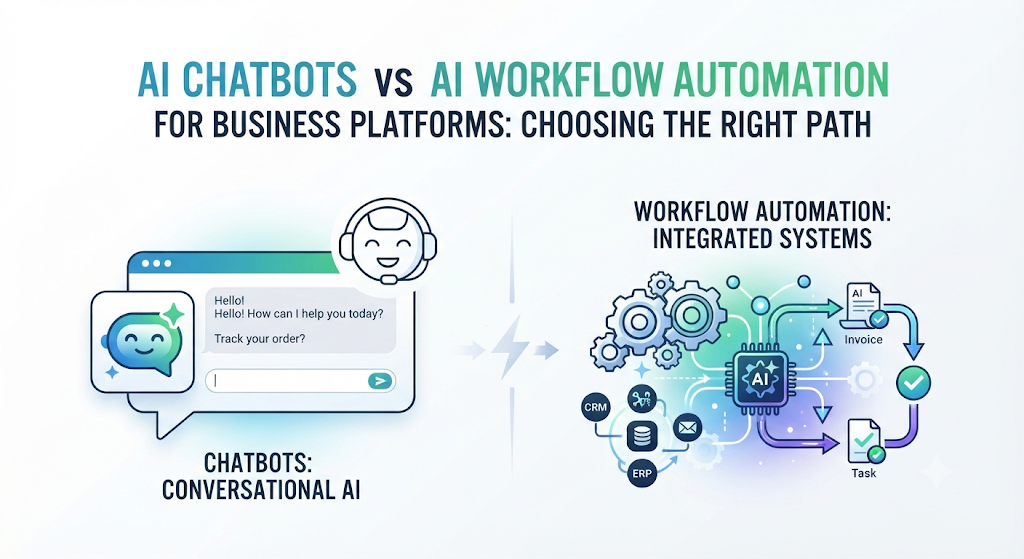
To compare these two systems fairly, you first need to separate the interface (how humans interact with software) from the execution engine (how software gets work done).
What Is an AI Chatbot?
An AI chatbot is a software program designed to hold human-like conversations through text or voice. Modern versions rely on Large Language Models (LLMs)—software trained on massive amounts of text to predict and generate natural sentences.
- Simple meaning: A digital assistant that reads what a person types or says and writes back a helpful reply.
- Why it matters: People prefer asking questions in plain language rather than digging through long help manuals or complex website menus.
- Practical example: A bank puts an AI chatbot on its mobile app. When a customer types, “I lost my debit card while traveling,” the bot understands the urgency, explains the card-freeze policy, and asks for confirmation before locking the account.
What Is AI Workflow Automation?
AI workflow automation is a system that connects different business apps and uses artificial intelligence to make decisions while moving tasks from start to finish automatically. Instead of waiting for someone to type in a chat box, it watches for triggers—specific digital events like a new form submission, an incoming email, or a payment alert.
- Simple meaning: An invisible digital assembly line that reads data, makes smart routing choices, and updates your business software without human typing.
- Why it matters: Most office delays happen when workers manually copy data from one program to another or wait for routine approvals.
- Practical example: When a supplier emails a PDF invoice, an AI workflow reads the text, checks if the total matches the purchase order in the accounting platform, and sends a message to the finance manager only if the numbers disagree.
How Both Systems Work Behind the Scenes
Although both tools use artificial intelligence, their internal machinery operates on very different rules.
Inside an AI Chatbot
When a user sends a message to a business chatbot, the platform runs a fast sequence of steps:
- Intent Recognition: The system analyzes the user’s words to figure out their goal (such as checking an order status or requesting a refund).
- Context Retrieval: Many business bots use Retrieval-Augmented Generation (RAG). This method searches your company’s approved help articles, product catalogs, or policy PDFs before writing an answer, keeping the bot grounded in real facts.
- Response Generation: The language model writes a clear, polite answer using the retrieved facts and remembers what was said earlier in the same chat session.
- Handoff or Action: If the user asks for something sensitive or complex, the bot transfers the chat history to a human agent.
Inside AI Workflow Automation
An AI workflow does not need a conversation to start working. It runs on a structured chain of logic:
- Event Trigger: An external action starts the flow—such as a customer filling out a quote form or a database record changing status.
- AI Classification and Extraction: The AI layer reads unstructured data (like messy emails, receipts, or call transcripts) and turns it into clean, structured fields like names, dates, and dollar amounts.
- Conditional Logic (If/Then Rules): The workflow checks business rules. For example, if a support request mentions “billing error” and comes from an enterprise account, it follows Path A; otherwise, it follows Path B.
- API Execution: The workflow uses Application Programming Interfaces (APIs)—digital bridges that let separate software programs talk to each other—to update your CRM, send invoices, or create project tasks automatically.
AI Chatbots vs AI Workflow Automation: Side-by-Side Comparison
The table below shows how the two approaches compare across key business factors.
| Feature | AI Chatbots | AI Workflow Automation |
|---|---|---|
| Primary Interface | Chat window, messaging app, or voice call | Invisible background triggers and app connections |
| Main Strength | Explaining policies, answering questions, guiding users | Moving data, routing tasks, updating databases |
| How It Starts | A human types or speaks a message | A system event occurs (new email, form, payment) |
| Best Business Areas | Customer support, sales pre-qualification, internal HR help | Accounting, order processing, IT tickets, data entry |
| Main Failure Mode | Hallucinations (inventing false facts) or frustrating loops | Broken API connections or bad data corrupting records |
| Setup Focus | Writing clear knowledge base docs and conversation guardrails | Mapping exact business rules, permissions, and app links |
Why This Distinction Matters for Business Platforms
Modern business platforms—such as Customer Relationship Management (CRM) systems, Enterprise Resource Planning (ERP) suites, and helpdesk software—now sell both tools as add-ons. Treating them as interchangeable leads to three major operational problems.
1. Conversation Without Action Creates Friction
A chatbot that can tell a customer how to cancel a subscription, but cannot actually process the cancellation in your billing system, still forces a human worker to finish the job. Customers feel annoyed when they have to repeat their details to a human agent after already explaining everything to a bot.
2. Automation Without Clear Rules Scales Mistakes
If you connect an AI workflow directly to your customer database without strict verification rules, a single misread email can overwrite valid client addresses or issue duplicate refunds at machine speed. Manual work is slow, so mistakes happen slowly; automated workflows execute errors instantly across hundreds of records.
3. Different Teams Maintain Each System
Chatbots require ongoing content maintenance. Whenever your pricing, return window, or product features change, someone must update the chatbot’s knowledge files. Workflow automation requires technical maintenance. Whenever a third-party app updates its software or changes a password token, an administrator must check the connection so the pipeline does not stall.
When to Use Each Approach (And When Not To)
Choosing the right tool depends entirely on where your team loses time and where your users get stuck.
When an AI Chatbot Is the Right Choice
- High volume of repetitive questions: Your support team answers the same fifty questions about shipping, sizing, password resets, or store hours every day.
- Guided product selection: Buyers feel overwhelmed by a large catalog and need someone to ask three quick questions and recommend the right item.
- 24/7 front-line triage: You want to greet website visitors outside business hours, collect their contact details, and book meetings on your sales calendar.
When NOT to Use an AI Chatbot
- Complex emotional disputes: Angry customers dealing with lost money, medical concerns, or legal complaints want a human decision-maker, not a cheerful script.
- Strict data entry tasks: Asking employees to type long expense reports into a chat box is slower than letting them upload a receipt to an automated form.
- Zero-tolerance compliance environments: If a single wrong word creates a legal liability and your team cannot review the knowledge base weekly, a free-talking bot is too risky.
When AI Workflow Automation Is the Right Choice
- Multi-app data transfers: Employees spend hours copying lead details from web forms into a CRM, then creating a folder in cloud storage, then alerting a manager in team chat.
- Document sorting and routing: Your business receives hundreds of incoming emails, resumes, or invoices that must be read, labeled, and sent to specific departments.
- Scheduled reporting and alerts: You need a system to check inventory levels every morning, predict low stock, and draft purchase orders automatically.
When NOT to Use AI Workflow Automation
- Broken or undefined processes: Automating a messy process where nobody agrees on the approval rules simply creates automated chaos. Fix the human process first.
- One-off or rare tasks: If a task happens twice a year and takes ten minutes, building and maintaining an automated workflow costs more than doing it manually.
- Highly subjective creative work: Tasks requiring deep human judgment, negotiation, or brand strategy should remain human-led.
How They Work Together: The Hybrid Architecture
In mature business platforms, chatbots and workflow automation rarely compete. Instead, they act as the front door and the back office of the same system.
Consider a realistic example for a mid-sized B2B software company:
- The Chatbot (Front Door): An existing client opens the support chat and types, “We just hired five new staff members and need to add seats to our plan.”
- Verification: The chatbot checks the user’s login status and confirms the cost of five extra seats using the company’s pricing document.
- The Workflow Trigger (Handoff): Once the client clicks “Approve Charge,” the chatbot triggers a background workflow instead of making a support agent do the typing.
- Workflow Automation (Back Office): The workflow updates the license count in the billing platform, generates an updated invoice, sends a receipt email, and logs a note in the sales team’s CRM profile so the account manager knows the client is growing.
In this setup, the chatbot handles human communication smoothly, while the workflow handles database updates accurately. Neither tool is forced to do a job it was not built for.
Practical Examples Across Different Business Sizes
Seeing how different organizations apply these tools makes the trade-offs clearer.
Example 1: A Local Home Services Business (5 Employees)
- The Problem: The owner misses phone calls while working on job sites, losing potential customers to competitors who answer faster.
- Best Starting Point: An AI chatbot connected to SMS and website chat. It answers basic service area questions, collects the homeowner’s address and problem description, and offers open calendar slots.
- Why: The main bottleneck is capturing leads through conversation while the owner is busy. Complex multi-app automation is unnecessary at this size.
Example 2: An E-Commerce Brand (30 Employees)
- The Problem: The operations team spends four hours daily matching supplier shipping manifests against warehouse inventory sheets and emailing customers about backorders.
- Best Starting Point: AI workflow automation. The workflow extracts tracking numbers from supplier PDFs, updates inventory counts in the store platform, and triggers automated delay notices to affected buyers.
- Why: No human conversation is needed to match spreadsheet rows. Removing manual data entry saves dozens of hours every week.
Example 3: A Regional Accounting Firm (120 Employees)
- The Problem: During tax season, clients constantly ask where to upload documents, while junior staff waste time renaming files and checking if IDs are missing.
- Best Starting Point: Both tools combined. A client-facing chatbot answers upload questions and checks if a document looks blurry right in the chat window, while a background workflow renames valid files, sorts them into encrypted client folders, and notifies the assigned accountant.
Common Mistakes Businesses Make When Adopting AI
Many AI projects stall after the first month because teams overlook simple operational realities.
Mistake 1: Deploying a Chatbot Without Clean Documentation
- What people do: They turn on an AI chatbot and point it at five years of unorganized company web pages and outdated policy memos.
- Why they do it: They assume AI can magically figure out which document is current.
- Why it causes problems: The bot mixes old pricing with new rules, giving customers contradictory answers.
- What to do instead: Create a dedicated, clean folder of verified FAQ documents and policy sheets specifically for the chatbot, and assign one person to review updates monthly.
Mistake 2: Building “Black Box” Workflows Without Human Checkpoints
- What people do: They let an AI workflow approve refunds, send external emails, or delete records with zero human review.
- Why it causes problems: When the AI misinterprets an unusual edge case, nobody notices until an angry client calls or financial records fail an audit.
- What to do instead: Use a Human-in-the-Loop (HITL) design. Let the AI draft the email or prepare the invoice, and require a manager to click one “Approve” button for any action above a specific dollar limit.
Mistake 3: Ignoring Hidden Usage Costs
- What people do: They calculate software budgets based only on the monthly base subscription fee.
- Why it causes problems: Many AI platforms charge per message, per token (small chunks of text processed by the AI), or per workflow step. A sudden spike in website traffic or a poorly built workflow loop can trigger unexpected overage bills.
- What to do instead: Set hard monthly spending caps and usage alerts inside your platform billing settings before launching to live customers.
Security, Privacy, and Operational Risks
Connecting AI to business platforms introduces real data risks that require practical safeguards.
1. Data Leakage and Prompt Injection
- Risk: Malicious users may type clever instructions into a chatbot—known as prompt injection—to trick the bot into revealing internal instructions or private data from connected databases.
- Why it matters: If a chatbot has broad access to your CRM, a manipulated prompt could expose another customer’s email or order history.
- How to reduce it: Restrict chatbot permissions using the Principle of Least Privilege. A public chatbot should only read public help articles and the specific logged-in user’s own order data—never the entire company database.
2. Sending Sensitive Data to External AI Models
- Risk: Employees or automated workflows may accidentally send customer Social Security numbers, health records, or trade secrets into third-party AI tools.
- Why it matters: This can violate privacy laws (such as GDPR or HIPAA) and breach customer trust.
- How to reduce it: Use enterprise business tiers that guarantee zero data retention (meaning the AI provider does not store or train on your company data), and use data-masking filters to hide personal ID numbers before AI processing.
3. Silent Workflow Failures
- Risk: An automated workflow stops running because a password expired or a software vendor changed a field name, and nobody notices for days.
- Why it matters: Customer orders or support tickets pile up unprocessed in the background.
- How to reduce it: Always build an error-handling branch into every workflow that sends an immediate alert to an administrator’s email or chat channel whenever a step fails.
A 6-Step Decision Framework for Your Business
Use this practical sequence before buying or building either system:
Step 1: Map where time is actually lost.
Watch your team work for two days. Are they typing the same answers to people repeatedly, or are they copying and pasting data between computer screens?
Step 2: Identify the trigger.
If the work starts when a human asks an open-ended question, lean toward an AI chatbot. If the work starts when a form arrives, a payment clears, or a status changes, lean toward AI workflow automation.
Step 3: Check your data readiness.
For a chatbot, check if your written help guides are accurate and up to date. For workflow automation, check if your business apps offer reliable APIs or built-in integrations.
Step 4: Define the risk boundary.
Decide what the AI is allowed to do alone (such as answering a shipping question or tagging an email) and what requires human approval (such as issuing a refund over $100).
Step 5: Start with one narrow pilot.
Do not try to automate your entire business at once. Pick one high-volume problem—such as order status inquiries or invoice data extraction—and test it for 30 days.
Step 6: Measure real outcomes.
Track clear numbers after launch: ticket deflection rate (questions solved without human help), hours saved per week, error rates, and customer satisfaction scores.
Pre-Launch Verification Checklist
Before turning on an AI chatbot or workflow automation tool for live business operations, verify these items:
- Single source of truth: All reference documents connected to the AI have been reviewed for outdated pricing or policies within the last 30 days.
- Permission boundaries: The AI system only has access to the specific folders, tables, or customer records required for its exact job.
- Human escalation path: Customers using a chatbot can reach a real human agent easily if the bot fails twice to answer their question.
- Approval gates: High-risk workflow actions (payments, record deletions, mass emails) pause for human confirmation.
- Error alerts: Technical failures trigger an instant notification to a designated team member.
- Spending limits: Billing alerts and maximum monthly usage caps are active on all AI API accounts.
- Privacy compliance: Data-sharing settings confirm that customer inputs are not used to train public AI models.
Key Terms to Know
- Large Language Model (LLM): An advanced AI system trained on huge text datasets to understand, summarize, and generate human-like language.
- Retrieval-Augmented Generation (RAG): A technique that forces an AI chatbot to look up facts in your approved company documents before answering a question, reducing made-up replies.
- Hallucination: When an AI model generates false, invented, or misleading information while sounding completely confident.
- Trigger: A specific digital event (such as receiving an email or completing a sale) that automatically starts an automated workflow.
- API (Application Programming Interface): A secure software bridge that allows two different business programs to share data and send commands to each other.
- Human-in-the-Loop (HITL): A system design where AI handles the heavy preparation work, but a human reviews and approves critical decisions before they become final.
- Prompt Injection: A security attack where a user inputs disguised instructions to trick an AI chatbot into ignoring its safety rules or revealing private data.
- Token: A small unit of text (roughly three-quarters of an English word) that AI platforms use to measure usage and calculate billing costs.
- Unstructured Data: Information that does not fit neatly into spreadsheet rows and columns, such as emails, PDF invoices, chat logs, and voice recordings.
Frequently Asked Questions (FAQs)
1. Can one platform provide both an AI chatbot and AI workflow automation?
Yes. Many modern CRM, helpdesk, and automation platforms include both features in the same suite. Even when they live inside one product, you should still build and manage them as two separate layers: the conversation layer that talks to users, and the workflow layer that updates records.
2. Which option is cheaper to set up for a small business?
An AI chatbot connected to existing help articles is usually faster and cheaper to launch because it does not require mapping complex app integrations. AI workflow automation often takes more setup time upfront to connect APIs and test rules, though it frequently saves more labor hours over time.
3. Do AI chatbots still make up wrong answers?
Yes. Even with strict rules and document lookup (RAG), language models can occasionally misinterpret a question or blend two policies together. You can minimize this risk by keeping help documents short, clear, and free of contradictions, and by blocking the bot from guessing when it cannot find a direct answer.
4. Do I need coding skills to build AI workflow automation?
Not necessarily. Many modern workflow tools use visual drag-and-drop builders where you connect apps using pre-built blocks. However, understanding basic logic (if/then rules, data formats, and user permissions) is essential so your workflows do not break when unusual data arrives.
5. Will AI workflow automation replace my operations staff?
In most businesses, workflow automation removes repetitive copy-paste tasks rather than replacing entire roles. Staff members spend less time moving data between spreadsheets and more time handling exceptions, reviewing approvals, and improving customer relationships.
6. How do I know if my AI chatbot is actually working well?
Look beyond the total number of chats. Track resolution rate (how many users got their answer without needing a human agent afterward), escalation rate (how often people got frustrated and asked for a person), and post-chat ratings.
7. What happens to an AI workflow if one of my business apps goes down?
If an external app goes offline temporarily, a poorly built workflow will drop the task and lose the data. Good workflow platforms include automatic retry queues that pause the task and try again safely once the connected app comes back online.
8. Should I automate customer emails with AI?
It is usually safest to let AI draft responses to customer emails while a human reviews and clicks send—especially for billing, complaints, or custom quotes. Fully automated email replies work best for simple confirmations, appointment reminders, and standard status updates.
Conclusion
AI chatbots and AI workflow automation solve two different parts of the business puzzle. An AI chatbot improves how people communicate with your business platform, making it faster and easier to get answers in plain language. AI workflow automation improves how work moves behind the scenes, removing manual data entry and speeding up routine decisions across your software tools.
The biggest mistake businesses make is buying a chat tool when they need a background process engine, or automating messy workflows without human safety checks. Start by identifying whether your main bottleneck is human conversation or multi-app execution, keep sensitive actions protected with human approval steps, and build clean documentation before scaling up. When you match the right tool to the right job, both your team and your customers feel the difference immediately.