
Introduction
Imagine you run an online bakery. Customers browse your digital store at night, adding cakes and cookies to their carts. Suddenly, your website goes black.
The screen shows an error message: 502 Bad Gateway.
Frustrated, your customers close the tab and buy from a competitor instead. Within minutes, your business loses sales, and your reputation takes a hit.
This scenario happens when an application experiences downtime—a period when a service is unavailable or offline. For modern businesses, downtime is not just an inconvenience; it is a direct financial loss.
Many teams rush to release new features, but they push code onto fragile setups. When the system breaks under sudden traffic, users suffer.
This guide explores how reliable cloud deployment prevents these outages. You will learn how modern cloud platforms work, why systems fail, and how to keep your applications running smoothly around the clock.
What Is Cloud Deployment and Downtime?
Before fixing a problem, we must understand its basic building blocks.
Cloud Deployment
Cloud deployment is the process of moving application code from a developer’s computer to remote servers managed by cloud providers like Amazon Web Services (AWS), Google Cloud, or Microsoft Azure. Instead of running software on a physical computer under a desk, your application runs in massive data centers spread across the world.
Application Downtime
Downtime is any period when your application stops working for your users. It can be total (nobody can load the page) or partial (the checkout button works, but user profiles do not load).
- Planned Downtime: Scheduled maintenance where engineers take the system offline briefly to update software.
- Unplanned Downtime: Sudden crashes caused by server failures, software bugs, or massive traffic spikes. Reliable cloud deployment focuses entirely on eliminating unplanned downtime.
Why Application Downtime Costs More Than You Think
When an application goes offline, the damage goes deeper than a temporary pause in sales.
Direct Financial Loss
For e-commerce stores, financial SaaS platforms, and streaming services, every minute offline translates to lost revenue. If a payment gateway drops during a flash sale, those transactions vanish forever.
Erosion of Customer Trust
Users have short memories for broken software. If an app crashes twice in a week, users delete it or switch to a competitor. Rebuilding that trust is difficult and expensive.
Burnout for Engineering Teams
When production systems crash at 2:00 AM, engineers must wake up to fix them. Frequent outages cause team exhaustion, leading to rushed code and further errors.
How Reliable Cloud Deployment Works
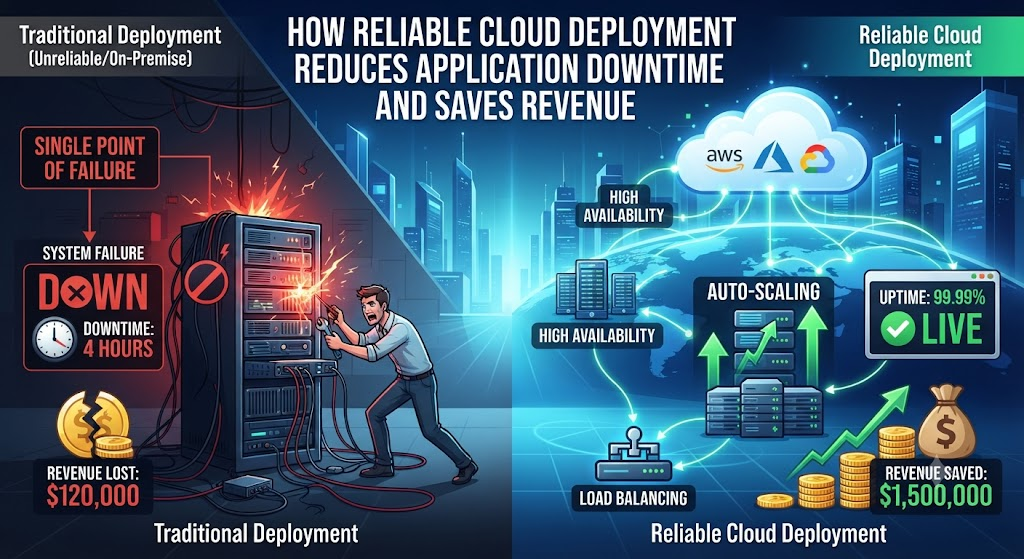
Traditional software deployment relied on a single physical server. If that server overheated or lost power, the application went offline instantly.
Cloud deployment solves this by introducing flexibility and redundancy.
1. Redundancy (No Single Point of Failure)
Instead of running an application on one server, reliable cloud deployment spreads copies of the application across multiple virtual servers, often called instances or nodes. If Server A crashes, Server B immediately takes over without the user noticing anything.
2. Load Balancing
A load balancer acts like a traffic police officer at a busy intersection. It sits in front of your servers and distributes incoming user requests evenly.
- Simple Meaning: It makes sure no single server gets overloaded.
- Why It Matters: If one server handles too much traffic, it slows down or crashes. The load balancer redirects traffic to healthier servers.
- Example: Imagine a popular restaurant with four open cash registers. Instead of sending all customers to the first line, a host directs people to whichever register opens up next.
3. Automated Scalability
Traffic changes throughout the day. A news website might get ten visitors at dawn and ten thousand visitors when breaking news drops.
Cloud deployment allows for autoscaling. When traffic spikes, the cloud automatically creates new server instances to handle the load. When traffic drops back down, it turns those extra servers off to save money.
Why Does Traditional Deployment Fail?
To appreciate cloud reliability, look at common flaws in older deployment methods:
- Manual Deployments: Humans make mistakes. Typing commands manually during an update often leads to typos that break the system.
- Lack of Staging Environments: Testing code only on a personal computer instead of a staging environment identical to the live production server.
- Bound to Hardware: If a physical server fails, the team must wait hours or days for replacement parts.
Real-World Practical Considerations
Moving to the cloud does not guarantee 100% uptime by itself. Engineering teams must design systems to expect failure.
Infrastructure as Code (IaC)
Modern cloud deployment uses code to build servers. Tools like Terraform allow engineers to write configuration scripts that build identical environments in minutes.
- Why it matters: If a production environment crashes completely, engineers do not rebuild it by clicking around a web dashboard. They run a script that recreates the exact infrastructure reliably, eliminating human configuration errors.
Blue-Green and Canary Deployments
Updating live software is risky. Reliable deployment uses safe rollout strategies:
- Blue-Green Deployment: You keep two identical production environments (Blue and Green). Blue is live for users. You deploy the new code to Green, test it thoroughly, and then switch the router so users instantly point to Green. If something breaks, you flip back to Blue in seconds.
- Canary Deployment: You roll out the new update to a tiny fraction of your users (e.g., 5%). If no errors occur, you gradually roll it out to everyone else.
Common Mistakes That Cause Cloud Outages
Even on advanced cloud platforms, poor practices lead to downtime.
| Common Mistake | Why It Happens | Result | What to Do Instead |
|---|---|---|---|
| Hardcoding Configuration | Developers store database passwords or API keys directly inside the application code. | Security breaches or crashes when endpoints change. | Use environment variables and secure secret managers. |
| Ignoring Monitoring & Alerts | Teams assume software works fine after launching it. | Outages run for hours before anyone notices. | Set up automated alerts for high error rates or slow response times. |
| Single Region Dependency | Hosting all servers in a single data center location. | Regional power outages or network cuts take the app offline. | Distribute applications across multiple availability zones or geographic regions. |
Risks and Limitations of Cloud Deployment
While cloud deployment drastically reduces downtime, it introduces unique challenges:
- Complexity: Managing distributed cloud systems requires specialized knowledge. Misconfigured cloud security groups can expose private data to the public internet.
- Vendor Lock-in: Building an application tightly integrated with one specific cloud provider’s proprietary tools makes moving to another provider difficult and expensive.
- Unpredictable Costs: If autoscaling runs wild due to a software bug or a scraping bot attack, cloud bills can skyrocket overnight.
Decision-Making Framework: Is Your Deployment Strategy Reliable?
Before launching your next application update, run through this simple framework:
- Redundancy Check: Is the application running on at least two separate server instances behind a load balancer?
- Rollback Plan: If this new update breaks the app, can we revert to the previous version in under five minutes?
- Automated Testing: Did automated scripts test the code for bugs before it reached the live server?
- Monitoring Active: Are error tracking and uptime monitoring tools active and sending alerts to the team?
- Backup Verified: Have we tested restoring our database from a recent backup?
Key Terms
- Availability Zone: Isolated data centers within a designated geographic region designed to remain unaffected by failures in other zones.
- CI/CD (Continuous Integration / Continuous Deployment): A method of automating the building, testing, and deployment of code updates.
- Latency: The delay between a user’s action and the application’s response.
- Load Balancer: A tool that distributes incoming network traffic across multiple servers.
- Redundancy: Duplication of critical components or functions of a system to increase reliability.
- Staging Environment: A testing environment that looks and acts identical to the live production environment.
- Uptime: The time during which an application is operational and accessible to users.
Frequently Asked Questions
What is the difference between high availability and fault tolerance?
High availability ensures an application runs with minimal downtime, recovering quickly if a failure occurs. Fault tolerance means zero downtime is allowed; if a component fails, backup components take over instantly without dropping active user sessions.
Does cloud deployment completely eliminate downtime?
No. While cloud platforms reduce hardware failures, downtime can still occur due to software bugs, bad configuration updates, or rare widespread cloud provider outages. Reliability minimizes these risks but cannot eliminate human error entirely.
What is a zero-downtime deployment?
It is a deployment strategy where application updates are released to users without interrupting active sessions or taking the system offline.
How do cloud providers measure reliability?
Reliability is often measured in “nines,” such as 99.9% (“three nines”) or 99.99% (“four nines”) uptime. Three nines allow for about 8.7 hours of downtime per year, while four nines limit downtime to less than 53 minutes annually.
Is cloud deployment more expensive than running physical servers?
Initially, cloud deployment can feel complex or costly. However, it eliminates upfront hardware purchasing costs and reduces expenses by allowing businesses to scale resources down when traffic is low.
How do I protect my cloud app from sudden traffic spikes?
Use a combination of autoscaling groups to add server capacity automatically and content delivery networks (CDNs) to cache static assets like images and stylesheets.
Conclusion
Application downtime damages revenue, customer trust, and engineering morale. Traditional deployment methods leave systems vulnerable to single points of failure and human error.
Reliable cloud deployment solves these problems by embracing redundancy, automated testing, load balancing, and smart rollout strategies.
By treating infrastructure as code and designing systems to expect failure, development teams can deliver stable, fast experiences that keep users happy and businesses online around the clock.
