Introduction
Many new founders want to build a digital business platform that connects users, services, or products in one place. They imagine a massive digital marketplace or software ecosystem from day one. They spend months writing complex feature lists and hiring developers before testing if anyone actually wants the product.
This approach often leads to high costs, delayed schedules, and low user adoption. Building a sustainable platform requires a structured method that balances technical design, user needs, and market realities.
This guide explains how to design, build, and launch a business platform step by step. You will learn how to plan your architecture, choose the right technology stack, manage security, and launch without wasting time or money.
What Is a Business Platform?
A business platform is a digital infrastructure that brings different groups together to interact, share data, or complete transactions.
Unlike a standard website that simply shares information, a platform creates a network. Think of platforms like app stores, freelance marketplaces, or booking portals. They do not just sell a single product. They provide the rules, tools, and space for other people to do business or exchange value.
Why Platforms Matter
Platforms scale faster than traditional linear businesses. When a traditional store adds a new product, it must buy and store inventory. When a platform adds a new user or provider, the value of the entire network increases for everyone else without a matching increase in physical overhead.
Key Platform Components
- User Interfaces: The front-end portals where customers, administrators, and service providers log in and interact.
- Core Logic Engine: The processing center that handles user accounts, data routing, permissions, and transactions.
- Data Storage: Secure databases that store user profiles, historical records, and transactional logs.
- Integration Layer: Application Programming Interfaces (APIs) that connect your platform to external payment processors, email tools, or analytics dashboards.
How a Business Platform Works
Understanding how data flows through a platform helps you make better technical and architectural decisions.
When a user performs an action on the front-end—such as booking a service or submitting a form—the browser sends a request to your server. The server processes this request using your core business rules, checks the database for permissions or inventory, executes the task, and sends an updated view back to the user.
The Three Core Layers
- The Presentation Layer: What the user sees and touches. This must be fast, mobile-responsive, and intuitive.
- The Application Layer: The business logic where calculations, user authentications, and rules are enforced.
- The Data Layer: Where sensitive user records, logs, and transactional states are stored securely.
Why Platform Strategy Comes Before Code
Many technical projects fail because the team writes code before defining the business model. Writing code is expensive. Changing business models after writing code is even more expensive.
Defining Your Value Proposition
You must answer a simple question: Why would someone use your platform instead of an existing alternative?
If your answer relies on being “cheaper” or “better,” you may struggle. Successful platforms win by offering convenience, fixing a broken industry workflow, or gathering fragmented buyers and sellers into one trusted place.
Mapping User Journeys
Before opening a code editor, map out every step your users will take.
- How does a new user register?
- What triggers a notification email?
- How does a transaction complete?
- What happens when something goes wrong, such as a failed payment or a forgotten password?
Clear journey maps prevent expensive redesigns later.
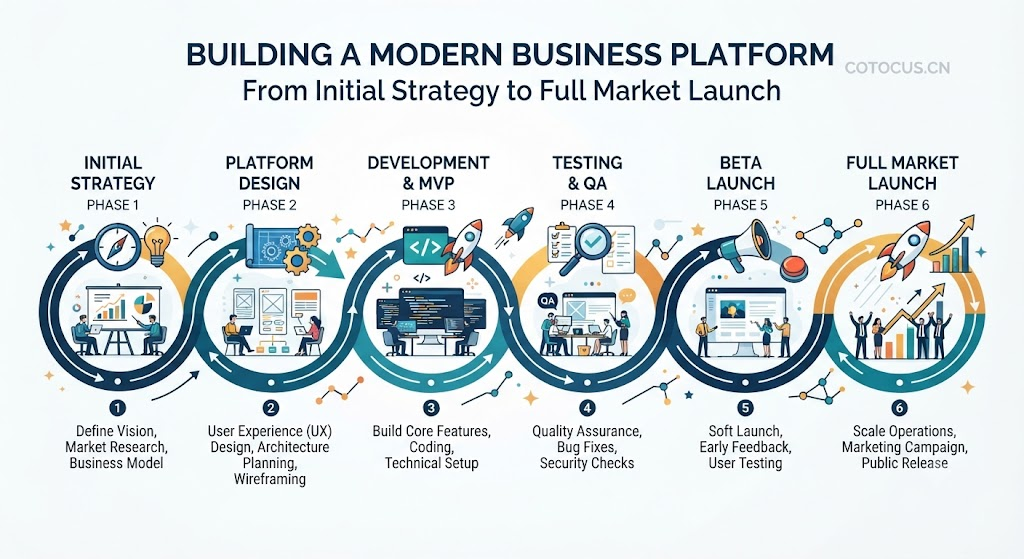
Step-by-Step Platform Development Lifecycle
Building a platform requires moving through distinct phases. Skipping steps usually creates technical debt and operational confusion.
Phase 1: Market Research and Feasibility
Analyze your target audience, study existing competitors, and identify regulatory requirements. If you handle payments or personal data, check local data protection laws early.
Phase 2: Minimum Viable Product (MVP) Scope
Do not build every feature on your wish list. Choose the single core feature that delivers the most value to your users. If you are building a freelance platform, your MVP needs user profiles, a simple search function, and a secure payment button. It does not need advanced analytics, multi-currency support, or AI recommendations on day one.
Phase 3: Architecture and Tech Stack Selection
Choose tools that match your team’s skills and your platform’s expected growth.
- Frontend: React, Next.js, or Vue for interactive user interfaces.
- Backend: Node.js, Python (Django/FastAPI), or Go for processing business logic.
- Database: PostgreSQL or MySQL for structured transactional data.
Phase 4: Development and Testing
Build the platform in short cycles. Test user sign-ups, payment flows, and data security continuously. Fix small bugs before they turn into major system failures.
Phase 5: Controlled Beta Launch
Release your platform to a small group of friendly users or industry partners. Watch how they use the system. Listen closely to where they get confused or frustrated.
Real-World Considerations and Trade-Offs
Choosing how to build your platform involves balancing speed, cost, and control.
| Approach | Initial Cost | Development Speed | Customization Control | Long-Term Scalability |
|---|---|---|---|---|
| No-Code / Low-Code (Bubble, Webflow) | Low | Very Fast | Limited | Moderate |
| Open-Source CMS / Plugins (WordPress) | Medium | Fast | Moderate | Moderate |
| Custom Software Development (React + Node) | High | Slower | Total | High |
When to Choose Custom Code
Choose custom development if your platform relies on unique business rules, complex data relationships, or strict enterprise-grade security requirements that pre-built plugins cannot support.
When to Choose Low-Code
Choose low-code tools if you want to test a business idea quickly with minimal financial risk before investing in custom engineering.
Common Mistakes to Avoid
Platform builders often repeat the same operational and technical errors.
- Building Too Much Too Soon: Founders spend a year building features that users do not want. Instead: Build the smallest possible working version, launch it, and let real user feedback guide your next features.
- Ignoring Mobile Users: Designing only for desktop computers while most users visit from mobile phones. Instead: Build with a mobile-first mindset from day one.
- Weak Security Architecture: Storing passwords insecurely or failing to encrypt sensitive user data. Instead: Use industry-standard authentication providers, hash all passwords, and enforce HTTPS across all pages.
- Neglecting Post-Launch Support: Treating launch day as the finish line instead of the starting line. Instead: Set up monitoring tools, error tracking, and user feedback channels before opening doors to the public.
Security, Privacy, and Risk Management
Platforms handle user data, passwords, and often financial transactions. A single security breach can destroy user trust permanently.
Essential Security Measures
- Data Encryption: Encrypt data both in transit (using SSL/TLS certificates) and at rest (in your database).
- Role-Based Access Control (RBAC): Ensure regular users cannot access administrative panels or sensitive database tables.
- Input Validation: Clean and validate all user inputs to prevent SQL injection and cross-site scripting (XSS) attacks.
- Regular Backups: Automate daily database backups and test your restoration process regularly.
Cost and Practical Reality
Building a platform requires ongoing investment beyond initial development.
- Infrastructure Costs: Server hosting, database scaling, content delivery networks (CDNs), and domain names.
- Third-Party Services: Payment gateway fees, email delivery services, SMS verification tools, and customer support software.
- Maintenance and Updates: Fixing bugs, updating software libraries, and patching security vulnerabilities.
Plan your budget to cover at least six months of operational costs after your initial launch.
Decision-Making Framework
Use this simple framework to guide your platform-building decisions:
- Clarify the Core Problem: What specific friction point does your platform eliminate?
- Define the MVP Scope: What are the three non-negotiable features needed to solve that problem?
- Evaluate Technical Options: Do existing tools solve 80% of your needs, or do you need custom code?
- Calculate True Costs: Estimate development time, hosting fees, and third-party API costs.
- Establish Security Protocols: Identify what user data you collect and how you will protect it.
- Plan Your Launch Strategy: How will your first 100 users find and test your platform?
Practical Checklist
- Defined the primary user problem and target audience.
- Mapped out core user journeys and interaction flows.
- Scoped the Minimum Viable Product (MVP) to essential features only.
- Selected a scalable technology stack that matches your team’s skills.
- Implemented secure user authentication and data encryption.
- Integrated reliable third-party payment and notification services.
- Conducted beta testing with a small group of real users.
- Set up error tracking and performance monitoring tools.
Key Terms
- API (Application Programming Interface): A set of rules that lets different software applications communicate with each other.
- MVP (Minimum Viable Product): The simplest version of a product that can be released to test market demand and gather user feedback.
- Tech Stack: The combination of programming languages, frameworks, and software tools used to build an application.
- Scalability: The ability of a system to handle growing amounts of work or user traffic without crashing or slowing down.
- Technical Debt: The future cost of choosing quick, easy software shortcuts over clean, sustainable engineering practices.
- Load Balancer: A tool that distributes incoming user traffic across multiple servers to prevent system overload.
Frequently Asked Questions
How long does it take to build a business platform?
A basic MVP built on low-code tools can take 4 to 8 weeks. A custom-coded platform with complex workflows usually takes 4 to 9 months of dedicated engineering work.
Do I need technical skills to start a platform?
Not necessarily. Many successful founders partner with technical co-founders or use reliable development agencies. However, you must understand your users’ needs and business logic deeply.
How do I attract my first users to a new platform?
Start by engaging in online communities where your target audience spends time. Offer direct value, solve their immediate problems manually if necessary, and invite them to test your platform early.
What is the best way to handle payments on a platform?
Use established third-party payment processors like Stripe, PayPal, or regional equivalents. They handle security compliance, encryption, and regulatory requirements much better than building custom payment infrastructure.
How much does it cost to build a platform?
Costs vary widely. A basic low-code setup might cost under $1,000 in software subscriptions. A custom-built platform with professional developers can range from $20,000 to over $100,000 depending on complexity.
Should I build a mobile app or a website first?
Build a responsive web application first. Websites are faster to update, cheaper to build, and easier for users to access without downloading an app from a store.
How do I protect user data on my platform?
Enforce strong password policies, use secure token-based authentication, encrypt database fields, restrict admin access, and follow standard data privacy regulations like GDPR where applicable.
What should I do after launching my platform?
Focus entirely on user behavior analytics and direct feedback. Fix bugs quickly, remove confusing features, and double down on the tools your users engage with most.
Conclusion
Building a successful business platform requires patience, clear planning, and discipline. By focusing on solving a specific problem with a simple MVP, you protect your budget and reduce technical risk. Listen to your early users, secure your data from day one, and scale your features only as your user base grows.