Introduction
Many business owners feel pressured to “move to the cloud.” You might hear tech consultants talk about scalability, serverless architectures, and multi-region redundancy. If you do not have a technical background, this can sound like a foreign language.
Yet, ignoring the cloud is no longer an option. Companies that stay entirely on physical office servers often struggle with slow remote access, expensive hardware upgrades, and constant maintenance worries.
Moving your operations to the cloud does not require a computer science degree. As a manager or owner, your job is not to write the technical code. Your job is to understand what cloud deployment is, why it matters, what risks to avoid, and how to make smart decisions that protect your company’s budget and data.
This guide explains cloud deployment in simple language, giving you the practical knowledge you need to lead your team through a smooth transition.
What Is Cloud Deployment?
Cloud deployment means setting up your company’s applications, databases, and files on remote servers hosted on the internet rather than on local hard drives or office servers.
Think of it like renting a fully serviced office space instead of buying and building a commercial warehouse. When you rent an office, the landlord handles the roof leaks, the electricity infrastructure, and the security gate. You just bring in your desks and start working. Similarly, a cloud provider handles the physical data centers, cooling systems, and hardware repairs. You simply pay to store your data and run your software over a secure internet connection.
Why Does It Matter?
- Access Anywhere: Your team can log in and work securely from home, a client’s office, or while traveling.
- Predictable Scaling: If your business grows quickly, you can buy more digital space instantly without waiting weeks for computer parts to ship.
- Reduced Upfront Costs: You avoid spending thousands of dollars upfront on heavy server hardware that will eventually become outdated.
How Cloud Deployment Works
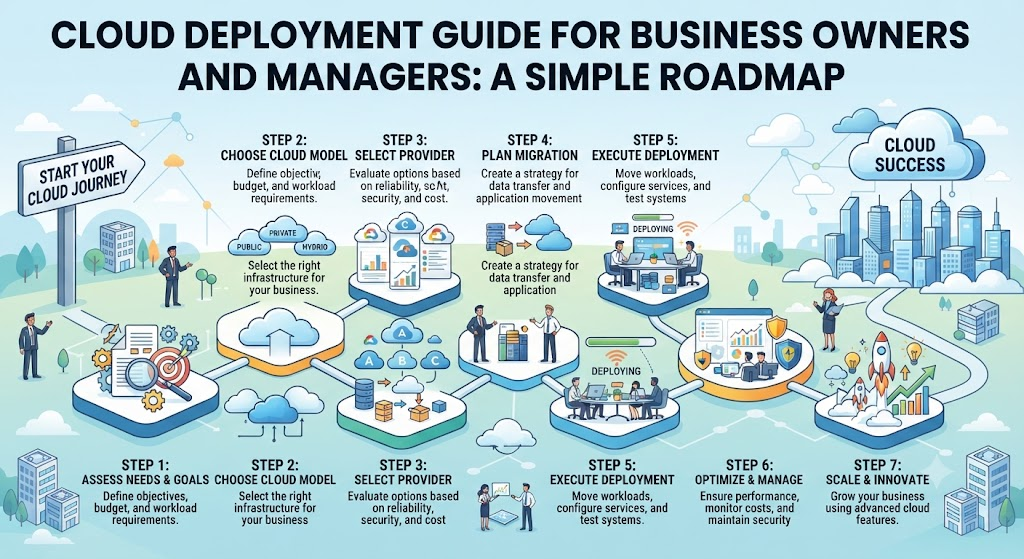
Understanding the basic journey helps you manage your tech team or external vendor effectively. A standard cloud deployment usually follows a few key phases:
- Assessment and Planning: Reviewing what software and data your business currently uses. Deciding what moves to the cloud first.
- Choosing the Right Model: Selecting how much control and responsibility you want over the cloud environment.
- Migration: Copying your data and installing your apps onto the cloud servers.
- Testing: Checking that everything runs smoothly, securely, and fast enough for your employees and customers.
- Going Live and Monitoring: Switching over to the new system and watching performance and costs daily.
Important Cloud Models to Know
Before you start, you should understand the three main ways cloud services are delivered.
1. Infrastructure as a Service (IaaS)
- Simple Meaning: Renting raw digital building blocks, like virtual computers and storage space.
- Why It Matters: Gives your tech team maximum control to build custom setups.
- Example: Renting empty digital hard drive space and processing power to build your own custom inventory database.
2. Platform as a Service (PaaS)
- Simple Meaning: Renting a ready-to-use workshop with tools and operating systems pre-installed.
- Why It Matters: Saves your developers time because they do not have to build the underlying foundation from scratch.
- Example: Using a pre-built web hosting environment where your team only has to upload the website code.
3. Software as a Service (SaaS)
- Simple Meaning: Renting a finished product that you just log into and use immediately through a web browser.
- Why It Matters: Requires zero technical setup and is ready for everyday staff use.
- Example: Using tools like Google Workspace, Microsoft 365, or Salesforce.
Practical Examples: Cloud Deployment in Action
To see how this works in the real world, let us look at two different business scenarios.
Example A: The Retail Store Owner
Sarah runs a growing online clothing store. During the holiday shopping season, her website traffic multiplies by five.
- Old Way: Her physical office server crashes because it cannot handle the sudden surge of visitors, leading to lost sales.
- Cloud Way: Sarah uses a cloud provider. When traffic spikes, the cloud system automatically spins up extra digital computing power to keep the website fast. When the holiday rush ends, the system scales back down, and she only pays for the extra power during the days she used it.
Example B: The Accounting Firm
Mark manages a firm with 15 accountants who handle sensitive client financial records.
- Old Way: Every accountant saves files on their own desktop. If a laptop breaks, critical tax documents might be lost forever.
- Cloud Way: Mark deploys a secure cloud document management system. All files live safely in an encrypted cloud vault. Accountants can work from home securely, and automated backups run every night without manual effort.
Common Mistakes Business Owners Make
Moving to the cloud can save money and boost efficiency, but mistakes during the process are expensive. Watch out for these common pitfalls:
1. Moving Everything All at Once
- What People Do: Try to migrate every single company file, app, and historical database on day one.
- Why It Causes Problems: It creates massive operational chaos, paralyzes staff, and makes it hard to find errors.
- What You Should Do Instead: Take a phased approach. Move non-critical apps first (like a project management tool) to test the waters before moving core financial databases.
2. Ignoring Ongoing Monthly Costs
- What People Do: Look only at the initial setup quote and assume monthly bills will stay flat.
- Why It Causes Problems: Cloud costs can creep up quietly if unused storage is left running or if your team provisions more computing power than necessary.
- What You Should Do Instead: Assign someone on your team to review cloud bills monthly and set up budget alerts with your provider.
3. Neglecting Staff Training
- What People Do: Push a new cloud tool onto employees without teaching them how to use it.
- Why It Causes Problems: Employees get frustrated, revert to old unsafe habits (like emailing files to personal accounts), and productivity drops.
- What You Should Do Instead: Invest time in clear, simple training sessions and create a short guide for daily tasks.
Risks and Limitations
While the cloud offers great freedom, it is not a magic fix for every business problem. Consider these trade-offs before you sign a contract:
- Internet Dependency: If your office internet goes down, your access to cloud tools stops. Having a backup mobile hotspot or secondary internet line is crucial.
- Data Privacy Concerns: Handing sensitive customer data to a massive tech provider requires strict compliance checks, especially if you operate in regulated industries like finance or healthcare.
- Vendor Lock-in: Moving your entire infrastructure to one specific cloud provider can make it very difficult and expensive to switch to a competitor later.
Decision-Making Framework for Managers
Use this step-by-step checklist to evaluate whether a cloud deployment project is ready to move forward:
- Define the Goal: Are you trying to cut hardware costs, improve remote work, or handle more customers?
- Audit Current Tools: List every software program and database your business currently uses.
- Classify Sensitivity: Separate public marketing files from highly confidential financial or customer data.
- Compare Providers: Look at major options (like AWS, Microsoft Azure, or Google Cloud) or consult an trusted IT partner.
- Calculate Total Cost: Add up migration labor, training time, and estimated monthly subscription costs over a three-year period.
- Set Security Rules: Establish who in your company has permission to access, edit, or delete cloud files.
- Test and Review: Run a small pilot test with a single department before rolling out the system company-wide.
Key Terms
- Bandwidth: The maximum amount of data that can travel through your internet connection at one time.
- Data Migration: The process of moving digital files and databases from one location (like an office server) to another (like the cloud).
- Multi-Factor Authentication (MFA): A security check where users must provide two or more pieces of evidence to log in (e.g., a password plus a text message code).
- Redundancy: Keeping duplicate copies of data or systems in different physical locations to prevent total loss if one system fails.
- Scalability: The ability of a system to easily expand or shrink its computing power to match workload demands.
- Service Level Agreement (SLA): A contract commitment from a cloud provider outlining their guaranteed system uptime (e.g., 99.9% uptime).
- Virtual Machine (VM): A digital software-based computer that runs inside a physical server.
Frequently Asked Questions
Is cloud deployment safe for sensitive business data?
Yes, reputable cloud providers often have much stronger physical and digital security than a typical small business office. However, safety also depends on how you configure your accounts—such as using strong passwords and multi-factor authentication.
How long does a typical cloud deployment take?
It depends entirely on your business size and complexity. Moving a small company to cloud email and storage can take a few days. Migrating a large company with legacy custom software can take several months.
Will cloud deployment completely eliminate my IT costs?
No. While you spend less money on physical server hardware and office maintenance, you trade those expenses for predictable monthly subscription fees and occasional consulting costs.
What happens to my cloud data if the provider goes out of business?
Major cloud providers are multi-billion-dollar global enterprises. However, standard business practice always requires you to maintain independent, encrypted backups of your critical data in a separate location.
Do I need to hire a full-time tech expert for cloud management?
For smaller businesses, partnering with a trusted external IT service provider is often more cost-effective than hiring a full-time engineer. For larger companies, an internal cloud manager is usually necessary.
Conclusion
Cloud deployment is a powerful lever for modern business growth. It removes the anchor of heavy physical hardware, empowers remote teams, and lets your business adapt quickly to changing market conditions.
Success does not require mastering complex technical syntax. It requires clear planning, realistic budgeting, careful security habits, and a phased migration approach. Take your time, involve your team in the transition, and treat the cloud as a flexible tool designed to serve your business goals—not the other way around.