
Introduction
Many businesses still rely on traditional IT systems—physical servers sitting in a back room, local databases, and software installed directly on office computers. While these setups have worked for years, they come with high maintenance costs, limited flexibility, and growing security vulnerabilities. Hardware ages, local backups fail, and scaling up requires buying expensive new equipment.
Moving to the cloud solves many of these problems. It offers flexibility, remote access, and predictable pricing. However, for a business deeply rooted in traditional systems, jumping straight into the cloud without a plan is a recipe for disaster. Data can get lost, operations can halt, and costs can spiral out of control.
This guide explains how businesses using traditional systems can plan, structure, and execute a smooth cloud migration without breaking their day-to-day operations.
What Is Cloud Migration Planning?
Cloud migration planning is the detailed roadmap a business creates before moving its digital assets from physical, on-premise infrastructure to a remote cloud provider (such as Amazon Web Services, Microsoft Azure, or Google Cloud).
Think of it like moving a physical warehouse to a modern, automated logistics center. You cannot simply throw everything into boxes and ship it overnight. You need to catalog your inventory, decide what to keep, throw away what is outdated, and train your team on how the new facility operates.
Why It Matters
Without a plan, cloud migration often results in unexpected downtime, compatibility issues with older software, and bloated cloud bills. A structured plan ensures that critical business data remains safe and accessible throughout the transition.
How Traditional Systems Differ From Cloud Environments
Before planning a move, it helps to understand the gap between old and new systems.
- Traditional Systems: Run on local hardware owned and managed by the company. The business pays for maintenance, power, physical security, and upgrades.
- Cloud Environments: Run on virtual servers managed by third-party providers. The business pays for what it uses, scales resources instantly, and relies on the provider for hardware upkeep.
Traditional systems offer total physical control, but they lack agility. Cloud environments offer speed and flexibility, but require a shift in how IT budgets and security are managed.
The Migration Strategy Framework: Choose Your Approach
Not all applications need to be moved the same way. When planning a cloud migration, businesses typically choose from a few standard strategies, often referred to as the “6 Rs”:
1. Rehosting (“Lift and Shift”)
- What it is: Moving applications to the cloud with little to no changes.
- When to use it: When you need to move quickly out of aging data centers.
- Trade-off: Fast and inexpensive upfront, but does not take full advantage of cloud-native features.
2. Replatforming (“Lift, Tinker, and Shift”)
- What it is: Making a few cloud optimizations without changing the core architecture of the software.
- When to use it: When migrating a database to a managed cloud service to reduce maintenance work.
- Trade-off: Moderate effort with noticeable performance gains.
3. Refactoring / Re-architecting
- What it is: Completely rewriting or redesigning an application to take full advantage of cloud features.
- When to use it: When old software cannot scale or integrate well with modern tools.
- Trade-off: High initial cost and time, but provides maximum long-term value.
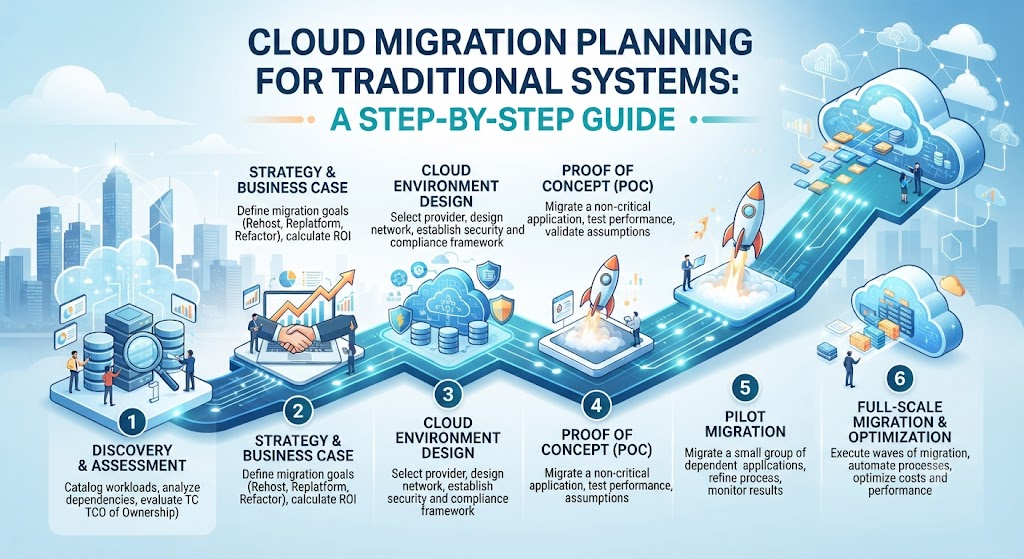
Step-by-Step Cloud Migration Planning Process
A successful migration follows a clear, structured workflow.
[Assessment] ---> [Portfolio Discovery] ---> [Strategy Selection] ---> [Pilot Migration] ---> [Full Execution] ---> [Optimization]
Step 1: Assess Current Readiness
Evaluate your existing hardware, software licenses, network bandwidth, and internal IT skills. Determine if your team needs external training or partner support.
Step 2: Discover and Map Applications
Catalog every piece of software, database, and data set currently in use. Identify dependencies—meaning which applications rely on others to function. Moving an app without its supporting database will cause it to break.
Step 3: Define Clear Business Goals
Are you migrating to reduce hardware costs, improve application speed, or enable remote work? Knowing your primary goal helps guide technical decisions.
Step 4: Run a Pilot Migration
Do not move your entire business at once. Start with a non-critical workload—such as a company blog, internal wiki, or archival database—to test the process and iron out unexpected errors.
Step 5: Execute and Validate
Migrate workloads in organized waves. Validate data integrity and application performance immediately after each wave goes live.
Common Mistakes Businesses Make
Moving from traditional systems to the cloud is complex. Avoiding these common pitfalls saves time and money.
- Mistake: Treating cloud migration as purely an IT project.
- Why it happens: Leadership assumes only the tech team needs to be involved.
- Problem: Business units end up with tools that do not match their daily workflows.
- Instead: Involve department heads early to ensure the cloud setup supports actual business processes.
- Mistake: Migrating everything at once (“Big Bang” approach).
- Why it happens: Companies want to shut down old servers quickly to cut costs.
- Problem: If something breaks, the entire business halts.
- Instead: Migrate in phases, starting with low-risk workloads.
- Mistake: Ignoring cloud cost management.
- Why it happens: Assuming the cloud is automatically cheaper than local servers.
- Problem: Unmanaged cloud resources run 24/7, leading to surprise monthly bills.
- Instead: Set up budget alerts and automated shutdown schedules for testing environments.
Risks and Limitations
| Risk | Why It Matters | How to Reduce It |
| Data Security Gaps | Misconfigured cloud storage can expose sensitive company data to the public internet. | Use automated security posture management tools and enforce multi-factor authentication (MFA). |
| Downtime & Disruption | Service outages during migration can halt customer transactions and hurt revenue. | Schedule migrations during off-peak hours and maintain active local backups until the cloud environment is verified. |
| Vendor Lock-In | Relying too heavily on proprietary tools from a single cloud provider makes it difficult to switch later. | Use open-source standards and container technologies (like Docker) where feasible. |
Checklist for Business Leaders
Before authorizing the final migration, verify that you have covered these essential items:
- Conducted a complete inventory of all legacy applications and data dependencies.
- Established a measurable business goal (e.g., reduce maintenance overhead by 20%).
- Selected the appropriate migration strategy (Rehost, Replatform, or Refactor) for each workload.
- Established cloud security policies, access controls, and encryption standards.
- Performed a successful pilot migration with a non-critical system.
- Set up cloud cost monitoring and budget alerts.
- Trained internal staff or secured expert partner support for ongoing cloud management.
Key Terms
- On-Premise: IT infrastructure (servers, storage, networking) hosted locally within a company’s physical office or building.
- Legacy System: Outdated computing software or hardware that is still in use because it fulfills critical business needs.
- Cloud-Native: Applications built specifically to run and scale efficiently in a cloud environment.
- Dependencies: Relationships between different software components where one relies on another to operate correctly.
- Containerization: Packaging software code and all its dependencies together so it can run reliably on any computing environment.
Frequently Asked Questions
How long does a typical cloud migration take?
The timeline varies widely based on company size and data volume. A small business with basic applications might migrate in a few weeks, while large enterprises with legacy systems can take anywhere from several months to a few years.
Is the cloud always cheaper than maintaining traditional servers?
Not automatically. While the cloud eliminates upfront hardware purchases and reduces physical maintenance costs, poor resource management can lead to higher ongoing operational expenses. Cost optimization requires active monitoring.
What happens to legacy applications that cannot run in the cloud?
Some very old legacy systems cannot be easily moved. Businesses typically choose to retire them, replace them with modern SaaS (Software as a Service) alternatives, or keep them running on isolated local servers while connecting them to the cloud via secure APIs.
Should we hire an external partner for our cloud migration?
If your internal IT team lacks experience with cloud architecture, hiring a certified migration partner is strongly recommended. They help prevent costly architectural mistakes and accelerate the transition timeline.
Conclusion
Migrating from traditional systems to the cloud is a major milestone for any business. It modernizes operations, improves flexibility, and prepares the organization for future growth. However, success depends entirely on thoughtful planning, realistic risk management, and phased execution. By assessing your existing assets, choosing the right migration strategies, and keeping business goals front and center, you can transition smoothly without disrupting your daily operations.
