
Introduction
When a startup or growing business first moves to the cloud, the goal is speed. Engineering teams spin up virtual servers, databases, and storage buckets to launch features quickly. This “speed-first” approach works well in the early stages, but as traffic grows, the cloud bill often grows even faster.
Suddenly, leadership asks why the monthly infrastructure bill rivals a major payroll expense.
Many businesses react by panic-cutting resources, which can crash apps and frustrate customers. Others ignore the bill, hoping revenue will outpace cloud expenses. Neither approach works. Cloud cost optimization provides a middle ground: keeping your infrastructure powerful while eliminating hidden waste.
This guide explains how growing businesses can take control of their cloud spending, understand key pricing models, and build sustainable financial habits without slowing down their engineering teams.
What Is Cloud Cost Optimization?
Cloud cost optimization is the practice of aligning your cloud infrastructure spending with your actual business needs.
In simple terms, it means making sure you are only paying for the computing power, memory, and storage you actually use, rather than paying for idle capacity “just in case.”
Why It Matters
Cloud platforms like Amazon Web Services (AWS), Microsoft Azure, and Google Cloud Platform (GCP) operate like utility companies: you pay for what you consume by the hour or second. Unlike owning physical hardware—where a server costs the same whether it is busy or idle—cloud waste directly drains your monthly cash flow. For a growing business, saving 30% on cloud bills can extend your operating runway by months.
Practical Example
Imagine renting a fleet of delivery vans for your bakery. If you rent ten large vans year-round, but you only make deliveries on Tuesday mornings, you are wasting money on empty vehicles. Cloud cost optimization is like downsizing to the right number of vans, or renting larger ones only on Tuesdays when demand peaks.
How Cloud Billing Works
To reduce your cloud bill, you first need to understand how cloud providers charge you. Most cloud bills are built on three core pillars:
- Compute: The processor power and memory (RAM) used to run your applications. You pay based on how long a server runs and how powerful it is.
- Storage: The space required to keep your files, logs, and database records. You pay per gigabyte or terabyte, often with extra charges for how frequently you access that data.
- Data Transfer (Network): The cost of moving data out of the cloud to your users or other networks. Bringing data into the cloud is usually free, but sending it out costs money.
Core Strategies for Cloud Cost Optimization
Optimizing your cloud spending does not happen overnight. It requires a mix of technical adjustments and team habits. Here are the most effective strategies for growing businesses.
1. Right-Sizing Your Resources
Right-sizing means matching the size of your cloud servers to your actual workload.
- The Problem: Engineers often choose large servers during setup to “play it safe.” As a result, many servers run at less than 5% capacity.
- The Solution: Use cloud monitoring tools to check how much CPU and memory your applications actually use over a 30-day period. If a server is consistently using only 10% of its power, downgrade it to a smaller, cheaper size.
2. Utilizing Reserved Instances and Savings Plans
Cloud providers offer major discounts if you commit to using their services for a longer period.
- On-Demand Pricing: Paying the standard rate month-to-month. It is flexible, but expensive.
- Reserved Instances (RIs) / Savings Plans: Committing to use a specific amount of computing power for 1 to 3 years in exchange for discounts of up to 40% to 60%.
- When to use: Only commit to reserved pricing for stable, predictable workloads (like your main database or core web servers). Keep unpredictable, experimental workloads on flexible on-demand pricing.
3. Automated Scheduling (Turning Off Non-Production Environments)
Development, testing, and staging environments are places where engineers test new code before releasing it to customers.
- The Problem: These environments often run 24 hours a day, 7 days a week, even though engineers only work during regular business hours (roughly 40 hours out of 168 hours in a week).
- The Solution: Set up automated schedules to shut down development servers at night and on weekends. This instantly cuts the runtime—and the cost—of those servers by roughly 70%.
4. Cleaning Up Orphaned Resources
When developers delete or update applications, they sometimes leave background resources running. These are called orphaned resources.
- Examples: Unattached storage disks (volumes that belonged to a deleted server), old database backups, and idle IP addresses.
- Why it matters: Cloud providers keep charging for these items because they still occupy space or network ports, even though no application uses them. Regular audits help find and delete these digital ghosts.
Real-World Considerations: Culture vs. Tools
Cutting cloud costs is not just an engineering puzzle; it is an organizational habit.
- Engineering Ownership: Developers move fast and rarely see the monthly finance bill. If engineering teams do not feel accountable for costs, optimization efforts will fail. Successful companies tie cloud efficiency metrics to engineering team reviews or dashboards.
- Avoiding Performance Degradation: Never cut resources so aggressively that your application slows down or crashes during traffic spikes. Always test changes in a staging environment before applying cost-cutting measures to live production systems.
Common Mistakes to Avoid
| What People Do | Why They Do It | Why It Causes Problems | What They Should Do Instead |
| Panic-deleting resources | Leadership demands an immediate 50% budget cut. | Deleting critical backup systems or active cache layers causes sudden app outages. | Audit resource utilization first; remove idle assets safely. |
| Over-committing to Savings Plans | Chasing the highest percentage discount offered by the cloud provider. | Business needs change; if you shut down an app, you still pay for the unused reserved commitment. | Only commit long-term savings plans to stable, baseline workloads. |
| Ignoring data transfer fees | Assuming internal cloud networking is always free. | Moving large datasets between different regions or out to external analytics tools triggers massive network bills. | Keep data processing in the same cloud region and review egress pathways. |
Risks and Limitations
While saving money is important, aggressive cost reduction introduces real operational risks:
- Developer Slowdown: If engineers spend all their time managing infrastructure costs instead of building product features, business growth stalls.
- Reduced Resilience: Running your app on the bare minimum number of servers removes your safety buffer. If a server fails unexpectedly, your app may go offline because there is no backup capacity ready to take over.
Decision-Making Framework: Where to Start
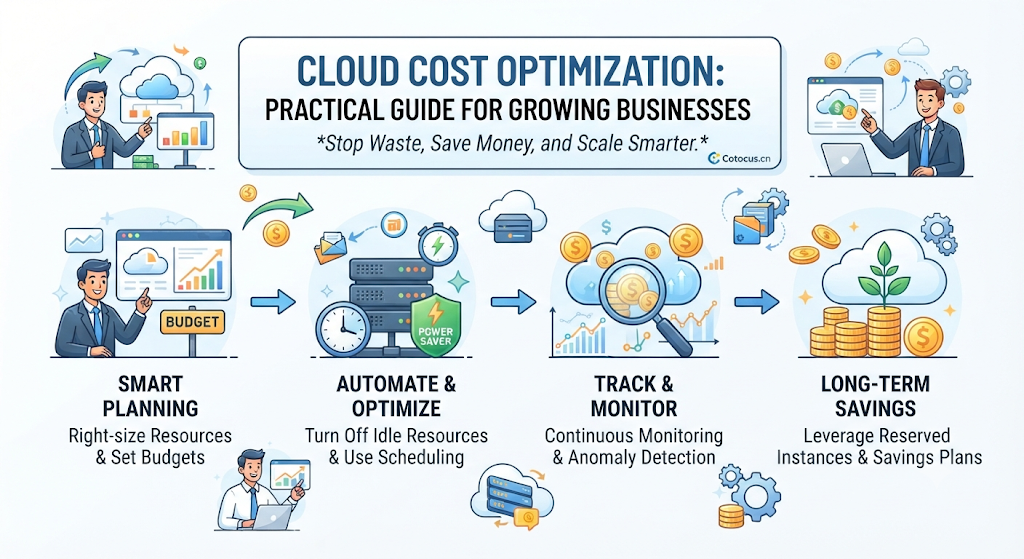
If your cloud bill is growing out of hand, follow this step-by-step approach to fix it without breaking your product:
- Visibility First: Turn on cloud cost-monitoring tools to see exactly which teams, projects, or servers spend the most money.
- Quick Wins: Hunt for obvious waste—unattached storage disks, idle test environments, and oversized databases running in development.
- Commitment Strategy: Review stable production workloads and apply reserved instances or savings plans to lock in lower rates.
- Continuous Monitoring: Set up budget alerts so you receive notifications when spending spikes unexpectedly, rather than waiting for the monthly bill.
Checklist for Cloud Cost Reviews
Use this practical checklist during your monthly or quarterly cloud review:
- Are all non-production environments scheduled to turn off on nights and weekends?
- Have we scanned for and deleted unattached storage volumes and idle IP addresses?
- Are our production servers right-sized based on actual CPU and memory usage data from the last 30 days?
- Do we have automated budget alerts configured for abnormal spending spikes?
- Are long-term workloads covered by cost-saving plans or reserved instances?
Key Terms
- Auto-Scaling: A feature that automatically adds or removes cloud servers based on real-time traffic demand.
- Data Egress: The cost charged by cloud providers for moving data out of their network to the public internet.
- Instance: A virtual server running in the cloud computing environment.
- Multi-Tenant Architecture: A setup where multiple customers or applications share the same physical computing hardware securely.
- Provisioned Capacity: The maximum amount of computing or storage power you have reserved and paid for in advance.
- Spot Instances: Excess cloud computing capacity sold by providers at steep discounts, with the catch that the provider can take it back if they need it elsewhere.
FAQs
How much can a growing business typically save on cloud costs?
Most growing businesses can reduce their cloud bills by 20% to 40% within the first few months simply by eliminating obvious waste, right-sizing oversized servers, and turning off non-production environments when not in use.
Will cost optimization slow down my application?
Not if done correctly. Good optimization removes waste (like idle servers and forgotten backups), not the resources your users actually rely on. In fact, right-sizing can sometimes improve performance by forcing teams to clean up inefficient code and database queries.
Who should be responsible for cloud cost optimization?
It is a shared responsibility. Finance teams track the overall budget and spot trends, engineering teams implement technical fixes and right-sizing, and leadership sets policies that balance speed with financial discipline.
What is the difference between a Reserved Instance and a Spot Instance?
A Reserved Instance is a long-term commitment (1-3 years) for guaranteed computing power at a discount. A Spot Instance lets you buy unused cloud capacity at a discount of up to 90%, but the cloud provider can disconnect your server with little warning if demand rises. Spot instances work well for batch processing, but not for live customer websites.
How often should we review our cloud bill?
You should check high-level spending dashboards weekly to catch sudden anomalies, and conduct a deep-dive optimization review every month or quarter with your engineering leads.
Are cloud cost management tools necessary?
For very small teams with a single server, basic dashboards provided by AWS, Azure, or GCP are enough. As your infrastructure grows across dozens of services, specialized cost management platforms become valuable to track who is spending what.
Conclusion
Cloud cost optimization is not a one-time project you check off a list; it is an ongoing operational habit. By pairing simple language and clear visibility with smart technical adjustments, growing businesses can maintain high performance and reliability without letting infrastructure costs drain their financial runway. Start small with easy wins like shutting down idle test environments, build internal accountability, and watch your cloud efficiency improve.
