
Introduction
Moving an application from a local computer to the cloud can feel intimidating. Many developers write code that works perfectly on their laptop, only to watch it break completely the moment it touches a cloud server.
This happens because local computers and cloud environments are entirely different worlds. Your laptop has a fixed hard drive, a single user, and manual restarts. Cloud servers are distributed, rented, shared, and managed automatically.
If you do not prepare your application properly, you risk unexpected downtime, security leaks, data loss, and massive cloud bills. This guide will walk you through everything you need to know to prepare your application for a smooth, secure, and cost-effective cloud deployment.
What Is Cloud Deployment?
Cloud deployment means moving your software application from a local machine or an on-premise physical data center to remote servers managed by a cloud provider like Amazon Web Services (AWS), Google Cloud Platform (GCP), or Microsoft Azure.
Why It Matters
When your app lives on the cloud, you do not need to buy or maintain physical hardware. Instead, you rent computing power, storage, and networking by the minute. This allows your application to grow instantly when thousands of users arrive and shrink when traffic drops.
Real-World Example
Imagine running a local bakery out of your home kitchen. It works fine for family and friends. But if a local food blog features you, hundreds of people might show up at your door. You cannot handle the demand. Moving to the cloud is like renting a flexible, modular commercial kitchen that can automatically hire extra bakers and expand its ovens the moment a crowd forms outside.
Core Concepts to Understand Before You Start
Before uploading code to the cloud, you must understand a few foundational concepts that govern modern cloud architecture.
- Statelessness: Writing application code that does not store permanent user data or session details on the local server’s internal hard drive. This matters because cloud servers are routinely destroyed and recreated automatically.
- Containers: A lightweight, standalone package containing everything your application needs to run (code, runtime, system tools, and libraries). This matters because it ensures your app runs identically on your laptop, a test server, and the production cloud.
- Environment Variables: External configuration values (like database passwords or API keys) kept completely separate from your source code. This matters because it keeps sensitive credentials out of your public code repository and allows you to switch configurations between development and production easily.
How to Prepare Your Application for Cloud Deployment
Preparing an application requires a systematic approach. Follow these phases to ensure your software is truly cloud-ready.
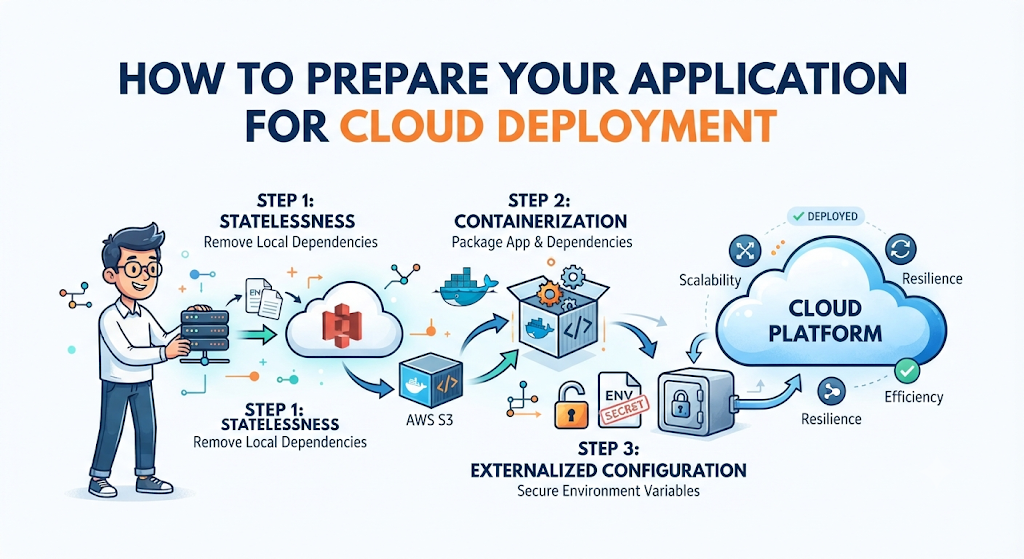
1. Make Your Application Stateless
The single biggest mistake developers make is treating a cloud server like a traditional computer. In the cloud, servers can disappear or restart at any second.
- What to do: Remove any code that saves uploaded files, logs, or user session data directly to the local file system.
- Why it matters: If your app saves a user’s uploaded profile picture to a local folder on Server A, and the cloud provider moves that user’s next request to Server B, the image will appear to be missing.
- How to fix it: Send uploaded files directly to cloud object storage (like AWS S3) and store user sessions in a centralized database or an in-memory cache (like Redis).
2. Package Your Application in Containers
Running your app directly on an operating system creates the classic developer dilemma: “It worked fine on my machine.”
- What to do: Use Docker to bundle your application code and all its dependencies into a single container image.
- Why it matters: Containers isolate your app from the underlying host machine. Whether your cloud server runs Ubuntu, Amazon Linux, or a managed container service, your app will execute the exact same way every time.
- Common mistake: Packing too many distinct services (like your database, web server, and background workers) into a single container. Keep one primary process per container.
3. Externalize Your Configuration
Hardcoding database URLs, API keys, or port numbers directly into your source code is a major security risk.
- What to do: Move all configuration settings out of your code files and into Environment Variables or secure parameter stores.
- Why it matters: If your code is public or compromised, hardcoded secrets are instantly exposed. Furthermore, externalizing configuration lets you run the exact same codebase in development, staging, and production by simply changing the environment variables.
Practical Examples: Local Setup vs. Cloud-Ready Setup
To see how this works in practice, let’s look at how file uploads are handled differently in a traditional local setup versus a cloud-ready setup.
| Feature | Local / Traditional Setup | Cloud-Ready Setup |
|---|---|---|
| File Storage | Saves uploads to local folder (/var/www/uploads/) | Streams uploads directly to cloud storage (e.g., AWS S3) |
| Configuration | Stored in a hardcoded config.json file | Loaded dynamically from environment variables |
| Scaling | Adding a second server breaks file sync and user sessions | Multiple servers share the same database and cloud storage seamlessly |
| Server Crash | App stays down until manually restarted | Cloud orchestrator automatically spins up a fresh replacement instance |
Real-World Considerations: Security and Cost
Deploying to the cloud introduces new operational realities that require careful attention.
Security and Secrets Management
Never store plain-text passwords or database connection strings in your Git repository. Use dedicated secret management tools (such as AWS Secrets Manager or HashiCorp Vault) to inject credentials into your application securely at runtime.
Cost Control
Cloud resources are easy to spin up and easy to forget. Without proper monitoring, an unoptimized database query or an abandoned staging cluster can generate surprise bills. Always set up billing alerts and configure auto-scaling rules so your infrastructure shrinks when traffic is low.
Common Mistakes Beginners Should Make
Here are frequent errors developers make when preparing for cloud deployment, along with what to do instead:
- Storing logs locally: People write logs to local text files. Why it causes problems: When the server scales down, your logs vanish forever. What to do instead: Stream logs to centralized logging services (like Datadog, CloudWatch, or ELK stack) using standard output (
stdout). - Ignoring health check endpoints: Deploying an app without telling the cloud provider how to verify if it is running correctly. Why it causes problems: The cloud load balancer might route live user traffic to an app instance that is still booting up or has crashed. What to do instead: Build a
/healthor/pingendpoint that returns a200 OKstatus only when your app and its database connection are fully operational. - Running heavy tasks inside the web request: Triggering intensive data processing inside a synchronous HTTP request. Why it causes problems: The request times out, and the user gets an error page. What to do instead: Offload heavy work to background task queues (like Celery, RabbitMQ, or AWS SQS).
Failure Modes and How to Avoid Them
Even with careful preparation, cloud deployments can fail due to specific overlooked dependencies.
- Database Connection Exhaustion: When an application scales out horizontally to 10 servers, each server might open 50 database connections, instantly overwhelming your database limit. Solution: Use a database connection pooler (like PgBouncer for PostgreSQL) to manage and share connections efficiently.
- Environment Drift: When your local development environment runs Node.js version 18, but your cloud server defaults to Node.js version 14. Solution: Use explicit container base images with pinned runtime versions to guarantee identical behavior everywhere.
Deployment Readiness Checklist
Before you push your application to a production cloud environment, review this practical checklist to ensure nothing was missed:
- Application code is completely stateless (no local file writes for user data).
- All secrets, passwords, and API keys are stored in environment variables or secret managers.
- Application is containerized using Docker with a pinned runtime version.
- A dedicated
/healthendpoint is configured for load balancer probes. - Database migrations are separated from the main app startup sequence to prevent race conditions during scaling.
- Centralized logging and error tracking (e.g., Sentry) are enabled.
- Resource limits (CPU and memory) are defined in your deployment configuration.
Key Terms
- Stateless: An architectural design where applications do not retain client session data locally between requests.
- Docker: A popular tool used to package applications and their dependencies into standardized containers.
- Environment Variables: Dynamic values passed into an application from the operating system or hosting platform at runtime.
- Load Balancer: A device or software service that distributes incoming user traffic across multiple backend servers.
- Object Storage: A cloud data storage architecture optimized for handling large amounts of unstructured data like images, videos, and backups.
- Auto-Scaling: A cloud computing feature that automatically adds or removes server resources based on current traffic demand.
- Container Orchestration: Automated tools (like Kubernetes) that manage the deployment, scaling, and health of multiple containers.
- Health Check: An automated routine where a cloud platform pings your app to ensure it is alive and responding correctly.
FAQs
Why does my app work locally but fail in the cloud?
Your local machine has persistent storage, manual process management, and local environment configurations. Cloud environments are ephemeral, meaning servers are isolated, ephemeral, and strictly controlled through networking rules and environment variables.
Do I have to use Docker to deploy to the cloud?
No, you can deploy code directly onto virtual machines (like AWS EC2) or use platform-as-a-service (PaaS) options like Heroku or Vercel. However, containerization with Docker makes deployments drastically more reliable and consistent across different environments.
How do I handle database migrations during cloud deployment?
Never let every single server instance run database migrations simultaneously when starting up, as this causes race conditions and database corruption. Instead, run migrations as a separate, one-off initialization step before deploying the new application version.
What is the best way to handle user-uploaded files in the cloud?
Never save uploads to the server’s local disk. Use an external cloud object storage service like Amazon S3, Google Cloud Storage, or Azure Blob Storage, and store only the resulting file URL in your database.
How do I secure my environment variables in the cloud?
Use your cloud provider’s native secret management service (such as AWS Parameter Store or GCP Secret Manager) rather than committing environment files into your Git repository.
What is a health check endpoint and why do I need it?
A health check is a simple URL route (like /health) that your cloud load balancer pings regularly. If your app returns an error or fails to respond, the cloud provider automatically stops sending user traffic to that broken instance and restarts it.
How do I prevent my cloud hosting bill from skyrocketing?
Set strict CPU and memory limits on your containers, configure auto-scaling thresholds conservatively, enable billing alarms, and shut down non-production staging environments outside of working hours.
Can I run stateful applications like databases in containers?
While possible, running stateful databases inside ephemeral containers requires advanced persistent volume management. For production applications, it is usually much safer and easier to use managed database services (like AWS RDS) provided by your cloud vendor.
Conclusion
Preparing an application for cloud deployment is not just about uploading files to a remote server; it is about changing how your software handles scale, persistence, and failure. By making your application stateless, containerizing your code, and externalizing your configuration, you build a resilient system that can survive server crashes and traffic surges gracefully. Take time to implement these practices early, and your journey to the cloud will be stable, secure, and stress-free.
