
Introduction
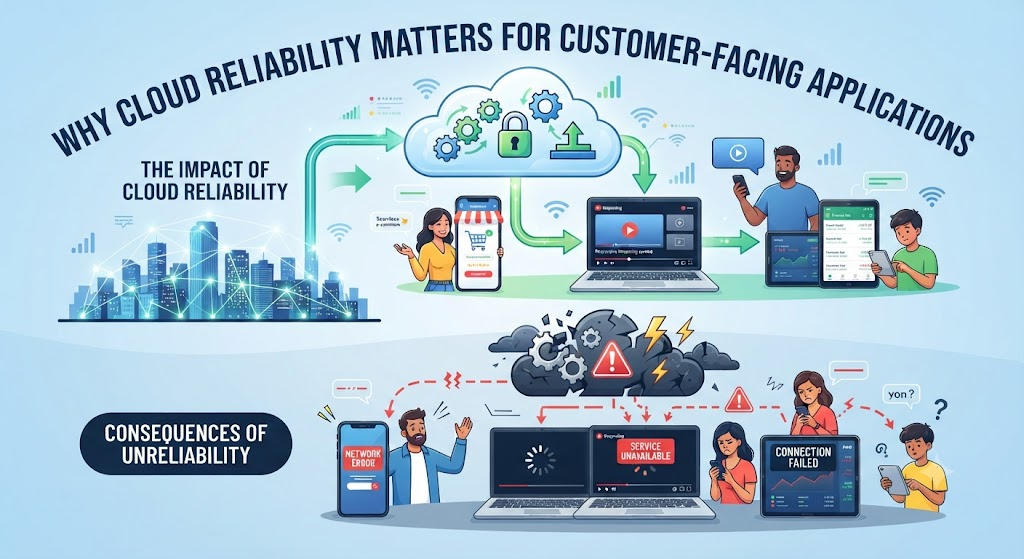
Imagine opening your favorite shopping app to buy a limited-edition item. You tap the buy button, but the screen freezes. You wait, refresh, and see an error page. Frustrated, you close the app and buy from a competitor instead.
This scenario plays out every day. When software fails, people do not blame the invisible servers running in the background. They blame the brand.
For modern businesses, customer-facing applications are the primary storefront. Whether it is a banking portal, a food delivery service, or a streaming platform, users expect instant access 24/7. Behind this smooth experience lies cloud infrastructure. Ensuring this infrastructure stays stable is no longer just an IT goal—it is a core business necessity.
What Is Cloud Reliability?
Cloud reliability refers to the ability of a cloud-based system to remain functional, accessible, and performant over time, even when unexpected failures happen.
In simple terms, it means your app works whenever a user opens it.
Cloud reliability combines several engineering concepts:
- Availability: The percentage of time an application is up and running.
- Fault Tolerance: The ability of a system to keep working even if a part of it breaks.
- Resilience: How quickly a system can recover from unexpected disruptions, like a sudden spike in traffic or a server crash.
Why It Matters
Users do not care about the complexity of your backend code or database queries. They care about speed and uptime. When an app is unreliable, users experience frustration, customer support teams get overwhelmed, and the business loses money and reputation.
How Cloud Reliability Works
Cloud reliability is not achieved by accident. It relies on architectural design, redundancy, and continuous monitoring.
1. Redundancy and Multi-Region Deployment
If your app runs on a single server in one data center, a power outage or hardware failure will take your app offline. Reliable systems use redundancy. They duplicate data and application logic across multiple availability zones or geographic regions. If one data center fails, traffic automatically shifts to a healthy one without human intervention.
2. Automated Scaling
Traffic is rarely constant. A flash sale or a viral social media post can cause a sudden surge in users. Cloud reliability involves using auto-scaling groups that automatically add more computing power when traffic spikes and scale down when things quiet down.
3. Continuous Monitoring and Observability
Teams cannot fix what they cannot see. Reliable cloud systems use automated monitoring tools to track CPU usage, error rates, and response times. If metrics cross dangerous thresholds, automated alerts notify engineers immediately.
Why Cloud Reliability Matters for Customer-Facing Applications
Customer-facing apps have zero margin for error compared to internal corporate tools. Here is why reliability is so critical for user-facing software:
- Protecting Brand Trust: Trust takes years to build and seconds to lose. Frequent crashes signal poor quality and make users question data security.
- Safeguarding Revenue: For e-commerce and SaaS platforms, downtime equals lost sales. Every minute an checkout portal is offline translates directly into lost revenue.
- Managing User Expectations: Modern users are accustomed to tech giants like Google, Amazon, and Netflix, which rarely go down. They hold all apps to that same high standard.
- Protecting SEO and App Store Rankings: Search engines and app stores monitor user engagement and crash rates. Unstable apps get penalized in search results and app store visibility.
Real-World Practical Considerations
Building a reliable cloud setup involves managing real-world trade-offs between cost, complexity, and performance.
The Cost of 100% Uptime
In cloud engineering, achieving higher levels of reliability costs exponentially more money. Moving from 99.9% uptime (about 8.7 hours of downtime per year) to 99.999% uptime (about 5 minutes of downtime per year) requires complex multi-region setups, expensive redundant databases, and specialized engineering talent. Businesses must calculate the financial impact of downtime versus the cost of extra infrastructure.
Human Error and Configuration Drift
Hardware failures are rare thanks to modern cloud providers like AWS, Google Cloud, and Microsoft Azure. Most reliability failures are caused by human error—such as a bad code deployment, a misconfigured firewall, or an expired security certificate. Implementing automated testing and deployment pipelines helps catch these mistakes before they hit production.
Common Mistakes
Many teams struggle with cloud reliability because of common planning and operational mistakes.
- Mistake: Relying on a single cloud region.
- Why it happens: It is cheaper and easier to set up.
- Why it causes problems: A localized outage takes the entire app offline.
- What to do instead: Distribute critical workloads across multiple availability zones.
- Mistake: Ignoring load testing before major events.
- Why it happens: Assuming normal testing is enough.
- Why it causes problems: Traffic surges overwhelm database connections.
- What to do instead: Simulate peak traffic loads using automated testing tools.
- Mistake: Treating monitoring as an afterthought.
- Why it happens: Teams focus only on building features.
- Why it causes problems: Users report bugs before internal alerts trigger.
- What to do instead: Set up comprehensive logging and alerting for key user journeys.
Risks and Limitations
Even the best cloud architectures face inherent risks.
- Cloud Provider Outages: Even major cloud vendors experience rare global or regional outages. If your entire stack relies on a single provider’s specific region, you are vulnerable to their infrastructure hiccups.
- Complexity Overhead: Multi-region failovers and automated scaling introduce architectural complexity, making debugging harder for development teams.
- Data Consistency Challenges: Keeping data synchronized across multiple geographic regions in real-time is notoriously difficult and can lead to sync conflicts if not managed correctly.
Decision-Making Framework: Choosing Your Reliability Strategy
Use this simple framework to determine how much reliability your app needs:
- Assess the Business Impact: What happens if the app goes down for 10 minutes? Is it a minor inconvenience or a massive financial loss?
- Define Service Level Objectives (SLOs): Set clear targets for uptime and response times based on user needs.
- Evaluate Architecture: Review your database and server setup for single points of failure.
- Implement Automation: Invest in automated backups, rollbacks, and failover mechanisms.
- Review and Iterate: Conduct regular post-incident reviews when failures occur to prevent repeat issues.
Checklist for Cloud Reliability
- Are workloads distributed across multiple availability zones?
- Is auto-scaling configured for traffic spikes?
- Are automated health checks and alerts active?
- Is there a tested disaster recovery and backup plan?
- Are deployment pipelines automated to reduce human error?
- Do monitoring tools track user-facing response times?
Key Terms
- Availability: The percentage of time a system is operational and accessible to users.
- Redundancy: Duplicating critical components or data to ensure system survival if one part fails.
- Failover: The automatic switching to a backup system or server when the primary system fails.
- Load Balancer: A tool that distributes incoming user traffic across multiple servers to prevent overload.
- Auto-Scaling: A cloud feature that automatically adjusts computing resources based on current demand.
- Downtime: The period during which an application is unavailable or unresponsive.
- Latency: The delay before a transfer of data begins following an instruction for its transfer.
- Observability: The measure of how well internal system states can be inferred from external outputs.
FAQs
What is the difference between high availability and fault tolerance?
High availability ensures a system remains running for a high percentage of time with minimal downtime. Fault tolerance means the system continues operating without interruption even if one or more components fail completely.
Does 100% cloud reliability exist?
No system achieves absolute 100% reliability due to unpredictable hardware failures, network glitches, or human error. Engineers instead aim for “five nines” (99.999% uptime), which allows for less than six minutes of unplanned downtime per year.
Why do cloud apps crash during traffic spikes?
Apps usually crash during traffic spikes because servers run out of memory or CPU capacity, or database connections max out. Proper auto-scaling and load balancing prevent this bottleneck.
Is multi-cloud necessary for every application?
No. Multi-cloud (using multiple providers like AWS and Azure simultaneously) adds massive architectural complexity and cost. It is usually only necessary for enterprise-grade applications with strict regulatory or extreme uptime requirements.
How does monitoring improve cloud reliability?
Monitoring gives engineering teams real-time visibility into system health, letting them catch bottlenecks, memory leaks, or error rates before they turn into full outages.
Conclusion
Cloud reliability forms the invisible foundation of every successful digital product. When engineered correctly, it protects brand reputation, keeps revenue flowing, and delivers the seamless experience modern users demand. By prioritizing redundancy, monitoring, and smart architecture, businesses can ensure their applications stay online no matter how heavy the traffic gets.
