
Introduction
Many companies start with basic tools like spreadsheets, email, shared folders, messaging apps, and ready-made software. In the beginning, these tools may look enough. A small team can manage customer records in a spreadsheet, track orders manually, send updates through email, and prepare reports by copying data from one place to another.
But as the company grows, the same simple process starts becoming slow, confusing, and risky.
A sales team may lose leads because customer information is scattered. An operations team may delay orders because approval happens manually. A finance team may struggle because invoices, payments, and reports are not connected. A customer support team may not know the latest status of a complaint because there is no single system to check.
This is where How Custom Web Applications Help Companies Grow Faster becomes an important topic.
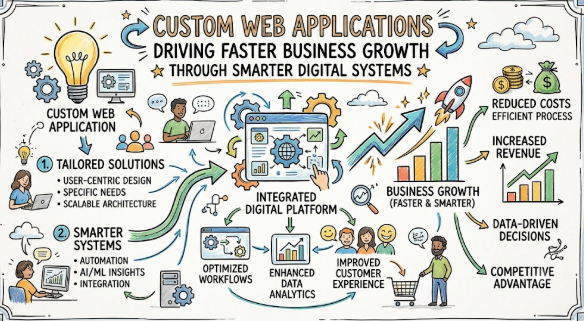
A custom web application is not just a website. It is a digital system built around a company’s exact workflow, customers, data, and business goals. It can help teams automate routine tasks, manage information better, reduce errors, improve customer experience, and make faster decisions.
Beginners often feel confused because they hear many terms like web app, SaaS, CRM, ERP, automation, dashboard, API, cloud hosting, user roles, and database. Some business owners also worry about cost, technical complexity, security, and whether they really need a custom system.
Poor understanding can lead to wrong decisions. A company may buy software that does not fit its workflow. Another business may build a custom app without proper planning. Some teams may spend money on features they do not need, while ignoring important things like security, scalability, user experience, and maintenance.
This blog will explain the complete topic in a simple and practical way. You will understand what custom web applications are, why companies use them, how they work, what mistakes to avoid, and how to plan them carefully.
This guide is useful for small business owners, startup founders, managers, students, digital teams, finance teams, sales teams, operations teams, and anyone who wants to understand business technology better.
The main idea is simple: faster growth does not come only from working harder. It also comes from building better systems. A custom web application can become one of those systems when it is planned correctly, developed responsibly, and improved over time.
Understanding Custom Web Applications in Simple Words
A custom web application is a software application that runs through a web browser and is built according to the specific needs of a business. Unlike ready-made software, it is designed around your company’s process, users, data, and goals.
For example, a normal website may only show information about a company. A custom web application can allow customers to log in, place orders, track service requests, upload documents, make payments, check reports, and communicate with support.
How It Works
A custom web application usually has three main parts:
- User interface: The screen where users interact with the application.
- Backend system: The logic that processes data, permissions, workflows, and actions.
- Database: The place where records, users, reports, transactions, and other information are stored.
When someone uses the app, the frontend collects the input, the backend processes it, and the database stores or retrieves the required information.
Why People Search for It
Companies search for custom web applications when their existing tools become limited. They may want to:
- Automate manual tasks
- Manage customer data better
- Build a client portal
- Improve reporting
- Connect different departments
- Reduce errors
- Create a unique digital product
- Improve business efficiency
Where It Is Used in Real Life
Custom web applications are used in many areas, such as:
- Customer relationship management
- Inventory management
- Finance and billing systems
- HR portals
- Learning management systems
- Appointment booking platforms
- E-commerce systems
- Vendor management portals
- Internal dashboards
- Project tracking tools
Connection With Business, Finance, and Planning
Custom applications can also support financial planning and decision-making. For example, a business can build a dashboard that tracks revenue, expenses, pending invoices, customer payments, and operational costs in one place. This helps owners avoid guesswork and make more informed decisions.
Beginner-Friendly Example
Imagine a small service company that manages customer requests through WhatsApp and Excel. As the customer base grows, the team starts missing follow-ups. A custom web app can allow customers to submit requests, assign tasks to employees, track status, send reminders, and generate monthly reports automatically.
Common Misunderstanding
Many beginners think custom web applications are only for large companies. This is not always true. Small and medium businesses can also use custom web apps when their workflow becomes repetitive, complex, or difficult to manage manually.
Practical Takeaway
A custom web application should not be built just because it looks modern. It should solve a real business problem, save time, reduce errors, improve customer experience, or create measurable operational value.
Why Custom Web Applications Are Important
Custom web applications are important because they help companies move from manual work to structured digital systems. When business processes are not organized, growth becomes difficult. Teams spend more time searching for data, fixing mistakes, repeating tasks, and waiting for approvals.
Better Savings
A custom web application can reduce repetitive work. When routine tasks are automated, employees can focus on higher-value work. This may reduce operational waste and improve productivity.
Better Borrowing and Financial Planning
Companies that track revenue, expenses, invoices, and customer activity clearly can make better financial decisions. A custom app can organize business records, which may help during loan preparation, investor discussions, or internal financial reviews.
Better Investing in Technology
Instead of buying multiple disconnected tools, a company can build one system that matches its process. This helps avoid unnecessary software subscriptions and reduces tool confusion.
Better Risk Awareness
A custom application can include approval workflows, audit logs, user permissions, and reporting. These features help reduce mistakes and improve accountability.
Better Long-Term Planning
As companies grow, they need systems that can support more users, more data, more customers, and more transactions. A custom web app can be planned with scalability in mind.
Emotional Decision-Making
Many companies make software decisions under pressure. They may buy a tool because a competitor uses it or because a vendor promises too much. A better approach is to understand the business problem first and then choose or build the right solution.
Short Practical Scenario
A growing logistics company manages delivery updates manually. Customers keep calling for status updates. The team feels overloaded. A custom tracking portal can allow customers to check delivery status themselves, reducing support pressure and improving customer satisfaction.
The Real Problem Readers Face With Custom Web Applications
The real problem is not only technical. The bigger issue is confusion, poor planning, and lack of clarity.
Many businesses know they need a better system, but they do not know where to start. They may not understand whether they need a website, web application, mobile app, CRM, ERP, automation tool, or internal dashboard.
Common Problems Companies Face
- Lack of awareness about available digital options
- Too much confusing advice from vendors and online articles
- No clear understanding of business requirements
- Emotional decisions based on urgency
- Weak comparison between ready-made and custom solutions
- Unrealistic expectations about cost and timeline
- Ignoring security and maintenance
- Not reading service terms properly
- Depending only on social media advice
- Not knowing the right next step after identifying the problem
Why This Becomes Risky
When companies do not plan properly, they may spend money on a system that employees do not use. They may also build too many features too early. In some cases, companies ignore data protection, user roles, backup, performance, and future maintenance.
Better Approach
The better approach is to start with the business problem. Before building a custom web application, companies should ask:
- What problem are we solving?
- Who will use the system?
- What data will be managed?
- Which tasks should be automated?
- What reports are needed?
- What risks must be controlled?
- How will the system support future growth?
A clear answer to these questions helps reduce confusion and improves decision-making.
How Custom Web Applications Work Step by Step
Step 1: Identify the Business Problem
What It Means
The first step is to understand the exact problem the company wants to solve. This may include slow processes, repeated manual work, poor reporting, customer delays, or disconnected teams.
Why It Matters
Without a clear problem, the web application can become confusing and expensive. A system should be built to solve a real need, not just to look modern.
How to Apply It
Write down the current process and mark where delays, errors, and repeated tasks happen.
Practical Example
A company takes customer orders through phone calls and records them in Excel. Errors happen because different employees update different sheets. The problem is not “we need an app.” The real problem is “we need one reliable order management system.”
Common Mistake
Building features before understanding the workflow.
Better Approach
Document the workflow first, then decide which parts need automation.
Step 2: Define Users and Their Roles
What It Means
Every web application has different users. These may include admins, employees, customers, vendors, managers, and support teams.
Why It Matters
Different users need different access. A customer should not see internal financial reports. A support employee may not need admin settings.
How to Apply It
Create a simple list of user roles and what each role can do.
Practical Example
In a client portal, customers can submit tickets, employees can respond, and managers can view reports.
Common Mistake
Giving too much access to everyone.
Better Approach
Use role-based access so users only see what they need.
Step 3: Plan Core Features First
What It Means
Core features are the most important functions needed to solve the main problem.
Why It Matters
Adding too many features early can delay the project and increase complexity.
How to Apply It
Divide features into must-have, useful later, and optional.
Practical Example
For an appointment booking app, must-have features include user registration, available slots, booking confirmation, and admin calendar.
Common Mistake
Trying to build every idea in the first version.
Better Approach
Start with a minimum useful version and improve it after feedback.
Step 4: Design a Simple User Experience
What It Means
User experience means how easy and comfortable the application is to use.
Why It Matters
Even a powerful application fails if employees or customers find it difficult.
How to Apply It
Keep screens clean, forms short, buttons clear, and navigation simple.
Practical Example
Instead of asking customers to fill 25 fields, ask only the required information first and collect extra details later if needed.
Common Mistake
Designing from a technical point of view only.
Better Approach
Design from the user’s daily working experience.
Step 5: Build Secure Data Management
What It Means
Data management includes how information is stored, updated, protected, and accessed.
Why It Matters
Business data can include customer details, payment records, documents, invoices, and internal reports.
How to Apply It
Use proper authentication, permissions, backups, and secure storage practices.
Practical Example
A finance dashboard should allow only authorized users to view revenue and payment data.
Common Mistake
Thinking security can be added later.
Better Approach
Include security planning from the beginning.
Step 6: Test Before Full Launch
What It Means
Testing checks whether the application works correctly before real users depend on it.
Why It Matters
A small error in a business application can affect orders, payments, reports, or customer trust.
How to Apply It
Test login, forms, workflows, reports, mobile view, speed, permissions, and error messages.
Practical Example
Before launching an invoice system, test whether tax details, customer names, payment status, and invoice numbers are correct.
Common Mistake
Launching without proper user testing.
Better Approach
Let a small group of real users test the system first.
Step 7: Train Users Properly
What It Means
Training helps employees and customers understand how to use the application.
Why It Matters
Even a good application may fail if users do not understand it.
How to Apply It
Create short guides, screen recordings, FAQs, and support instructions.
Practical Example
A sales team can receive a simple guide showing how to add leads, update status, and generate reports.
Common Mistake
Assuming users will learn everything automatically.
Better Approach
Provide clear onboarding and support.
Step 8: Improve After Feedback
What It Means
A custom web application should improve over time based on real usage.
Why It Matters
Business needs change. Customer expectations change. Teams may discover better workflows after using the app.
How to Apply It
Collect feedback, review analytics, track support issues, and improve features in phases.
Practical Example
After launching a customer portal, users may request automatic email updates. This can be added in the next version.
Common Mistake
Treating the app as a one-time project.
Better Approach
Plan continuous improvement and maintenance.
Key Factors That Influence Custom Web Application Success
Business Goal Clarity
A custom web application works best when the business goal is clear. The goal may be to reduce manual work, improve customer service, centralize data, automate approvals, or create a digital platform.
Common mistake: Starting development without a written goal.
Better approach: Define the business outcome before defining features.
Workflow Understanding
The application should match the company’s real workflow. If the workflow is not understood, the app may create more confusion instead of solving problems.
Common mistake: Copying another company’s system.
Better approach: Map your own process first.
User Experience
A simple, clean, and easy interface increases adoption. Employees should not feel that the app adds extra burden.
Common mistake: Adding too many fields and complex screens.
Better approach: Keep only what users need for the task.
Scalability
Scalability means the app can handle more users, more data, and more activity as the business grows.
Common mistake: Building only for current needs without future planning.
Better approach: Plan architecture that can grow step by step.
Security
Security protects users, data, documents, financial records, and business information.
Common mistake: Ignoring access control and data protection.
Better approach: Use secure login, permissions, backups, and monitoring.
Integration
Many businesses already use tools for email, payments, accounting, CRM, or communication. A custom web app may need to connect with these systems.
Common mistake: Building a system that stays isolated.
Better approach: Plan useful integrations where they reduce manual work.
Reporting and Analytics
Reports help leaders understand performance, customer behavior, pending tasks, sales activity, and operational issues.
Common mistake: Adding reports after the system is already built.
Better approach: Decide key reports during planning.
Maintenance
A custom web application needs updates, bug fixes, performance checks, and improvements.
Common mistake: Thinking development ends after launch.
Better approach: Plan maintenance as part of the project.
Detailed Breakdown of Custom Web Applications
Custom Web Application vs Website
A website usually shares information. A custom web application helps users perform actions. For example, a company website may describe services, while a custom web app may allow customers to book services, track orders, upload files, and view invoices.
Better approach: Use a website for information and a web application for interaction, workflow, and automation.
Custom Web Application vs Ready-Made Software
Ready-made software is built for many businesses. It may be faster to start with, but it may not fit every process. A custom web application is built for a specific company’s needs.
Common mistake: Assuming custom is always better.
Better approach: Compare both options based on workflow, budget, flexibility, and long-term use.
Automation and Productivity
Custom web applications help automate repetitive tasks such as approvals, reminders, status updates, report generation, and notifications. This reduces manual follow-up and helps teams work faster.
Example: A leave management app can automatically send approval requests to managers and update employee records.
Customer Experience
A custom web app can improve how customers interact with a business. Customers can log in, check status, submit requests, download documents, and get updates without waiting for manual support.
Common mistake: Building only for internal teams and ignoring customer convenience.
Better approach: Include customer experience in planning.
Data Centralization
When data is spread across Excel, email, WhatsApp, and different tools, decision-making becomes slow. A custom app can bring important data into one organized system.
Example: A sales dashboard can show leads, follow-ups, conversions, and pending activities in one place.
Business Process Control
Custom applications can include approval flows, user permissions, task assignments, and audit logs. This helps managers track who did what and when.
Common mistake: Depending only on verbal updates.
Better approach: Use system-based tracking for important workflows.
Scalable Growth
As companies grow, they need systems that can support more users and more complexity. A custom app can be designed in phases so the company does not need to replace systems again and again.
Security and Trust
Customers and employees trust a company more when systems are organized, secure, and reliable. A custom app should protect data through secure login, encryption where required, backups, and careful access control.
Business Intelligence
Custom dashboards can help companies understand trends, customer behavior, pending work, financial status, and performance gaps. Better visibility supports better decisions.
Cost Control
Although custom development may require planning and investment, it can reduce long-term inefficiencies when built for the right reason. The key is to avoid unnecessary features and focus on business value.
Common Mistakes Beginners Make With Custom Web Applications
Following Random Advice
Many business owners follow advice from friends, online videos, or social media without checking whether it fits their company.
Why it happens: Technology looks confusing, so people copy others.
Why it is risky: A solution that works for one company may fail for another.
What to do instead: Understand your own workflow before choosing a solution.
Ignoring Risk
Some teams focus only on features and ignore security, backup, performance, and compliance.
Why it happens: These areas are less visible than design and features.
Why it is risky: Data loss or security problems can damage trust.
What to do instead: Discuss risk controls before development begins.
Not Comparing Options
A company may decide to build custom software without checking whether an existing tool can solve the problem.
Why it happens: Custom software sounds flexible and attractive.
Why it is risky: It may increase cost and complexity unnecessarily.
What to do instead: Compare ready-made tools, customization options, and custom development.
Trusting Unrealistic Claims
Some vendors may promise very fast delivery, very low cost, or unlimited features.
Why it happens: Businesses want quick results.
Why it is risky: Poor planning can lead to low-quality systems.
What to do instead: Ask for clear scope, timeline, maintenance plan, and limitations.
Making Emotional Decisions
Urgency can push companies to start development without proper analysis.
Why it happens: Teams feel pressure when manual work becomes painful.
Why it is risky: The app may solve symptoms but not the real problem.
What to do instead: Take time to document requirements.
Not Reading Terms and Conditions
Many companies do not check ownership, support, hosting, maintenance, and data policies.
Why it happens: Technical agreements look complex.
Why it is risky: Future changes, data access, or support may become difficult.
What to do instead: Review project terms carefully.
Sharing Sensitive Information Carelessly
During development, businesses may share customer data, financial files, or internal records without controls.
Why it happens: Teams focus on getting the project done.
Why it is risky: Data privacy and trust can be affected.
What to do instead: Share only required data and use secure access methods.
Ignoring Legal or Compliance Responsibilities
Some industries have rules related to customer data, payments, records, or privacy.
Why it happens: Compliance is often considered later.
Why it is risky: The company may face operational or legal issues.
What to do instead: Consult qualified professionals where required.
Don’t Do This Checklist
- Do not build an app without a clear business problem.
- Do not copy another company’s software blindly.
- Do not ignore security and backups.
- Do not add too many features in the first version.
- Do not depend only on verbal requirements.
- Do not skip user testing.
- Do not share sensitive data without control.
- Do not ignore maintenance cost.
- Do not accept unrealistic promises without checking scope.
- Do not launch without user training.
Practical Real-Life Examples of Custom Web Applications
Example 1: Small Business Managing Customer Requests
Situation: A service company receives customer requests through phone and messages.
Mistake or challenge: The team misses follow-ups because requests are not tracked in one place.
Better action: A custom service request portal can record each request, assign it to staff, and track status.
Learning: Centralized tracking helps reduce confusion and improves customer response.
Example 2: Sales Team Losing Leads
Situation: A sales team uses spreadsheets to manage leads.
Mistake or challenge: Follow-ups are delayed because employees forget dates or update old sheets.
Better action: A custom lead management app can send reminders and show pipeline status.
Learning: Better visibility helps teams act on time.
Example 3: Finance Team Preparing Reports Manually
Situation: A finance team copies data from invoices, payments, and expense sheets.
Mistake or challenge: Reports take too much time and may include errors.
Better action: A custom dashboard can collect data and generate structured reports.
Learning: Automation improves accuracy and saves time.
Example 4: Small Manufacturer Tracking Inventory
Situation: A manufacturer tracks stock manually.
Mistake or challenge: The team does not know when items are low or overstocked.
Better action: A custom inventory app can track stock movement and alert managers.
Learning: Real-time information supports better planning.
Example 5: Customer Portal for Better Service
Situation: Customers keep calling support to ask for order status.
Mistake or challenge: Support staff spend hours answering repeated questions.
Better action: A customer portal can show order progress and important updates.
Learning: Self-service features improve customer experience and reduce workload.
Two Useful Tables for Better Understanding
Table 1: Ready-Made Software vs Custom Web Application
| Area | Ready-Made Software | Custom Web Application |
|---|---|---|
| Fit with workflow | General fit for common needs | Built around specific business process |
| Setup speed | Usually faster to start | Requires planning and development |
| Flexibility | Limited customization | Higher flexibility |
| Cost structure | Subscription or license based | Depends on scope, features, and maintenance |
| Scalability | Depends on vendor limits | Can be planned according to growth |
| Ownership control | Usually controlled by vendor | Can offer more control depending on agreement |
| Best for | Standard processes | Unique workflows and growth-focused systems |
Table 2: Beginner Mistake vs Better Approach
| Beginner Mistake | Better Approach |
|---|---|
| Starting without requirements | Document workflow and user needs first |
| Adding too many features | Start with core features |
| Ignoring security | Plan access control, backup, and protection early |
| Skipping user testing | Test with real users before launch |
| Choosing based only on price | Compare value, support, quality, and long-term fit |
| No maintenance plan | Plan updates, bug fixes, and improvements |
| Poor user training | Provide guides, onboarding, and support |
Tools, Methods, and Frameworks Readers Can Use
Requirement Document
A requirement document explains what the application should do. It includes users, features, workflows, reports, permissions, and expected outcomes.
Why it helps: It reduces confusion between the business team and development team.
How beginners can use it: Start with simple bullet points and process notes.
Mistake it avoids: Building features based on assumptions.
Workflow Mapping
Workflow mapping shows each step in a business process.
Why it helps: It identifies delays, repeated work, and unnecessary steps.
How beginners can use it: Draw the current process on paper or a digital board.
Mistake it avoids: Automating a broken process without improving it.
Feature Priority List
This method separates features into must-have, should-have, and future features.
Why it helps: It controls cost and keeps the first version focused.
How beginners can use it: Ask which features are needed to solve the main problem.
Mistake it avoids: Building too much too early.
User Role Matrix
A user role matrix defines who can access which part of the application.
Why it helps: It improves security and clarity.
How beginners can use it: List all user types and their allowed actions.
Mistake it avoids: Giving unnecessary access to users.
Prototype or Wireframe
A prototype is a simple visual layout of the application before development.
Why it helps: Users can review the design before coding starts.
How beginners can use it: Check whether screens are easy to understand.
Mistake it avoids: Discovering design problems too late.
Testing Checklist
A testing checklist includes important actions that must be checked before launch.
Why it helps: It reduces errors and improves reliability.
How beginners can use it: Test login, forms, reports, permissions, and mobile view.
Mistake it avoids: Launching with basic issues.
Maintenance Plan
A maintenance plan explains how the app will be updated and supported after launch.
Why it helps: It keeps the system stable and useful.
How beginners can use it: Discuss support, bug fixes, backups, and future changes.
Mistake it avoids: Treating the app as a one-time project.
Expert Tips to Make Better Decisions
1. Start With the Problem, Not the Feature
This matters because features only have value when they solve a real issue. Beginners often say they need dashboards, automation, or portals without defining the problem.
Apply it by writing the top three business problems before discussing features.
2. Keep the First Version Simple
A simple first version helps the company launch faster and learn from real users. Too many features can delay the project.
Apply it by building only the core workflow first.
3. Think About Users Early
The app should be easy for real users, not just technically impressive. Employees and customers should be able to complete tasks without confusion.
Apply it by involving actual users during planning and testing.
4. Do Not Ignore Security
Security protects business data, customer records, and internal information. It should not be treated as an extra feature.
Apply it by planning login protection, user roles, backups, and secure data handling.
5. Compare Custom and Ready-Made Options
Custom development is useful, but it is not always required. Sometimes a ready-made tool may solve the problem at lower complexity.
Apply it by comparing workflow fit, flexibility, cost, and long-term control.
6. Plan for Growth
A system that works for 10 users may not work for 1,000 users if scalability is ignored.
Apply it by discussing future users, data volume, and feature expansion.
7. Use Written Requirements
Verbal discussions are easy to forget or misunderstand. Written requirements create clarity.
Apply it by preparing a simple project document before development starts.
8. Test With Real Scenarios
Testing should not only check whether buttons work. It should check real business situations.
Apply it by testing actual customer orders, reports, approvals, and user roles.
9. Train Users Before Launch
People resist systems they do not understand. Training improves adoption.
Apply it by creating short guides, videos, and help notes.
10. Review Performance Regularly
A web application should remain fast and stable as usage grows.
Apply it by checking loading speed, errors, user feedback, and server performance.
11. Avoid Vendor Lock-In Without Understanding Terms
Some agreements may limit future flexibility.
Apply it by reviewing ownership, hosting, code access, support, and data export terms.
12. Protect Personal and Business Data
Data privacy is important for trust and risk reduction.
Apply it by collecting only necessary data and controlling access carefully.
13. Take Professional Advice When Needed
Legal, tax, financial, and compliance-related workflows may need expert review.
Apply it by consulting qualified professionals before building sensitive modules.
14. Improve in Phases
Business systems become stronger through continuous improvement.
Apply it by collecting feedback and planning future releases.
15. Measure Practical Value
A custom web app should improve time, accuracy, customer experience, reporting, or control.
Apply it by defining success indicators before launch.
Case Studies: How Better Understanding Changes Decisions
Case Study 1: Growing Service Company
Profile
A small home service company with 25 employees and a growing customer base.
Situation
The company managed bookings through phone calls, WhatsApp, and spreadsheets.
Problem
Customers complained about missed appointments and delayed updates.
Wrong Approach
The owner first planned to build a large application with customer login, payment, employee tracking, reviews, coupons, and advanced reports all at once.
Better Approach
The team started with a simple booking and job assignment system. It included customer details, appointment slots, staff assignment, job status, and basic reports.
Result or Learning
The company reduced confusion and improved internal coordination. More features were planned after employees became comfortable with the system.
Key Takeaway
Start with the most painful workflow before adding advanced features.
Case Study 2: B2B Sales Team
Profile
A B2B company selling services to corporate clients.
Situation
The sales team tracked leads in separate spreadsheets.
Problem
Managers could not see real-time pipeline status, and follow-ups were missed.
Wrong Approach
The company considered buying a complex enterprise CRM without checking whether the team needed all features.
Better Approach
They planned a custom lightweight lead tracking application with lead source, follow-up date, status, notes, reminders, and manager dashboard.
Result or Learning
The sales process became more visible. The team understood which leads needed attention and which follow-ups were pending.
Key Takeaway
A focused system can be more useful than a complex tool when the business need is specific.
Case Study 3: Small Finance Operations Team
Profile
A small company handling invoices, vendor payments, and monthly expense reports.
Situation
The finance team used email attachments and spreadsheets to track payments.
Problem
Reports were delayed, and invoice status was often unclear.
Wrong Approach
The team wanted to build a full finance platform immediately.
Better Approach
They started with an internal invoice tracking dashboard. It included invoice upload, approval status, due date, payment status, and monthly summary.
Result or Learning
The team gained better visibility and reduced repeated follow-up messages.
Key Takeaway
Custom web applications can support financial discipline when they organize records and reduce manual tracking.
Risk Awareness: What Readers Must Check First
Data Privacy Risk
Data privacy risk means sensitive information may be accessed, shared, or stored improperly.
Why it matters: Customer trust and business reputation can be affected.
How to reduce it: Collect only required data, use access control, and follow relevant privacy practices.
Cybersecurity Risk
Cybersecurity risk includes hacking, weak passwords, unauthorized access, and insecure systems.
Why it matters: A security issue can disrupt business operations.
How to reduce it: Use secure login, strong authentication, regular updates, and monitoring.
Project Scope Risk
Scope risk happens when features keep increasing during the project.
Why it matters: It can increase cost, delay launch, and confuse users.
How to reduce it: Define must-have features clearly and manage changes carefully.
Budget Risk
Budget risk means the project may cost more than expected.
Why it matters: Poor planning can affect cash flow and business priorities.
How to reduce it: Prepare a clear scope, phase-wise plan, and maintenance budget.
Performance Risk
Performance risk happens when the app becomes slow as users or data increase.
Why it matters: Slow systems reduce productivity and frustrate users.
How to reduce it: Plan scalable architecture and test performance.
Compliance Risk
Compliance risk is related to legal, tax, financial, or industry rules.
Why it matters: Some workflows may involve regulated data or official records.
How to reduce it: Consult qualified professionals where required.
Vendor Risk
Vendor risk happens when a company depends too much on one provider without clear terms.
Why it matters: Future changes, support, or data access may become difficult.
How to reduce it: Review ownership, support, hosting, and exit terms.
User Adoption Risk
User adoption risk means employees or customers may not use the application properly.
Why it matters: A system has no value if users avoid it.
How to reduce it: Keep the app simple and provide training.
Misinformation Risk
Misinformation risk happens when decisions are based on incomplete or misleading advice.
Why it matters: Companies may choose the wrong technology or budget.
How to reduce it: Verify details and take expert guidance when needed.
Readers should always verify technical, legal, financial, and compliance details before making major decisions.
Checklist Before Taking Action
Before building or choosing a custom web application, review this checklist carefully:
- The business problem is clearly defined.
- The current workflow is documented.
- User roles are identified.
- Core features are separated from future features.
- Ready-made software options are compared.
- Budget and maintenance cost are reviewed.
- Data privacy needs are understood.
- Security requirements are planned.
- Reports and dashboards are defined.
- Integrations are identified.
- User training plan is prepared.
- Testing process is planned.
- Backup and recovery needs are discussed.
- Legal or compliance impact is reviewed where required.
- Vendor terms are checked.
- Ownership and data access are understood.
- Emotional or rushed decisions are avoided.
- Professional advice is considered where needed.
- A written plan is prepared before development starts.
Use this checklist before approving a project, signing an agreement, or starting development. It helps reduce confusion and supports better long-term decisions.
Strategic Insights for Better Decision-Making
Business Process First, Technology Second
A custom web application should support a business process. If the process is unclear, technology will not solve the deeper problem.
For example, if approval rules are confusing offline, the same confusion may appear inside the application. First improve the process, then automate it.
Scalable Architecture
Scalable architecture means the system can grow with the business. It should support more users, more transactions, and more features over time.
A beginner-friendly example is an order system that starts with basic order tracking but later adds payment, delivery, customer portal, and analytics.
Modular Development
Modular development means building the app in smaller sections. This makes it easier to improve and maintain.
For example, a business can first build login and customer management, then add billing, reports, and notifications later.
Data-Driven Decisions
Custom applications can collect useful data. This data can help businesses understand customer behavior, sales performance, service delays, and financial activity.
The better approach is to decide early which data matters for decisions.
Automation With Human Control
Automation is useful, but not every decision should be fully automatic. Some approvals, exceptions, or financial actions may still need human review.
For example, a refund request can be automatically recorded, but approval may still require a manager.
User Feedback Loop
Users often discover practical issues after using the system. Feedback helps improve the application.
Companies should collect feedback from employees, customers, and managers after launch.
Security by Design
Security should be part of planning, not an afterthought. User roles, password policies, access logs, and backups should be included early.
This reduces risk and improves trust.
Long-Term Maintenance Thinking
A custom app needs updates as business needs change. Maintenance includes bug fixes, performance checks, security patches, and feature improvements.
A smart company plans maintenance from the beginning.
Integration Planning
A custom application becomes more powerful when it connects with useful tools such as email, payment gateways, accounting software, CRM systems, or communication platforms.
However, integrations should be added only when they solve real problems.
Cost vs Value Thinking
The cheapest system is not always the best. The most expensive system is not always necessary. The right decision depends on business value, reliability, usability, security, and future needs.
Key Terms Explained for Beginners
- Custom Web Application: A browser-based software system built for a company’s specific workflow, users, and business needs.
- Frontend: The part of the application users see and interact with, such as forms, buttons, dashboards, and menus.
- Backend: The behind-the-scenes part that handles logic, data processing, user permissions, and workflows.
- Database: A structured place where information such as users, orders, invoices, reports, and records is stored.
- User Role: A permission level that defines what a user can view or do inside the application.
- Dashboard: A visual screen that shows important information such as sales, tasks, reports, or performance status.
- Automation: The process of allowing software to complete repetitive tasks with less manual effort.
- Workflow: A sequence of steps followed to complete a business process, such as approval, booking, billing, or support.
- Scalability: The ability of an application to handle more users, data, and activity as the business grows.
- Integration: A connection between the web application and another tool, such as payment software, email, CRM, or accounting software.
- API: A method that allows two software systems to communicate and exchange information.
- Authentication: The process of confirming a user’s identity, usually through login credentials.
- Authorization: The process of deciding what a logged-in user is allowed to access.
- Maintenance: Ongoing updates, fixes, performance checks, and improvements after the application is launched.
- Prototype: A simple visual model of the application used to review layout and user flow before development.
Who Should Read This Blog
Beginners
Beginners who are new to web applications can use this blog to understand the topic in simple language.
Students
Students learning business technology, software development, or digital transformation can understand how real companies use custom systems.
Salaried Employees
Employees working in sales, finance, HR, operations, or support can understand how custom applications improve daily work.
Small Business Owners
Small business owners can learn when a custom web application is useful and how to avoid costly mistakes.
New Investors
Investors reviewing digital businesses can better understand how custom systems support operations and scalability.
Traders and Finance Learners
People familiar with financial decision-making can connect the same discipline of risk review, planning, and comparison to software decisions.
Loan Seekers
Business loan seekers can understand how organized systems and records may support better business planning and documentation.
Crypto Learners
Crypto learners can relate to the importance of security, data protection, and platform risk awareness.
Casino Content Creators
Casino content creators can understand how custom platforms, review systems, user portals, and responsible content workflows can support structured publishing.
Finance Bloggers
Finance bloggers can learn how digital systems support content planning, reporting, compliance review, and user experience.
People Improving Money Awareness
Anyone trying to make better business or financial decisions can learn how proper systems reduce confusion and improve planning.
People Trying to Avoid Business Mistakes
This blog helps readers avoid rushed software decisions, poor planning, weak security, and unnecessary spending.
Frequently Asked Questions
1. What is a custom web application?
A custom web application is browser-based software built for a specific business need. It can manage workflows, users, data, reports, and automation. Unlike a basic website, it allows people to perform tasks and interact with business systems.
2. How Custom Web Applications Help Companies Grow Faster?
Custom web applications help companies grow faster by reducing manual work, improving data visibility, automating tasks, and supporting better customer service. They help teams work in a more organized and scalable way.
3. Are custom web applications only for large companies?
No, small and medium businesses can also use custom web applications. The need depends on workflow complexity, growth plans, customer expectations, and operational challenges.
4. What is the biggest mistake beginners make with custom web apps?
The biggest mistake is starting development without clear requirements. A company should first understand its workflow, users, problems, and goals before building any application.
5. How can beginners start safely?
Beginners should start by documenting the business problem, listing users, defining core features, comparing options, and planning security. A small first version is usually better than a large confusing system.
6. Why is user experience important in custom web applications?
User experience matters because employees and customers will only use the app if it is simple and useful. A confusing interface can reduce adoption and waste development effort.
7. How Custom Web Applications Help Companies Grow Faster in customer service?
They help by offering customer portals, ticket tracking, automated updates, and faster response systems. This reduces repeated calls and improves customer satisfaction.
8. Should a company choose ready-made software or custom development?
It depends on the business need. Ready-made software may work for standard processes, while custom development is better for unique workflows, special reporting, or long-term flexibility.
9. What risks should companies check before building a web application?
Companies should check data privacy, cybersecurity, budget, scope, performance, compliance, vendor terms, and maintenance needs. These risks should be reviewed before development begins.
10. How often should a custom web application be reviewed?
A custom web application should be reviewed regularly based on user feedback, performance, security needs, and business changes. Regular review helps keep the system useful and reliable.
11. Can custom web applications support financial planning?
Yes, they can support financial planning by organizing invoices, payments, reports, expenses, and business records. However, financial decisions should still be reviewed carefully with qualified professionals when needed.
12. What is the best next step after learning How Custom Web Applications Help Companies Grow Faster?
The best next step is to identify one important business problem and map the current workflow. After that, define users, core features, risks, and whether custom development is truly needed.
Conclusion and Next Steps
Understanding How Custom Web Applications Help Companies Grow Faster is important for any business that wants to improve operations, reduce manual work, and build better digital systems. A custom web application is not only a technical product. It is a business tool that can support better workflows, faster decisions, stronger customer experience, and long-term scalability.
The key lesson is that technology should solve a real problem. Companies should not build custom applications only because they look modern or because competitors are using digital tools. A strong custom web application starts with clear thinking. The business must understand its current process, identify pain points, define users, prioritize features, and plan security from the beginning.
Beginners should remember that growth is not only about more customers or more sales. Growth also requires systems that can handle more work without creating confusion. When teams depend only on spreadsheets, email, and manual follow-ups, small errors can become larger problems as the business expands. A custom web application can bring structure, automation, visibility, and control.
At the same time, custom development should be approached carefully. Poor planning can lead to wasted money, delayed projects, low user adoption, and security risks. This is why companies should compare options, prepare written requirements, test with real users, and plan maintenance before launch.
The practical next step is simple: choose one business process that is slow, repetitive, or difficult to manage. Map how it works today. Identify where delays and mistakes happen. Then decide whether a custom web application can improve that process in a measurable way.
Businesses should also think long term. A useful application should grow with the company. It should allow improvements, support more users, protect important data, and provide meaningful reports. The best systems are not always the biggest systems. They are the systems that people actually use and that solve real problems.
A custom web application can help companies grow faster, but only when it is built with clarity, responsibility, and practical business understanding. Careful planning, risk awareness, user training, and continuous improvement make the difference between a simple software project and a valuable business growth system.
