
Introduction
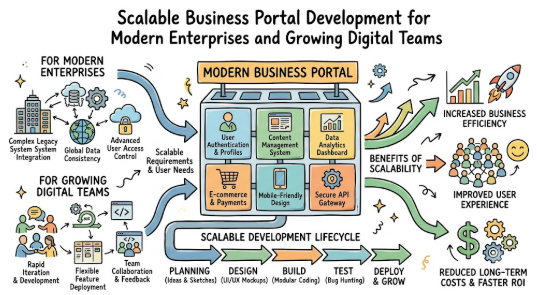
Many businesses start with simple websites, spreadsheets, emails, and manual follow-ups, but as customers, teams, orders, data, and internal operations grow, these basic systems begin to create delays and confusion. A business portal solves this problem by bringing users, services, workflows, documents, communication, and approvals into one organized digital platform. However, beginners often feel confused because portal development includes planning, design, security, integrations, performance, user roles, and future scalability. Poor planning can lead to expensive rework, slow systems, weak user experience, and data risks. This Complete Guide to Building Business Portals That Scale explains the topic in simple language for business owners, managers, startups, and digital teams who want practical understanding before making technical or financial decisions.
Understanding Building Business Portals That Scale in Simple Words
A business portal is a digital platform where users can log in and complete specific tasks. These users may be customers, employees, vendors, partners, students, agents, or administrators. A scalable business portal is one that continues to perform well when more users, more data, more features, and more transactions are added over time.
In simple words, building business portals that scale means creating a portal that is useful today and ready for tomorrow. It should not break when the business grows. It should not become slow when traffic increases. It should not become confusing when new departments, services, or workflows are added.
For example, a small service company may begin with a customer portal where clients submit requests. Later, the company may add invoice downloads, payment tracking, support tickets, project updates, document sharing, and role-based dashboards. If the portal is planned well from the beginning, these additions become easier. If it is built without structure, every new feature may become costly and difficult.
A common misunderstanding is that a portal is only a login page or dashboard. In reality, a good portal is a complete business system with user management, workflows, permissions, integrations, reports, notifications, security controls, and support processes.
Why Building Business Portals That Scale Is Important
Building business portals that scale is important because digital platforms now directly affect customer experience, team productivity, data quality, service delivery, and operational cost. When a portal is weak, users face login problems, slow pages, unclear navigation, duplicate forms, missing updates, and poor support visibility. These issues damage trust and increase manual workload.
A scalable portal helps businesses organize work better. Customers can track their requests. Employees can manage approvals. Vendors can upload documents. Managers can review reports. Finance teams can track invoices. Support teams can respond faster. Business owners can understand operations from one place instead of depending on scattered emails and spreadsheets.
The common mistake is building only for current needs. The better approach is to design for current simplicity and future expansion.
The Real Problem Readers Face With Business Portals
- Unclear requirements: Businesses often start without knowing the exact purpose, users, or needed features.
- Confusing portal with website: Many think a portal is just a login page, but it also needs workflows, dashboards, roles, and reports.
- Poor user experience: Complicated navigation and forms make users avoid the portal.
- No scalability planning: Portals may work at first but fail when users, data, or features grow.
- Weak security: Many portals ignore access control, data privacy, backups, and secure login.
- Too many features early: Adding everything at once increases cost, delay, and confusion.
- Poor integration planning: Businesses forget to plan connections with CRM, ERP, payment, email, or support tools.
- Hidden long-term costs: Maintenance, hosting, updates, support, and security are often ignored.
- No real user testing: Launching without feedback leads to usability issues later.
- No maintenance plan: A business portal needs regular updates, monitoring, and improvements after launch.
How Building Business Portals That Scale Works Step by Step
Step 1: Define the Portal Purpose Clearly
What it means: Decide why the portal is being built. Is it for customers, employees, vendors, partners, students, or internal operations?
Why it matters: A portal without a clear purpose becomes confusing. Different users need different features, permissions, dashboards, and communication flows.
How to apply it: Write one clear sentence: “This portal will help users do X without manual follow-up.”
Practical example: A customer service portal may allow clients to raise tickets, track status, upload documents, and view support history.
Common mistake: Starting with design screens before defining the actual business problem.
Better approach: Start with user needs, workflow problems, and business goals before choosing technology.
Step 2: Identify User Types and Roles
What it means: List every type of user who will access the portal.
Why it matters: A customer should not see admin controls. A vendor should not see internal employee data. A manager may need reports that normal staff do not need.
How to apply it: Create roles such as Admin, Manager, Staff, Customer, Vendor, Partner, or Guest.
Practical example: In a vendor portal, vendors upload documents, procurement teams review them, and finance teams approve payments.
Common mistake: Giving all users similar access because it is easier during development.
Better approach: Use role-based access control from the beginning.
Step 3: Map the Business Workflow
What it means: Document how work moves from one step to another.
Why it matters: A portal should support real operations, not create extra steps.
How to apply it: Write the journey from request creation to completion. Include approvals, alerts, documents, status changes, and responsible people.
Practical example: A loan service portal may include application submission, document upload, verification, approval review, communication, and status tracking.
Common mistake: Building features without knowing how users will actually move through the system.
Better approach: Draw simple workflow maps before development.
Step 4: Plan the Core Features First
What it means: Separate must-have features from nice-to-have features.
Why it matters: Beginners often try to build everything at once, which increases cost, delay, and confusion.
How to apply it: Start with login, dashboard, profile, workflow forms, notifications, document handling, reports, and admin controls.
Practical example: A training portal may first launch with student login, course access, payment status, support tickets, and certificate downloads. Advanced analytics can come later.
Common mistake: Adding too many features before testing the basic portal experience.
Better approach: Build a minimum useful version, then improve based on real user feedback.
Step 5: Choose a Scalable Architecture
What it means: Select a technical structure that can handle growth.
Why it matters: Poor architecture may work for 100 users but fail when the portal reaches thousands of users or more complex workflows.
How to apply it: Plan database structure, APIs, caching, cloud hosting, modular code, secure authentication, and performance monitoring.
Practical example: A B2B portal may need separate modules for customers, billing, support, documents, and reporting so each part can improve independently.
Common mistake: Building everything as one tightly connected system with no flexibility.
Better approach: Use modular architecture and clean integration planning.
Step 6: Build Security and Data Privacy Into the System
What it means: Protect user accounts, personal data, business records, and system access.
Why it matters: Portals often store sensitive information. Weak security can damage trust and create legal or business problems.
How to apply it: Use strong authentication, role permissions, secure hosting, encrypted connections, activity logs, backups, and regular reviews.
Practical example: A healthcare-related portal should carefully control who can view patient-related documents or appointment records.
Common mistake: Treating security as something to add after launch.
Better approach: Include security planning in design, development, testing, and maintenance.
Step 7: Test With Real Users Before Full Launch
What it means: Ask real users to use the portal and share feedback before making it widely available.
Why it matters: Developers and business owners may miss practical issues that users notice quickly.
How to apply it: Test login, forms, navigation, mobile view, notifications, file upload, search, and support flow.
Practical example: A vendor may say the document upload process is unclear. A customer may say the status labels are confusing.
Common mistake: Launching the portal publicly without user testing.
Better approach: Run pilot testing with selected users and fix issues before scaling.
Step 8: Monitor, Improve, and Maintain Continuously
What it means: Keep checking performance, errors, user behavior, feedback, security, and feature usage after launch.
Why it matters: A scalable portal is not a one-time project. It needs continuous improvement.
How to apply it: Review speed, uptime, failed logins, support tickets, user complaints, abandoned forms, and feature requests.
Practical example: If users repeatedly contact support for password issues, the portal may need a better password reset flow.
Common mistake: Thinking the project is finished after launch.
Better approach: Treat the portal as a living business platform.
Key Factors That Influence Scalable Business Portals
User Experience
User experience decides whether people actually use the portal. A portal may have powerful features, but if users cannot find them, the system fails. Beginners should focus on clear navigation, simple forms, readable dashboards, mobile-friendly design, and helpful messages.
The common mistake is designing for internal teams only. The better approach is to design for the actual user journey.
Performance
Performance means how fast and stable the portal feels. Slow pages, delayed searches, heavy dashboards, and failed uploads can frustrate users. Performance depends on hosting, database design, code quality, caching, file handling, and traffic management.
The common mistake is testing only with a small amount of data. The better approach is to test performance under realistic growth conditions.
Security
Security protects users, data, documents, payments, and business information. A secure portal should include strong login controls, role-based permissions, secure data handling, backups, and activity monitoring.
The common mistake is assuming small businesses are not at risk. The better approach is to apply basic security discipline from day one.
Scalability
Scalability means the portal can handle growth without major rebuilding. It includes more users, more data, more features, more integrations, and more business locations.
The common mistake is building only for the first version. The better approach is to create a roadmap that allows new modules to be added gradually.
Integration Readiness
Business portals often need to connect with CRM, ERP, payment systems, accounting tools, email systems, cloud storage, analytics, support tools, or internal databases.
The common mistake is ignoring integrations until later. The better approach is to plan APIs, data flow, and system ownership early.
Data Quality
A portal becomes useful only when the data inside it is clean, updated, and organized. Poor data creates wrong reports, duplicate records, and user confusion.
The common mistake is collecting too much unnecessary data. The better approach is to collect only useful, structured, and validated information.
Workflow Automation
Automation helps reduce repetitive manual tasks. It can support approvals, reminders, status updates, ticket routing, document checks, and reporting.
The common mistake is automating a bad process. The better approach is to simplify the process first, then automate it.
Maintenance Planning
A business portal needs updates, bug fixes, security reviews, backup checks, user support, and performance improvements.
The common mistake is budgeting only for development. The better approach is to plan long-term maintenance from the beginning.
Detailed Breakdown of Business Portal Development
Business Portal Strategy
A business portal should begin with strategy, not coding. Strategy means understanding what the portal must achieve for the business and users. This includes user needs, business goals, pain points, workflows, growth plans, and success indicators.
A beginner-friendly way to start is by asking: Who will use the portal? What task will they complete? What problem will the portal reduce? What information will be stored? What process will become faster or clearer?
The mistake is starting with a feature list copied from another company. The better approach is to build a portal around your own users and operations.
Portal Architecture
Business portal architecture is the structure behind the system. It includes the frontend, backend, database, APIs, authentication, hosting, file storage, reporting layer, and integration points.
A strong architecture allows future expansion. For example, if a company later adds a mobile app, partner dashboard, payment gateway, or analytics system, the portal should not need a complete rebuild.
The mistake is creating a single rigid system where every feature depends on every other feature. The better approach is modular architecture where each major part can improve without damaging the whole platform.
User Login and Access Control
Login is not just a username and password screen. It is the entry point to the portal. It must be simple, secure, and reliable. Access control decides what each user can see and do.
For example, a customer may view orders and invoices. A support agent may update ticket status. A manager may review reports. An admin may manage users and settings.
The mistake is giving broad access to many users. The better approach is to give only the required access for each role.
Dashboard Design
A dashboard should show the most useful information first. It should not overload users with every possible detail.
A customer dashboard may show active requests, recent updates, invoices, documents, and support options. An admin dashboard may show pending approvals, user activity, system alerts, and reports.
The mistake is building dashboards that look impressive but do not help users take action. The better approach is to make dashboards simple, task-focused, and role-specific.
Workflow Management
A portal becomes powerful when it reflects real business workflows. Workflows may include approvals, submissions, reviews, payments, document checks, escalation, and notifications.
For example, in an employee portal, a leave request may move from employee submission to manager approval to HR record update. In a vendor portal, an invoice may move from upload to verification to payment status.
The mistake is keeping workflow rules only in people’s heads. The better approach is to document each workflow and build it clearly into the portal.
Document and File Handling
Many portals need document upload, download, verification, storage, and version control. This is common in education, finance, healthcare, HR, legal, real estate, and vendor management.
The portal should define allowed file types, file size limits, document categories, access permissions, and retention rules.
The mistake is storing files without naming structure or access control. The better approach is to organize documents by user, category, date, status, and permission.
Notifications and Communication
Notifications help users know what action is required. They may be sent through email, SMS, dashboard alerts, or in-app messages.
Useful notifications include account creation, request submission, approval status, document rejection, payment update, deadline reminder, and support response.
The mistake is sending too many notifications. The better approach is to send only meaningful alerts that help users act.
Reporting and Analytics
Reports help decision-makers understand portal activity. Reports may show user registrations, pending requests, completed tasks, ticket volume, document status, payments, response time, or workflow bottlenecks.
Beginners should avoid complex reporting at the start. Begin with practical reports that help teams make better decisions.
The mistake is collecting data without knowing how it will be used. The better approach is to define useful reports before designing data fields.
Integration With Other Systems
A business portal may need to connect with accounting software, CRM, ERP, HRMS, learning management systems, payment gateways, cloud storage, support tools, or marketing platforms.
Integration planning should include what data moves, which system is the source of truth, how errors are handled, and who owns the data.
The mistake is manually copying data between systems after launch. The better approach is to plan safe and structured integration flows early.
Mobile-Friendly Design
Many users access portals from mobile devices. A portal that works only on desktop may create friction.
Mobile-friendly design means readable text, simple forms, fast loading, clear buttons, and easy navigation on smaller screens.
The mistake is testing only on large screens. The better approach is to test mobile experience during every development stage.
Support and Feedback System
A scalable portal should include a way for users to get help. This may include FAQs, ticket forms, chat support, help documents, or guided messages.
Feedback is important because users often reveal hidden problems. For example, if many users ask the same question, the portal may need clearer instructions.
The mistake is treating support as separate from portal design. The better approach is to use support feedback to improve the portal continuously.
Common Mistakes Beginners Make With Business Portals
Following Random Advice
Many beginners copy ideas from competitors, social media posts, or generic articles. This happens because portal planning feels technical and confusing. The risk is that copied features may not solve your actual business problem.
The better approach is to study your own users, workflows, and service model before finalizing features.
Ignoring Scalability
Some businesses build only for today’s user count. This may work at the start but can create problems when traffic, data, and workflows grow.
The better approach is to plan phased growth, modular features, and flexible hosting.
Not Comparing Options Properly
Businesses often compare only development cost. They ignore maintenance, security, hosting, performance, documentation, and upgrade needs.
The better approach is to compare total long-term value, not just initial price.
Trusting Unrealistic Claims
Some vendors may promise very fast delivery, unlimited features, or extremely low-cost enterprise systems. Such claims should be checked carefully.
The better approach is to ask for scope, timeline, responsibilities, testing process, support terms, and maintenance details in writing.
Ignoring Security
Security mistakes happen when teams focus only on design and features. This is risky because portals often store sensitive user and business data.
The better approach is to include authentication, permissions, backups, encryption, monitoring, and review processes.
Making Emotional Decisions
Business owners may rush because they feel pressure from competitors or customers. Rushed decisions can create unclear scope and poor development outcomes.
The better approach is to prepare a written requirement document and phased plan.
Not Reading Terms and Conditions
Hosting, software licenses, support agreements, and vendor contracts may include important limitations.
The better approach is to read terms carefully and clarify ownership, data access, maintenance, backups, and exit options.
Sharing Sensitive Information Carelessly
Portal planning may involve customer records, employee data, financial documents, or private business information.
The better approach is to share only necessary information with trusted teams under proper confidentiality and access rules.
Ignoring Compliance Responsibilities
Some industries may have legal, privacy, tax, or data handling responsibilities.
The better approach is to consult qualified professionals when the portal handles sensitive or regulated information.
Depending Only on Social Media Advice
Social media can provide ideas, but it cannot replace proper planning.
The better approach is to combine research with expert review, user feedback, and business-specific analysis.
Don’t Do This Checklist
- Don’t build a portal without defining its purpose.
- Don’t copy a competitor’s portal blindly.
- Don’t ignore user roles and permissions.
- Don’t collect unnecessary personal data.
- Don’t treat security as an afterthought.
- Don’t launch without testing.
- Don’t choose technology only because it is popular.
- Don’t skip documentation.
- Don’t ignore mobile users.
- Don’t forget maintenance and support planning.
- Don’t rely on verbal promises from vendors.
- Don’t build too many features in the first version.
Practical Real-Life Examples of Scalable Business Portals
Example 1: Small Business Owner Managing Customer Requests
A service business receives customer requests through phone calls and emails. The team loses track of status updates and repeats the same answers. A customer portal with request tracking, document upload, and notifications improves visibility. The learning is that portals should reduce confusion, not just create a digital form.
Example 2: Training Institute Handling Student Access
A training institute manually sends course details, invoices, certificates, and class updates. As student numbers grow, manual work becomes slow. A student portal gives learners access to schedules, payments, support, and certificates. The learning is that self-service features can reduce repeated support pressure.
Example 3: Vendor Management for a Growing Company
A company works with many vendors and collects documents through email. Files become scattered and approvals become delayed. A vendor portal allows structured uploads, status tracking, and finance review. The learning is that organized workflows are as important as attractive design.
Example 4: Internal Employee Portal for HR Operations
An HR team handles leave requests, policy documents, onboarding forms, and employee queries manually. Employees often ask the same questions. An employee portal centralizes HR documents, leave workflows, and support requests. The learning is that internal portals can improve employee experience and reduce repetitive admin work.
Example 5: Customer Dashboard for a SaaS Business
A SaaS company wants customers to view subscription details, invoices, support tickets, usage reports, and account settings. Without a portal, customers depend on support for basic information. A scalable customer dashboard gives users control and improves transparency. The learning is that good portals make users more independent.
Two Useful Tables for Better Understanding
Table 1: Business Portal Type and Practical Use
| Portal Type | Main Users | Common Features | Best Use Case |
|---|---|---|---|
| Customer Portal | Customers and clients | Account dashboard, support tickets, invoices, documents | Service updates and self-service support |
| Employee Portal | Internal staff | HR forms, policies, leave requests, announcements | Internal communication and workflow management |
| Vendor Portal | Suppliers and partners | Document upload, approval status, invoice tracking | Procurement and vendor coordination |
| Partner Portal | Business partners | Sales resources, reports, leads, communication | Channel partner management |
| Student Portal | Learners and institutes | Course access, fees, certificates, support | Education and training management |
Table 2: Beginner Mistake vs Better Approach
| Beginner Mistake | Why It Creates Problems | Better Approach |
|---|---|---|
| Building without clear requirements | Creates scope confusion and rework | Prepare a written requirement document |
| Ignoring user roles | Increases data and access risk | Use role-based permissions |
| Adding too many features early | Delays launch and increases complexity | Start with core useful features |
| Skipping security planning | Exposes users and business data | Build security into every stage |
| Not planning maintenance | Portal becomes outdated or unstable | Budget for updates, support, and monitoring |
| Poor mobile testing | Users face difficulty on phones | Test on multiple devices before launch |
Tools, Methods, and Frameworks Readers Can Use
Requirement Discovery Checklist
A requirement discovery checklist helps beginners define what the portal should do before development begins. It includes users, features, workflows, data fields, reports, integrations, and security needs.
It helps avoid the mistake of starting development with unclear expectations.
User Journey Mapping
User journey mapping explains how each user moves through the portal. It shows where users log in, what they need, what action they take, and where they may feel confused.
Beginners can use it to design simple and practical screens.
Role-Based Access Matrix
A role-based access matrix lists what each user type can view, create, edit, approve, or delete. This is useful for security and workflow clarity.
It helps avoid accidental access to sensitive information.
Feature Prioritization Framework
This method separates features into must-have, should-have, could-have, and future features. It helps teams avoid building too much too early.
Beginners can use it to launch faster with useful core functionality.
Workflow Mapping
Workflow mapping shows how a request, document, approval, or task moves from start to finish. It helps identify delays and unclear responsibilities.
This prevents the mistake of automating a broken process.
Security Review Checklist
A security checklist includes login rules, password policies, access control, data protection, backups, monitoring, and user activity logs.
It helps beginners remember that security is not optional.
Integration Planning Sheet
This sheet lists systems that must connect with the portal, such as CRM, accounting, payment, email, HR, or support systems.
It helps avoid data duplication and manual transfer later.
Performance Testing Method
Performance testing checks whether the portal can handle more users, larger files, heavier reports, and more database activity.
It helps avoid the mistake of assuming the portal will scale automatically.
Feedback Collection System
Feedback forms, support tickets, and user interviews help teams improve the portal after launch.
It helps avoid building based only on internal assumptions.
Maintenance Roadmap
A maintenance roadmap includes bug fixes, security updates, feature improvements, backup checks, and performance reviews.
It helps keep the portal reliable after launch.
Expert Tips to Make Better Portal Decisions
1. Start With the Business Problem
A portal should solve a real problem. Before discussing design or technology, define the pain point clearly. This helps avoid unnecessary features and keeps the project focused.
2. Keep the First Version Simple
The first version should include only the most useful features. This matters because too many features can slow development and confuse users. Begin with core workflows, then improve based on feedback.
3. Build for Real Users, Not Internal Assumptions
A portal should match how users think and work. Interview customers, employees, or vendors before finalizing screens. This helps avoid creating a system that looks good but feels difficult to use.
4. Use Role-Based Access From the Beginning
Every user should have only the access they need. This protects data and reduces operational mistakes. Define roles before development begins.
5. Plan for Integration Early
If the portal must connect with payment systems, CRM, ERP, or accounting software, plan it early. Late integration decisions can increase complexity and cost.
6. Focus on Mobile Experience
Many users may access the portal from mobile devices. Test forms, dashboards, buttons, and file uploads on mobile screens. A poor mobile experience can reduce portal adoption.
7. Document Every Important Decision
Documentation helps future developers, support teams, and business managers understand the system. Record requirements, workflows, roles, integrations, and maintenance rules.
8. Avoid Over-Customization Without Reason
Custom features are useful when they solve real problems, but unnecessary customization can make maintenance harder. Use standard patterns where possible and customize only when needed.
9. Test With Real Data
A portal may work well with sample data but become slow or confusing with real records. Test with realistic user counts, file sizes, and workflows before full launch.
10. Make Security a Daily Habit
Security should be part of planning, coding, testing, hosting, and maintenance. Review user permissions, backups, logs, and data handling regularly.
11. Prepare a Support Process
Users will need help after launch. Prepare FAQs, contact options, ticket handling, and issue escalation. A strong support process improves trust.
12. Review the Portal Regularly
A portal should improve as the business changes. Review user feedback, feature usage, performance, and support issues every month or quarter.
Case Studies: How Better Understanding Changes Decisions
Case Study 1: Service Company Building a Customer Portal
Profile: A mid-sized service business with growing customer support requests.
Situation: Customers were asking for service updates through phone and email.
Problem: Support staff spent too much time answering repeated status questions.
Wrong approach: The company first wanted a beautiful dashboard with many advanced features but had not mapped the actual support workflow.
Better approach: The team documented customer journeys, ticket stages, document needs, and notification rules. They launched a simple portal with request tracking, file upload, status updates, and support history.
Result or learning: Customers received clearer updates, and the support team had better visibility. The main learning was that workflow clarity mattered more than fancy design.
Key takeaway: Build around the real user problem first.
Case Study 2: Manufacturing Business Creating a Vendor Portal
Profile: A manufacturing company working with multiple suppliers.
Situation: Vendor documents, invoices, and approval emails were scattered across different teams.
Problem: Delays happened because procurement, finance, and operations did not have a shared view.
Wrong approach: The company considered building only an invoice upload page.
Better approach: The team designed a vendor portal with role-based access, document categories, approval status, invoice tracking, and internal review workflows.
Result or learning: The portal created a more organized process. The learning was that a portal should support the full workflow, not only one form.
Key takeaway: Think beyond one feature and understand the complete process.
Case Study 3: Education Provider Scaling a Student Portal
Profile: A training provider with online and offline learners.
Situation: Students needed course schedules, payment details, certificates, support, and learning resources.
Problem: Manual communication became difficult as batches increased.
Wrong approach: The provider wanted to add all features at once, including advanced analytics and community tools.
Better approach: The first phase focused on student login, batch details, fee status, certificate download, and support tickets. Later phases planned reports and engagement tools.
Result or learning: The phased approach reduced confusion and helped the team learn from student feedback.
Key takeaway: Scalable portals grow in planned stages.
Risk Awareness: What Readers Must Check First
Security Risk
Security risk means the possibility of unauthorized access, data misuse, weak passwords, or system attacks. It matters because portals often store private business and user information. Reduce this risk with strong authentication, access control, secure hosting, backups, and regular reviews.
Data Privacy Risk
Data privacy risk happens when personal or confidential information is collected, stored, or shared without proper control. It matters because users trust the portal with their information. Reduce this risk by collecting only necessary data and limiting access.
Platform Risk
Platform risk means the portal depends on hosting, software, plugins, or systems that may fail, become outdated, or limit future growth. Reduce this risk by choosing reliable infrastructure and avoiding unnecessary dependency on unstable tools.
Performance Risk
Performance risk means the portal may become slow when users, data, or features increase. Reduce this risk through proper architecture, database planning, caching, monitoring, and performance testing.
Integration Risk
Integration risk occurs when connected systems fail to exchange data properly. This can create wrong records, duplicate entries, or delays. Reduce this risk by defining data flow, error handling, and system ownership.
Compliance Risk
Some portals may handle regulated data, financial records, contracts, health-related details, or tax documents. Compliance risk matters because mistakes may create legal or professional issues. Consult qualified experts when required.
Operational Risk
Operational risk happens when the portal does not match real business processes. Users may avoid the system and return to manual work. Reduce this risk by mapping workflows and testing with real users.
Cybersecurity Risk
Cybersecurity risk includes hacking, phishing, malware, credential theft, and unauthorized system changes. Reduce this risk with secure coding, regular updates, monitoring, backup planning, and staff awareness.
Misinformation Risk
Misinformation risk occurs when teams make technology decisions based on incomplete or unreliable advice. Reduce this risk by verifying details, comparing options, and seeking professional review when needed.
Budget Risk
Budget risk happens when businesses plan only for development and forget hosting, support, maintenance, security, testing, and future upgrades. Reduce this risk by preparing a full lifecycle budget.
Readers should always verify technical, legal, tax, privacy, and compliance details with qualified professionals where required.
Checklist Before Taking Action
- Define the exact purpose of the portal.
- Identify all user types and roles.
- Map the complete business workflow.
- Separate must-have and future features.
- Prepare a written requirement document.
- Review security and data privacy needs.
- Check hosting, performance, and backup requirements.
- Compare development options properly.
- Understand maintenance and support costs.
- Plan integrations with other business systems.
- Protect personal and business data.
- Avoid unrealistic promises from vendors.
- Keep emergency business operations separate from untested systems.
- Test the portal with real users before full launch.
- Review legal, tax, privacy, or compliance impact if relevant.
- Prepare a phased rollout plan.
- Avoid emotional or rushed decisions.
- Keep documentation for future teams.
- Consider professional advice for complex portals.
Use this checklist before spending money, signing a development contract, choosing a platform, or launching the portal. A checklist does not remove all risk, but it helps you make calmer, clearer, and more responsible decisions.
Strategic Insights for Better Decision-Making
Modular Architecture
Modular architecture means building the portal in separate parts, such as users, payments, documents, reports, support, and notifications. This helps the business add or improve features without rebuilding everything.
Scalable Hosting
Hosting should match current needs and future growth. A small portal may start with simple hosting, but a growing portal may need cloud infrastructure, load management, backups, and monitoring.
Data Ownership
Businesses should clearly know who owns the data, where it is stored, how it is backed up, and how it can be exported. This prevents dependency problems later.
User Adoption Planning
A portal succeeds only when users actually use it. Training, simple onboarding, help content, and clear benefits improve adoption.
Process Before Automation
Automation works best when the process is already clear. If a workflow is confusing offline, automation may make the confusion faster. First simplify, then automate.
Security by Design
Security should not wait until the end. Login rules, permissions, data handling, file access, and audit logs should be planned during design.
Phased Development
A phased roadmap reduces risk. Start with core features, test them, improve them, and then add advanced modules. This is often safer than trying to launch everything at once.
Reporting for Decisions
Reports should help real decisions. Instead of creating too many dashboards, focus on reports that show pending tasks, bottlenecks, user activity, and service quality.
Feedback-Driven Improvement
User feedback should guide updates. If users repeatedly face the same issue, the portal needs improvement, not only support replies.
Long-Term Maintenance Thinking
Every portal needs updates, monitoring, bug fixes, and security care. Long-term thinking prevents the portal from becoming outdated or unstable.
Key Terms Explained for Beginners
- Business Portal: A business portal is a secure digital platform where users log in to access services, information, documents, workflows, or dashboards.
- Scalability: Scalability means the portal can handle growth in users, data, traffic, features, and business complexity without major failure.
- User Role: A user role defines what a person can see or do inside the portal, such as admin, customer, employee, vendor, or manager.
- Dashboard: A dashboard is the main screen where users see important updates, actions, reports, or account information.
- Workflow: A workflow is the step-by-step process a task follows, such as submission, review, approval, and completion.
- API: An API allows one software system to connect and exchange data with another system in a structured way.
- Integration: Integration means connecting the portal with other tools such as CRM, ERP, accounting software, payment gateways, or email systems.
- Authentication: Authentication confirms that a user is who they claim to be, usually through login credentials or additional verification.
- Authorization: Authorization decides what an authenticated user is allowed to access or change.
- Database: A database stores portal information such as users, requests, documents, transactions, messages, and reports.
- Cloud Hosting: Cloud hosting means running the portal on internet-based infrastructure that can often be adjusted as needs grow.
- Backup: A backup is a saved copy of data that can help restore the system if data is lost or damaged.
- Performance Testing: Performance testing checks how well the portal works under heavier usage, larger data, or more traffic.
- User Experience: User experience means how easy, clear, and helpful the portal feels for the people using it.
- Maintenance: Maintenance includes updates, bug fixes, monitoring, security checks, and improvements after the portal is launched.
Who Should Read This Blog
Beginners
Beginners who do not understand portal development can use this guide to learn the basics in simple language.
Students
Students learning business technology, software development, or digital transformation can understand how real portals are planned.
Salaried Employees
Employees involved in operations, support, HR, sales, or admin work can learn how portals reduce repetitive tasks.
Small Business Owners
Small business owners can understand what to check before investing in a customer, vendor, or employee portal.
New Investors
Investors evaluating digital businesses can use this guide to understand whether a portal has practical scalability.
Traders
Traders or financial service professionals managing user dashboards, reports, or client access can understand portal planning basics.
Loan Seekers
Loan service users or businesses building loan-related platforms can understand workflow, documentation, and user access needs.
Crypto Learners
Crypto learners can relate portal planning to platform security, account access, data privacy, and user trust.
Casino Content Creators
Casino content creators or affiliate teams managing content portals can understand user intent, compliance-sensitive design, and trust-building structure.
Finance Bloggers
Finance bloggers building membership portals, calculators, dashboards, or reader tools can learn how to plan scalable digital experiences.
People Improving Money Awareness
Anyone making technology spending decisions can use this guide to avoid rushed, unclear, or risky portal investments.
People Trying to Avoid Financial Mistakes
Readers who want to avoid poor vendor selection, hidden maintenance costs, and weak planning will find the checklist and risk sections useful.
Frequently Asked Questions
1. What is the Complete Guide to Building Business Portals That Scale about?
The Complete Guide to Building Business Portals That Scale explains how to plan, design, develop, secure, and maintain business portals. It focuses on beginner-friendly steps, practical risks, user roles, workflows, and long-term growth.
2. Why is building a scalable business portal important for beginners?
Beginners often focus only on design or price, but scalability affects performance, security, user experience, and future costs. A scalable portal helps businesses grow without repeated rebuilding.
3. What is the first step in building a business portal?
The first step is defining the portal’s purpose. You should know who will use it, what problem it solves, what workflows it supports, and what business result it should improve.
4. How does a business portal help small businesses?
A business portal can reduce manual follow-ups, organize documents, improve customer support, track requests, manage approvals, and centralize communication. It helps small teams work with more clarity.
5. What is the biggest mistake in portal development?
The biggest mistake is starting development without clear requirements. This can cause scope changes, delays, extra cost, poor user experience, and features that do not solve real problems.
6. How can beginners choose the right portal features?
Beginners should separate must-have features from future features. Start with login, dashboard, user roles, core workflows, notifications, documents, and reports before adding advanced options.
7. Is the Complete Guide to Building Business Portals That Scale useful for startups?
Yes, the Complete Guide to Building Business Portals That Scale is useful for startups because it explains phased development, scalable architecture, user feedback, and risk control in simple terms.
8. What security features should a business portal include?
A business portal should include secure login, role-based access, encrypted connections, backups, activity logs, data protection, and regular security reviews. Sensitive portals may need expert security guidance.
9. How often should a business portal be reviewed?
A business portal should be reviewed regularly based on usage, user feedback, security needs, performance, and business changes. Monthly or quarterly reviews can help identify improvements.
10. Can a business portal connect with other software?
Yes, many portals connect with CRM, ERP, accounting tools, payment systems, HR software, support tools, and email systems. Integration planning should be done early to avoid future problems.
11. What risks should businesses check before launching a portal?
Businesses should check security risk, data privacy risk, performance risk, compliance risk, integration risk, budget risk, and operational risk. Testing and professional review can reduce many issues.
12. What is the best next step after reading this blog?
The best next step is to prepare a simple portal requirement document. List users, workflows, features, security needs, integrations, reports, budget, and future growth expectations before speaking with developers.
Conclusion and Next Steps
Building a business portal is not only a technology decision; it is a business planning decision that affects users, operations, data, security, cost, and long-term growth. This Complete Guide to Building Business Portals That Scale shows that a successful portal begins with clear purpose, proper user roles, mapped workflows, useful features, scalable architecture, strong security, realistic testing, and continuous improvement. Beginners should remember that the best portal is not always the one with the most features. It is the one that solves real problems, supports users smoothly, protects information, and grows with the business. Before taking action, prepare written requirements, compare options carefully, review risks, avoid rushed decisions, and consider expert guidance where technical, legal, privacy, or compliance matters are involved. A scalable portal can become a strong digital foundation when it is planned with patience, discipline, and practical thinking.
