
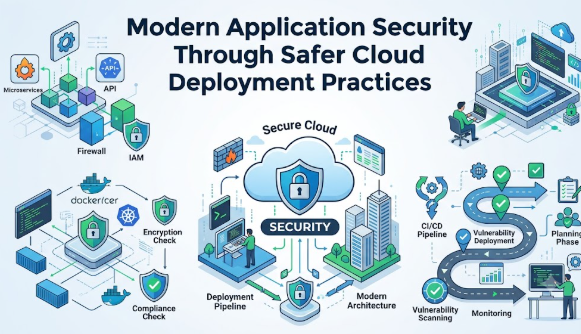
Introduction
Modern applications are no longer limited to one computer, one server, or one office network. A simple app may use cloud storage, APIs, databases, payment systems, user accounts, mobile access, and automated updates. This makes cloud deployment powerful, but it also makes mistakes more serious. Many beginners focus only on launching fast, reducing hosting cost, or adding new features. However, if security is ignored during deployment, the application may expose customer data, suffer downtime, lose trust, or create compliance problems. This is why Why Secure Cloud Deployment Matters for Modern Applications is an important topic for startups, developers, small businesses, product teams, and digital service providers. Secure cloud deployment is not only a technical task. It is a business safety practice that protects users, money, reputation, and long-term growth.
Understanding Secure Cloud Deployment in Simple Words
Secure cloud deployment means launching and running an application in a cloud environment with proper security controls from the beginning. It includes identity access, data protection, encryption, monitoring, backup, network safety, secure coding, deployment automation, and risk review.
In simple words, it means your application is not only “online” but also protected. A modern application may run on cloud servers, containers, serverless platforms, managed databases, and third-party services. Secure deployment ensures these parts work together safely.
People search for secure cloud deployment because they want to avoid data breaches, hacking, downtime, compliance issues, wrong permissions, and unexpected business damage. It is used in real life by SaaS companies, e-commerce stores, healthcare platforms, finance apps, education portals, booking systems, and internal business tools.
For example, imagine a small business launching a customer portal. If the database is open to the internet or admin access is weak, private customer details may become exposed. A secure deployment would use access control, encrypted data, private networks, logging, and regular review.
A common misunderstanding is that cloud providers automatically secure everything. In reality, cloud security is shared. The provider secures the cloud platform, but the customer must configure applications, access, data, and permissions correctly.
The practical takeaway is simple: cloud deployment should never be treated as only a hosting task. It should be treated as a security, reliability, compliance, and business continuity decision.
Why Secure Cloud Deployment Is Important
Secure cloud deployment is important because modern applications often handle sensitive data, customer accounts, financial transactions, business records, internal documents, and operational workflows. If deployment security is weak, the damage can affect savings, borrowing decisions, investment planning, tax records, digital business income, user trust, and long-term financial discipline.
For small business owners, an insecure cloud application can create direct costs such as emergency repair, service downtime, customer refunds, legal review, and lost sales. For finance-related platforms, weak deployment may expose transaction records, identity details, tax documents, or user account information. For crypto or trading apps, poor security can create platform risk, fraud risk, and loss of user confidence. For casino or affiliate platforms, insecure deployment can damage trust, content reliability, user privacy, and compliance-sensitive operations.
Secure cloud deployment also supports emotional decision-making. When businesses deploy without planning, they often panic after problems appear. A better approach is to review security before launch, test carefully, monitor continuously, and keep emergency response steps ready.
A practical scenario is a startup launching a subscription app. The team may want to go live quickly, but if payment keys are stored inside public code, attackers may misuse them. A secure deployment would keep secrets in a protected vault, restrict access, and monitor unusual activity.
The Real Problem Readers Face With Secure Cloud Deployment
The real problem is not that beginners ignore security intentionally. The problem is that cloud deployment feels complex. There are too many dashboards, services, permissions, pricing plans, networking choices, and online opinions. Beginners may hear terms like IAM, encryption, DevSecOps, containers, API gateway, zero trust, CI/CD, secrets management, and compliance without knowing where to start.
Many people depend only on social media advice, quick videos, copied scripts, or default settings. This can lead to weak comparison, unrealistic expectations, and poor planning. Some assume that using a famous cloud platform means the application is automatically safe. Others believe security can be added later after traffic grows.
This thinking is risky. Security added late is often more expensive, more confusing, and more disruptive. A small configuration mistake can expose storage, databases, admin panels, logs, or private keys. A weak password policy can allow unauthorized access. A missing backup plan can make recovery difficult after failure.
The better approach is to treat secure cloud deployment as a step-by-step discipline. Beginners do not need to become experts overnight, but they should understand the basics: protect access, protect data, reduce public exposure, monitor activity, test changes, document decisions, and review risks regularly.
How Secure Cloud Deployment Works Step by Step
Step 1: Define What the Application Really Needs
This step means understanding what the application does, what data it handles, who uses it, and which cloud services are required. It matters because security depends on business context. A simple blog, payment platform, healthcare portal, and finance dashboard do not need the same level of protection. To apply this step, list your application features, user types, data categories, and business risks before choosing cloud services. For example, an app that stores customer invoices must protect documents, login access, and backup copies. The common mistake is deploying first and thinking about security later. The better approach is to create a simple deployment requirement document before launch.
Step 2: Choose the Right Cloud Architecture
Cloud architecture means how servers, databases, storage, networks, APIs, and security controls are arranged. It matters because a poor architecture can expose systems even if the application code is good. To apply this step, decide whether you need public cloud, private cloud, hybrid cloud, containers, serverless, managed database, or virtual machines. For example, a small SaaS app may use managed database services instead of manually managing database servers. The common mistake is copying another company’s architecture without understanding your own needs. The better approach is to start simple, secure, documented, and scalable.
Step 3: Set Strong Identity and Access Controls
Identity and access control decide who can enter the system and what they can do. This matters because many cloud incidents begin with excessive permissions, shared accounts, weak passwords, or exposed access keys. To apply this step, use role-based access, multi-factor authentication, least privilege, and separate accounts for different responsibilities. For example, a developer may need deployment access but not billing or production database export access. The common mistake is giving admin access to everyone for convenience. The better approach is to give only the minimum access required and review permissions regularly.
Step 4: Protect Data at Every Stage
Data must be protected when stored, transferred, processed, backed up, and deleted. This matters because modern applications often handle customer names, emails, payment records, business documents, analytics, or private files. To apply this step, use encryption, access restrictions, secure database settings, safe backup storage, and clear data retention rules. For example, customer documents should not be stored in public buckets or exposed through guessable file links. The common mistake is protecting the application login but forgetting storage, logs, and backups. The better approach is to map where data lives and protect each location.
Step 5: Secure the Deployment Pipeline
The deployment pipeline moves code from development to production. It matters because attackers may target build systems, automation tools, exposed tokens, or insecure scripts. To apply this step, protect source code repositories, scan dependencies, restrict pipeline permissions, store secrets safely, and require approval for production releases. For example, a pipeline should not print API keys in logs or allow unreviewed code to reach production. The common mistake is treating CI/CD as a convenience tool only. The better approach is to treat the pipeline as a high-value security area.
Step 6: Configure Network and Application Protection
Network protection controls how users, services, APIs, databases, and internal systems communicate. It matters because unnecessary public access increases risk. To apply this step, use private networks where possible, firewall rules, API gateways, web application protection, secure ports, and service-to-service authentication. For example, a database should usually not be directly open to the public internet. The common mistake is opening wide network access to fix connection issues quickly. The better approach is to allow only required traffic and document every exception.
Step 7: Monitor, Log, and Test Continuously
Monitoring helps you detect unusual activity, failed logins, service errors, traffic spikes, configuration changes, and possible attacks. It matters because secure deployment is not complete after launch. To apply this step, enable logs, alerts, uptime monitoring, vulnerability checks, and regular security testing. For example, repeated failed admin logins should trigger an alert. The common mistake is checking security only during the first deployment. The better approach is continuous monitoring with clear ownership and response steps.
Step 8: Prepare Backup, Recovery, and Incident Response
Backup and recovery planning means being ready when something fails. It matters because even strong systems can face human error, outages, cyberattacks, or accidental deletion. To apply this step, create backup schedules, test restoration, document incident response steps, and assign responsibilities. For example, a business should know how to restore customer records if a database update goes wrong. The common mistake is assuming backups work without testing them. The better approach is to test recovery before a real emergency happens.
Key Factors That Influence Secure Cloud Deployment
Cloud Architecture
Cloud architecture influences how secure and reliable the application becomes. A clear architecture separates public services, private systems, databases, monitoring, and backup. The common mistake is building everything in one open environment. The better approach is to design with separation, least exposure, and future growth in mind.
Identity and Access Management
Access control decides who can view, change, deploy, delete, or export data. It affects application security directly. Beginners often use shared admin accounts because they feel faster. A better approach is individual accounts, multi-factor authentication, role-based access, and regular access reviews.
Data Sensitivity
Not all data has the same risk. Public blog content, customer records, payment references, tax documents, and health information need different protection levels. The mistake is treating all data equally. The better approach is to classify data and apply controls based on sensitivity.
Deployment Automation
Automation can reduce manual mistakes, but insecure automation can spread mistakes faster. A safe deployment process uses tested scripts, approval gates, secret management, and rollback options. The mistake is using copied deployment scripts without review. The better approach is version-controlled, reviewed, and documented automation.
Compliance Requirements
Some applications must follow privacy, financial, industry, or regional rules. Even if a business is small, it may still need proper recordkeeping, user consent, data protection, and audit readiness. The mistake is thinking compliance matters only for large companies. The better approach is to understand basic obligations before launch.
Monitoring and Alerts
Monitoring helps detect problems before they become serious. It includes logs, error tracking, access review, uptime checks, and security alerts. The mistake is collecting logs but never reviewing them. The better approach is actionable alerts, clear owners, and regular review.
Backup and Recovery
Backups reduce damage from deletion, ransomware, configuration mistakes, or service failure. The mistake is storing backups in the same risky environment or never testing restoration. The better approach is protected backups, recovery testing, and documented recovery time expectations.
Cost and Security Balance
Security needs planning, but it does not always mean using the most expensive tools. Beginners should choose controls based on risk, data sensitivity, and business impact. The mistake is either overspending without strategy or avoiding security completely. The better approach is practical, risk-based security spending.
Detailed Breakdown of Secure Cloud Deployment
Cloud Deployment Basics
Cloud deployment means placing an application into a cloud environment so users can access it. This may include servers, containers, serverless functions, storage, database, content delivery, DNS, monitoring, and automation. A secure deployment adds protection around these parts.
The mistake beginners make is thinking deployment only means “make the app live.” The better approach is to ask: who can access it, what data is exposed, how updates happen, how failures are handled, and how risks are monitored.
Shared Responsibility in Cloud Security
Cloud platforms provide infrastructure security, physical data center protection, and many managed security features. However, customers still need to configure access, data permissions, applications, networks, identities, and monitoring correctly.
The common mistake is assuming the cloud provider protects everything automatically. The better approach is to clearly understand what the provider manages and what your team must manage.
Application Security Before Deployment
Secure cloud deployment starts before launch. Code should be reviewed, dependencies should be checked, secrets should not be stored in code, and authentication should be tested. If insecure code is deployed into a strong cloud environment, the application can still be vulnerable.
The mistake is waiting until production to test security. The better approach is to include security checks in development and staging environments.
Infrastructure Security
Infrastructure includes servers, containers, storage, networks, databases, load balancers, and cloud permissions. Secure infrastructure uses private access where possible, strong identity controls, encrypted storage, safe firewall rules, and limited administrative access.
The mistake is leaving default settings unchanged. The better approach is to review every default setting before going live.
DevSecOps Cloud Deployment
DevSecOps means adding security into development and operations instead of treating it as a final approval step. It includes automated checks, secure pipelines, dependency scanning, policy review, infrastructure-as-code checks, and continuous monitoring.
The mistake is treating security as the responsibility of one person only. The better approach is shared responsibility across developers, operations, security, and business owners.
Secrets and Key Management
Secrets include API keys, passwords, database credentials, private tokens, signing keys, and payment credentials. These should never be placed in public repositories, plain text files, screenshots, emails, or exposed logs.
The mistake is storing secrets inside code for convenience. The better approach is to use a secrets manager, rotate keys, restrict access, and monitor usage.
Data Protection and Privacy
Modern applications may collect user data, business data, payment references, behavior analytics, uploaded documents, or communication records. Data protection requires encryption, access limits, retention policies, backup safety, and secure deletion.
The mistake is collecting more data than needed. The better approach is to collect only useful data, protect it properly, and remove it when it is no longer required.
Monitoring and Incident Response
Monitoring shows what is happening inside the cloud environment. Incident response explains what to do when something goes wrong. A secure deployment should include alert rules, ownership, escalation paths, backup steps, and communication plans.
The mistake is reacting only after users complain. The better approach is proactive detection, early alerts, and prepared response actions.
Beginner Mistakes in Cloud Security
Beginners often use weak passwords, public databases, exposed storage, shared admin accounts, untested backups, copied scripts, and open network rules. These mistakes happen because teams want speed, but speed without safety can create long-term damage.
The better approach is to deploy slowly enough to verify security and fast enough to keep business moving responsibly.
Common Mistakes Beginners Make With Secure Cloud Deployment
Following Random Advice
This happens when beginners copy commands, templates, or social media suggestions without understanding them. It is risky because cloud environments differ. A command that works for one project may expose another. Readers should use trusted documentation, internal review, and practical testing instead.
Ignoring Risk Before Launch
Many teams launch first and review risk later. This can lead to exposed data, weak access, or unstable services. The better approach is to complete a basic security checklist before production release.
Not Comparing Deployment Options
Some teams choose cloud services only because they are popular. This can create unnecessary cost, complexity, or weak control. Readers should compare managed services, serverless options, container platforms, and virtual machines based on actual needs.
Trusting Fake Security Claims
Some vendors, tools, or online posts may make broad claims about complete protection. This is risky because no tool removes all responsibility. Readers should verify features, limitations, and required configuration.
Making Emotional Decisions
During deadlines, teams may disable security controls to “fix quickly.” This can create long-term exposure. The better approach is to use controlled emergency changes, document them, and reverse risky changes quickly.
Not Reading Terms and Conditions
Cloud services, APIs, and third-party tools have limits, billing rules, support terms, and data handling conditions. Ignoring these can create financial, legal, or operational problems. Readers should review important terms before storing sensitive data or depending on a service.
Sharing Sensitive Information
Beginners may share screenshots, logs, credentials, database details, or access keys in chat groups. This can expose systems. The better approach is to remove sensitive information before sharing and use secure support channels.
Ignoring Compliance Responsibilities
Even small businesses may handle user data, payment records, tax documents, or confidential client information. Ignoring compliance can create future problems. The better approach is to understand basic privacy and legal duties early.
Depending Only on Social Media Advice
Social media can be useful for awareness, but it should not replace documentation, professional review, or proper testing. The better approach is to verify every important deployment decision.
Acting in Panic, Greed, or Pressure
Pressure to launch quickly can lead to weak security. Panic after an error can make the situation worse. The better approach is calm planning, rollback options, backups, and clear response steps.
Don’t Do This Checklist
- Do not keep production secrets inside source code.
- Do not use shared admin accounts for the whole team.
- Do not open databases publicly without a strong reason.
- Do not ignore cloud billing alerts and usage monitoring.
- Do not deploy untested code directly to production.
- Do not assume backups work without testing restoration.
- Do not collect sensitive user data without a clear need.
- Do not depend only on copied scripts or social media advice.
- Do not skip access reviews after team changes.
- Do not delay security until after a problem happens.
Practical Real-Life Examples of Secure Cloud Deployment
Example 1: Small Business Customer Portal
A small business launches a portal for customers to download invoices. The challenge is that invoice files may contain personal and billing details. The better action is to store files privately, require login, use access controls, and monitor downloads. The learning is that even simple portals need data protection.
Example 2: Startup Subscription Application
A startup builds a monthly subscription app and connects a payment gateway. The mistake is storing payment API keys in application code. The better action is to use a secrets manager and restrict who can access payment settings. The learning is that secret management protects both customers and business operations.
Example 3: Education Platform With Student Accounts
An online education platform allows students to log in and view course materials. The challenge is weak passwords and shared admin access. The better action is to use multi-factor authentication for admins, role-based access, and login monitoring. The learning is that identity security is a core part of cloud deployment.
Example 4: Finance Dashboard for Internal Teams
A company creates an internal dashboard for revenue, expenses, and reports. The mistake is allowing broad access to all employees. The better action is to separate roles, limit exports, and review access monthly. The learning is that internal applications also need strong security.
Example 5: SaaS Team Using Automated Deployment
A SaaS team uses CI/CD to deploy faster. The challenge is that the pipeline has too many permissions. The better action is to limit pipeline access, scan dependencies, protect tokens, and require approval for production changes. The learning is that automation must be secure, not just fast.
Two Useful Tables for Better Understanding
Table 1: Insecure vs Secure Cloud Deployment Approach
| Area | Insecure Approach | Secure Approach |
|---|---|---|
| Access Control | Shared admin accounts and broad permissions | Individual accounts, least privilege, and MFA |
| Data Storage | Public storage or unclear permissions | Private storage, encryption, and controlled access |
| Deployment Pipeline | Secrets in code and unreviewed releases | Protected secrets, approvals, scans, and rollback |
| Network Setup | Wide open ports and public databases | Limited access, private networks, and firewall rules |
| Monitoring | Logs disabled or ignored | Alerts, log review, and response ownership |
| Backup | Backup assumed but not tested | Regular backups with tested restoration |
| Compliance | Handled later when problems appear | Reviewed before collecting sensitive data |
Table 2: Beginner Cloud Security Checks by Priority
| Priority | Security Check | Why It Matters |
|---|---|---|
| High | Enable MFA for admin accounts | Reduces unauthorized access risk |
| High | Remove secrets from code | Prevents credential exposure |
| High | Restrict database access | Protects sensitive application data |
| High | Enable backups and test restore | Supports recovery after failure |
| Medium | Review IAM permissions | Reduces excessive access |
| Medium | Scan dependencies | Helps detect vulnerable packages |
| Medium | Monitor logs and alerts | Improves early problem detection |
| Medium | Document deployment steps | Reduces confusion and repeated mistakes |
| Low but Useful | Review unused resources | Reduces cost and attack surface |
| Low but Useful | Train team members | Builds long-term security awareness |
Tools, Methods, and Frameworks Readers Can Use
Cloud Security Checklist
A cloud security checklist is a written list of items to review before and after deployment. It helps beginners avoid missed steps such as weak access, public storage, missing backups, or disabled logging. Beginners can use it before every production release. It helps avoid the mistake of relying on memory during stressful deployment work.
Identity and Access Review
An identity review checks who has access to cloud accounts, databases, repositories, pipelines, and dashboards. It helps remove unnecessary permissions. Beginners can schedule this review monthly or whenever someone joins or leaves the team. It helps avoid excessive access and shared-account problems.
Secrets Management Method
Secrets management means storing passwords, tokens, API keys, and certificates in a protected system instead of plain text files. It helps prevent accidental exposure. Beginners can start by removing secrets from source code and using environment variables or a dedicated secret manager. It helps avoid credential leaks.
Infrastructure-as-Code Review
Infrastructure-as-code allows teams to define cloud resources using files. It helps make deployments repeatable and reviewable. Beginners can use peer review before applying infrastructure changes. It helps avoid manual misconfiguration and undocumented changes.
CI/CD Security Checks
CI/CD security checks scan code, dependencies, containers, and deployment scripts before release. They help find problems early. Beginners can start with dependency scanning, branch protection, approval workflows, and limited deployment permissions. It helps avoid unsafe releases.
Backup and Recovery Testing
Backup testing confirms that stored backups can actually be restored. It helps reduce panic during incidents. Beginners can test restoration in a safe environment at regular intervals. It helps avoid the mistake of discovering broken backups during a real emergency.
Risk Register
A risk register is a simple document that lists risks, impact, owner, and action plan. It helps teams think clearly about security priorities. Beginners can use it to track risks such as public exposure, weak passwords, vendor dependency, or compliance gaps. It helps avoid vague and unmanaged risk.
Incident Response Plan
An incident response plan explains what to do when something goes wrong. It includes who to contact, what to check, how to stop damage, how to communicate, and how to recover. Beginners can create a simple one-page plan. It helps avoid emotional decisions during emergencies.
Expert Tips to Make Better Decisions
1. Learn the Basics Before Deployment
Understanding basic cloud security helps you avoid dangerous assumptions. Beginners should learn identity, access control, encryption, backups, monitoring, and networking before going live. This matters because small mistakes can create large exposure.
2. Use Least Privilege Everywhere
Least privilege means giving users and services only the access they need. It matters because unnecessary permissions increase damage if an account is compromised. Apply it by creating roles for developers, admins, support users, and automation tools.
3. Protect Admin Accounts First
Admin accounts can change infrastructure, delete data, and access sensitive settings. Protect them with MFA, strong passwords, limited users, and activity alerts. This helps prevent account takeover and insider mistakes.
4. Never Store Secrets in Code
Secrets in code can leak through repositories, logs, backups, or screenshots. Store them in protected systems and rotate them when needed. This is one of the most important habits in application deployment security.
5. Keep Production Separate From Testing
Testing systems should not freely access production data or production credentials. Separation matters because development mistakes should not affect real users. Use separate environments, accounts, databases, and permissions.
6. Monitor What Matters
Monitoring should focus on useful signals such as failed logins, unusual traffic, permission changes, high error rates, and unexpected cost spikes. This matters because too many meaningless alerts create alert fatigue. Start small and improve over time.
7. Test Backups Before Trusting Them
A backup is useful only if it can be restored. Beginners should test backup restoration in a safe environment. This helps avoid business disruption when accidental deletion or system failure happens.
8. Review Cloud Costs With Security
Security and cost are connected. Unused public resources, forgotten servers, and excessive access can create both cost and risk. Review resource usage regularly to improve safety and financial control.
9. Avoid Public Exposure by Default
Databases, admin panels, storage buckets, and internal APIs should not be public unless there is a clear reason. Public exposure increases attack surface. Use private access, VPN, identity controls, or restricted networks when possible.
10. Document Every Important Decision
Documentation helps teams understand why something was configured a certain way. It prevents confusion when people change roles or leave the project. Keep simple notes for architecture, access, backup, deployment, and incident response.
11. Review Third-Party Tools Carefully
Modern applications depend on external APIs, plugins, packages, and SaaS tools. These can introduce risk. Review permissions, data sharing, support terms, and security settings before connecting them to production systems.
12. Start Simple and Improve Gradually
Beginners do not need the most complex architecture from day one. A simple, well-secured deployment is often better than a complex setup nobody understands. Start with essential controls and mature the system over time.
13. Make Security Part of Team Culture
Security should not be limited to one person. Developers, managers, operations teams, support teams, and business owners should understand their role. This helps prevent repeated mistakes and rushed unsafe decisions.
14. Take Professional Advice When Needed
Some applications handle sensitive financial, healthcare, legal, or personal data. In such cases, professional security, legal, or compliance advice may be necessary. This helps reduce unknown risks before they become serious problems.
15. Review Security After Every Major Change
New features, new integrations, new users, and new regions can change risk. Review security after major changes instead of assuming old controls are enough. This keeps cloud deployment aligned with business growth.
Case Studies: How Better Understanding Changes Decisions
Case Study 1: Small SaaS Startup
Profile: A small SaaS startup with three developers and one product manager.
Situation: The team wants to launch quickly to onboard early customers.
Problem: They are using shared admin access and storing database credentials in environment files on multiple laptops.
Wrong approach: They plan to fix security after getting customers.
Better approach: The team enables MFA, separates production access, moves secrets into a protected system, creates a backup plan, and reviews database permissions before launch.
Result or learning: The launch may take more planning, but the team reduces avoidable risk and builds a safer foundation.
Key takeaway: Early security habits prevent bigger problems as the product grows.
Case Study 2: Online Service Business
Profile: A service business that uses a cloud application for customer bookings and documents.
Situation: Customers upload identity documents and service forms.
Problem: Uploaded files are stored in a bucket with unclear permissions.
Wrong approach: The business assumes that because the storage is in the cloud, it is automatically private.
Better approach: The team reviews storage permissions, restricts access, enables encryption, creates retention rules, and tests file access from different user roles.
Result or learning: The business understands that data storage security needs active configuration.
Key takeaway: Sensitive files require careful access design, not default assumptions.
Case Study 3: Growing Product Team With CI/CD
Profile: A growing product team deploying updates every week.
Situation: The team uses automated deployment to release faster.
Problem: The CI/CD pipeline has broad production permissions, and logs sometimes show sensitive values.
Wrong approach: The team ignores the issue because automation saves time.
Better approach: The team limits pipeline permissions, masks secrets in logs, adds approval for production deployment, and scans dependencies before release.
Result or learning: Deployment remains fast but becomes safer and more controlled.
Key takeaway: Speed and security can work together when automation is designed responsibly.
Risk Awareness: What Readers Must Check First
Cybersecurity Risk
Cybersecurity risk means the chance of unauthorized access, data exposure, malware, or account takeover. It matters because cloud applications are connected to the internet and may face continuous threats. Reduce this risk through MFA, patching, least privilege, monitoring, and secure coding.
Data Privacy Risk
Data privacy risk means user information may be collected, stored, shared, or exposed improperly. It matters because customers trust applications with personal and business details. Reduce this risk by collecting only necessary data, protecting storage, limiting access, and reviewing privacy obligations.
Misconfiguration Risk
Misconfiguration happens when cloud services are set up incorrectly. It matters because small setting errors can expose storage, databases, or admin panels. Reduce this risk through checklists, automated configuration review, peer review, and regular audits.
Platform Risk
Platform risk means depending too heavily on one provider, service, or tool without understanding limits. It matters because outages, pricing changes, feature limitations, or account issues can affect operations. Reduce this risk through backups, portability planning, and clear vendor review.
Compliance Risk
Compliance risk means failing to follow applicable data, industry, tax, legal, or contractual requirements. It matters because non-compliance can create penalties, disputes, or loss of trust. Reduce this risk by reviewing obligations and consulting qualified professionals when needed.
Financial Risk
Financial risk includes unexpected cloud bills, downtime costs, emergency repairs, and lost business. It matters because poor deployment planning can damage cash flow. Reduce this risk through budgets, alerts, usage review, right-sized resources, and documented recovery plans.
Operational Risk
Operational risk means systems may fail because processes are unclear. It matters when teams do not know who owns access, backups, monitoring, or incident response. Reduce this risk through documentation, ownership, training, and regular drills.
Misinformation Risk
Misinformation risk comes from blindly following random advice, outdated tutorials, or copied scripts. It matters because cloud tools change and every application has different needs. Reduce this risk by verifying instructions, reading trusted documentation, and testing in non-production environments.
Readers should always verify cloud settings, review risks, and consult qualified security, legal, tax, or compliance professionals where required.
Checklist Before Taking Action
- I understand what data the application collects, stores, and processes.
- I have reviewed who needs access to cloud accounts and production systems.
- I have enabled MFA for important accounts.
- I have removed secrets from source code and plain text files.
- I have restricted database, storage, and admin access.
- I have checked whether sensitive data needs encryption.
- I have compared deployment options based on security, cost, and complexity.
- I have reviewed cloud charges, billing alerts, and usage limits.
- I have enabled backups and tested restoration.
- I have enabled logging and useful alerts.
- I have reviewed third-party tools and integrations.
- I have checked privacy, legal, tax, or compliance impact where relevant.
- I have prepared a rollback or recovery plan.
- I have avoided fake claims, shortcuts, and copied scripts without review.
- I have documented important deployment decisions.
- I have considered professional advice for sensitive or regulated applications.
Use this checklist before launching a new application, making major cloud changes, adding payment systems, collecting user data, or giving new team members access. The goal is not perfection. The goal is to reduce avoidable mistakes and make better decisions before risk becomes expensive.
Strategic Insights for Better Decision-Making
Identity Comes Before Infrastructure
Many beginners focus on servers first, but identity is often the real control point. If the wrong person has admin access, even a strong architecture can be changed or damaged. Start by controlling who can access what.
Secure Defaults Save Time Later
Secure defaults mean new resources start private, encrypted, monitored, and limited unless there is a reason to change them. This helps teams avoid repeated mistakes. For example, storage should not be public by default.
Deployment Speed Needs Guardrails
Fast deployment is valuable, but speed without checks creates risk. Guardrails such as approval workflows, automated tests, dependency scans, and rollback plans allow teams to move quickly without ignoring safety.
Observability Is a Security Tool
Observability means understanding what your system is doing through logs, metrics, traces, and alerts. It helps detect unusual behavior and operational problems. Without observability, teams may not know something is wrong until users complain.
Data Minimization Reduces Risk
The less sensitive data you collect, the less you must protect. Beginners often collect extra data “for later,” but unnecessary data increases privacy and security responsibility. Collect only what supports a clear purpose.
Cloud Cost and Cloud Risk Should Be Reviewed Together
Unused resources, forgotten accounts, and unmanaged services create both financial and security problems. A monthly cloud review should include cost, access, data exposure, backups, and monitoring.
Security Maturity Grows in Layers
A beginner team may start with MFA, backups, private databases, and logging. Later, they may add advanced monitoring, automated policy checks, threat detection, and compliance workflows. The better approach is steady maturity, not random tool buying.
Human Process Matters as Much as Technology
Even the best tools fail when people share passwords, skip reviews, ignore alerts, or rush deployments. Secure cloud deployment requires habits, training, ownership, and accountability.
Key Terms Explained for Beginners
- Cloud Deployment: Cloud deployment means launching an application on cloud infrastructure so users can access it through the internet or private systems.
- Secure Cloud Deployment: Secure cloud deployment means launching applications with proper protection for access, data, networks, monitoring, backups, and updates.
- Cloud Application Security: Cloud application security focuses on protecting application code, user accounts, APIs, data, and cloud services from misuse or attack.
- Identity and Access Management: Identity and access management controls who can log in, what they can do, and which systems they can access.
- Least Privilege: Least privilege means giving users and systems only the minimum access they need to perform their work.
- Multi-Factor Authentication: Multi-factor authentication adds an extra verification step beyond a password, making account takeover harder.
- Encryption: Encryption protects data by making it unreadable without the correct key. It is useful for stored data and data moving between systems.
- Secrets: Secrets are sensitive values such as passwords, API keys, tokens, certificates, and database credentials.
- CI/CD Pipeline: A CI/CD pipeline automates code testing, building, and deployment. It must be secured because it can affect production systems.
- DevSecOps: DevSecOps means adding security into development and operations workflows instead of treating it as a final step.
- Misconfiguration: Misconfiguration means a system is set up incorrectly, such as public storage, weak permissions, or open network access.
- Backup: A backup is a saved copy of data or systems that can help restore operations after failure or deletion.
- Incident Response: Incident response is a planned process for detecting, managing, communicating, and recovering from security or operational problems.
- Compliance: Compliance means following relevant laws, rules, contracts, or industry requirements related to data, privacy, security, or business operations.
- Monitoring: Monitoring means watching systems, logs, traffic, errors, and alerts to detect problems early.
Who Should Read This Blog
Beginners
Beginners should read this blog to understand cloud security in simple language before launching applications or managing cloud tools.
Students
Students can use this guide to understand real-world cloud deployment concepts beyond theory and classroom examples.
Salaried Employees
Employees working in IT, operations, support, finance, or digital teams can understand how secure deployment protects business systems and customer data.
Small Business Owners
Small business owners can learn why cloud security affects customer trust, cost control, business continuity, and long-term reliability.
New Investors
New investors evaluating technology businesses can better understand why secure infrastructure matters for digital product stability and risk management.
Traders
Traders using cloud-based tools, dashboards, or platforms can understand why platform security, access protection, and data safety matter.
Loan Seekers
Loan seekers using digital finance platforms can understand why secure applications are important when sharing identity or financial documents online.
Crypto Learners
Crypto learners can understand platform risk, account security, private key safety, and why secure deployment matters for blockchain-related applications.
Casino Content Creators
Casino content creators can learn how secure hosting, privacy, responsible content, and trust signals support safer digital publishing.
Finance Bloggers
Finance bloggers can understand why website security, user privacy, forms, lead data, and hosting decisions affect content trust.
People Improving Money Awareness
Anyone improving digital and financial awareness can learn how cloud security connects with privacy, risk, business cost, and responsible decision-making.
People Trying to Avoid Financial Mistakes
Readers who want to avoid costly digital mistakes can use this blog to make safer, more informed cloud decisions.
Frequently Asked Questions
1. What is secure cloud deployment?
Secure cloud deployment means launching and running an application in the cloud with proper security controls. It includes access management, data protection, monitoring, backups, network safety, and safe update processes. The goal is to reduce avoidable risks before and after launch.
2. Why Secure Cloud Deployment Matters for Modern Applications?
Why Secure Cloud Deployment Matters for Modern Applications is important because modern apps often handle user data, payments, files, and business processes. A weak deployment can create data leaks, downtime, financial loss, and trust issues. Secure deployment helps applications operate more safely and reliably.
3. Is secure cloud deployment only for large companies?
No. Small businesses, startups, bloggers, SaaS teams, and internal company apps also need secure deployment. Even a small application can expose sensitive data if storage, access, or databases are misconfigured. Beginners should start with basic security controls early.
4. What is the biggest mistake beginners make?
The biggest mistake is assuming the cloud provider secures everything automatically. Cloud providers offer many security features, but users must configure access, data, applications, and permissions correctly. A safer approach is to understand shared responsibility before deployment.
5. How can beginners start safely with cloud deployment?
Beginners can start by enabling MFA, limiting admin access, protecting secrets, keeping databases private, enabling backups, and monitoring logs. They should test changes in a non-production environment first. A simple checklist helps reduce common mistakes.
6. Does secure cloud deployment reduce business risk?
Yes, it can reduce many avoidable risks such as unauthorized access, data exposure, downtime, and recovery problems. However, it does not remove all risk. Businesses still need monitoring, review, documentation, and professional advice where required.
7. What role does DevSecOps play in secure cloud deployment?
DevSecOps adds security into development, testing, deployment, and operations. It helps teams find issues earlier through automation, reviews, scans, and secure pipelines. This makes security a regular habit instead of a last-minute task.
8. Why is access control so important in cloud security?
Access control decides who can enter systems and what actions they can perform. Weak access can allow accidental damage, data exposure, or unauthorized changes. Strong access control uses least privilege, MFA, separate roles, and regular review.
9. How often should cloud security be reviewed?
Cloud security should be reviewed before launch, after major changes, when new team members join, and at regular intervals. Monthly access and cost reviews are useful for many teams. Critical applications may need more frequent monitoring.
10. What should I avoid before deploying a cloud application?
Avoid storing secrets in code, opening databases publicly, using shared admin accounts, skipping backups, and copying scripts without review. Also avoid ignoring compliance, privacy, and data protection responsibilities. A planned review is safer than a rushed deployment.
11. How does secure cloud deployment help financial planning?
Secure deployment helps reduce unexpected costs from downtime, emergency repairs, data incidents, and inefficient cloud usage. It also supports better budgeting through monitoring, billing alerts, and resource review. Security and cost control should be planned together.
12. What is the best next step after learning Why Secure Cloud Deployment Matters for Modern Applications?
The best next step is to review your current or planned deployment with a checklist. Check access, data, secrets, network exposure, backups, monitoring, and compliance needs. If your application handles sensitive data, consider qualified professional review.
Conclusion
Secure cloud deployment is one of the most important foundations for modern applications because it protects users, data, business operations, financial stability, and long-term trust. Beginners often think cloud deployment is only about hosting an application, but real deployment includes access control, data protection, secure pipelines, monitoring, backups, compliance awareness, and recovery planning. The key lesson from Why Secure Cloud Deployment Matters for Modern Applications is that speed should not replace safety. A fast launch may feel exciting, but weak permissions, exposed databases, public storage, missing backups, or leaked secrets can create serious problems later. The better path is to start with simple but strong security habits: enable MFA, use least privilege, protect secrets, keep sensitive systems private, monitor activity, test backups, document decisions, and review risks regularly. Businesses should also remember that cloud security is not a one-time task. Every new feature, new integration, new user role, and new deployment can change risk. Therefore, secure deployment should become a regular operating habit, not a final checklist before launch. Readers should use this guide to review their current cloud setup, identify weak areas, and improve step by step. Where financial, legal, tax, privacy, or security risks are significant, qualified professional advice should be considered. A careful, practical, and disciplined approach will help modern applications grow with better reliability, stronger trust, and lower avoidable risk.
