
Introduction
Businesses often hit a growth wall with their digital tools. Your current site might look outdated, load slowly, or fail to bring in new customers. When this happens, leaders face a major choice: do we invest in a website redesign, or do we build a full web application?
Making the wrong choice wastes time and budget. You might spend months redesigning a standard marketing site when your business actually needs interactive software to serve clients. Or, you might commission an expensive web application when a clean, fast content site is all your brand requires.
This guide breaks down the core differences between a website redesign and web application development. You will learn how each option works, what problems they solve, and a clear framework to help you choose the right path for your goals.
What Is a Website Redesign?
A website redesign is the process of updating, restructuring, and improving an existing website. It focuses on your public-facing digital storefront.
Why It Matters
Your website is often the first interaction a potential customer has with your brand. If the site is hard to use on mobile phones, takes too long to load, or looks like it was built ten years ago, visitors leave. A redesign fixes these issues to build trust and convert visitors into buyers.
How It Works
A redesign typically involves:
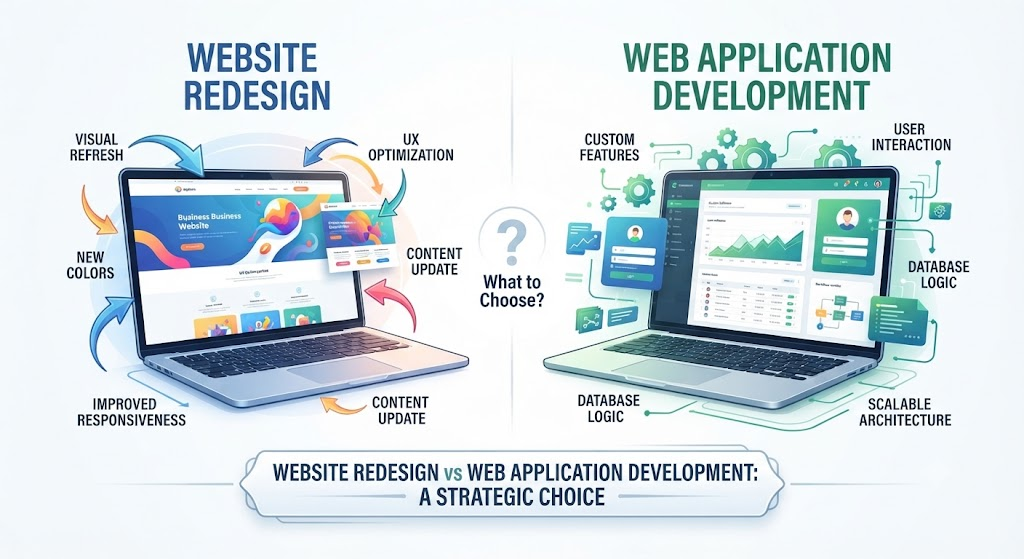
- Visual Refresh: Updating colors, fonts, layouts, and imagery to match modern design standards.
- Structure Improvement: Organizing pages so visitors find information in three clicks or fewer.
- Performance Tuning: Compressing images and cleaning up code so pages load instantly.
- Mobile Optimization: Ensuring the site looks and works smoothly on smartphones and tablets.
What Is Web Application Development?
Web application development is the process of building software that runs in a web browser and allows users to perform interactive tasks. Examples include project management dashboards, customer portals, online banking tools, and SaaS (Software as a Service) platforms.
Why It Matters
Unlike standard websites meant for reading and browsing, web applications are built for doing work. Users log in, input data, manipulate files, and interact with dynamic systems. If your business model relies on users doing more than just reading content—such as booking appointments, managing accounts, or collaborating on files—you need a web application.
How It Works
Building a web application requires complex engineering. It involves:
- Frontend Development: The visual interface users interact with directly in their browser.
- Backend Development: The server-side logic, databases, and APIs that process user requests and store information securely.
- User Authentication: Secure login systems with password management, role-based permissions, and data privacy controls.
Key Differences: Website Redesign vs Web Application Development
To understand which approach your project requires, look at how websites and web applications differ across core operational areas.
| Feature | Website Redesign | Web Application Development |
| Primary Goal | Inform, market, and convert visitors into leads or buyers. | Enable users to perform tasks, run workflows, and interact with data. |
| User Interaction | Mostly passive (reading, watching videos, filling out contact forms). | Active (logging in, creating accounts, editing data, running processes). |
| Data Handling | Static content stored in a Content Management System (CMS). | Dynamic data processed, updated, and stored securely in a database. |
| Complexity | Focused on design, user experience (UX), SEO, and copywriting. | Focused on logic, database architecture, security, and scalability. |
| Maintenance | Regular content updates, security patches, and design tweaks. | Ongoing bug fixes, server monitoring, feature updates, and database maintenance. |
When to Choose a Website Redesign
Choose a website redesign if your goals center around brand perception, marketing, and reach.
Ideal Scenarios
- Your bounce rate is high: Visitors land on your site and leave immediately because the layout is confusing.
- Your brand has evolved: Your business offers new services, but your current site still highlights old offerings.
- Poor mobile experience: Users struggle to read text or click buttons on their smartphones.
- Outdated technology: Your current site is slow, vulnerable to security threats, or difficult for your team to update.
When to Choose Web Application Development
Choose web application development if your business solves a problem through software functionality rather than information sharing.
Ideal Scenarios
- Custom workflows: You need a specialized tool that lets users log in, manage accounts, or process transactions.
- Proprietary software: You are launching a digital product or SaaS tool that customers pay to access.
- Heavy data processing: Your platform needs to pull data from external APIs, generate custom reports, or manage complex user permissions.
- Interactive features: Users need to upload files, chat in real time, or manipulate live data sets.
Common Mistakes to Avoid
Choosing between a redesign and custom application development often leads to costly errors when teams misdiagnose their actual needs.
- Treating an application like a brochure site: Trying to build a complex software tool using a basic website builder. This results in broken workflows, security vulnerabilities, and frustrated users.
- Overcomplicating a simple site: Building a custom web application when a standard, well-optimized business website with a good CMS would completely satisfy your business goals.
- Ignoring mobile usability: Designing desktop-first layouts without testing how users interact with the platform on smaller screens.
- Skipping security planning: Launching a web application without robust user authentication, data encryption, and regular security audits.
Decision-Making Framework
Use these steps to determine the right path for your next digital project:
- Define the Core User Goal: Are visitors coming to read and learn about your business, or are they coming to log in and do work?
- Audit Existing Performance: Review your current analytics. Is traffic dropping due to poor design and slow speeds, or are users complaining about missing software features?
- Evaluate Technical Complexity: Do you need simple content pages, or do you need custom databases, user accounts, and API integrations?
- Assess Budget and Timeline: Website redesigns are generally faster and more cost-effective. Web application development requires a larger investment of time, testing, and ongoing maintenance.
- Consult Technical Experts: Talk with developers or UX strategists to validate your assumptions before committing budget.
Key Terms
- Content Management System (CMS): Software used to create, manage, and modify content on a website without advanced technical skills.
- Frontend: The visible part of a website or application that users see and interact with in their web browser.
- Backend: The behind-the-scenes server infrastructure, database, and application logic that powers a web application.
- API (Application Programming Interface): A set of rules that allows different software applications to communicate with each other.
- Bounce Rate: The percentage of visitors who leave a website after viewing only one page.
FAQs
What is the main difference between a website and a web application?
A website is primarily informational and meant for reading and browsing. A web application is interactive software that users log into to perform tasks, manage data, or run workflows.
Can a website be upgraded into a web application?
Yes, but it often requires rebuilding the underlying architecture. While content sites run on standard CMS platforms, web applications need custom databases, secure login systems, and dedicated backend logic.
Which project takes longer to build?
Web application development generally takes significantly longer because it requires complex database design, rigorous security testing, and custom feature development compared to a standard website redesign.
How do I know if my business needs a web application?
If your product or service requires user accounts, real-time data processing, custom dashboards, or interactive tools that users pay to access, you need a web application.
Does a website redesign improve SEO?
Yes. A modern redesign improves page speed, mobile responsiveness, and site structure, all of which help search engines crawl and rank your pages higher.
Conclusion
Choosing between a website redesign and web application development comes down to understanding your core business objectives. If your primary goal is to attract visitors, build brand authority, and generate leads, invest in a strategic website redesign. If your goal is to deliver software functionality, handle user accounts, and process dynamic data, commit to web application development. Aligning your digital investment with actual user needs ensures long-term success and sustainable growth.
