
Introduction
A web application might work flawlessly when dozens of people browse it at the same time. Buttons respond instantly, pages open immediately, and everything feels smooth. However, when thousands of users visit at the exact same minute—such as during a major product launch, a promotional flash sale, or breaking news coverage—the service can freeze. Pages take forever to load, random error messages appear, and the server runs out of working memory.
This sudden failure happens because the application was built to function, but never designed to scale.
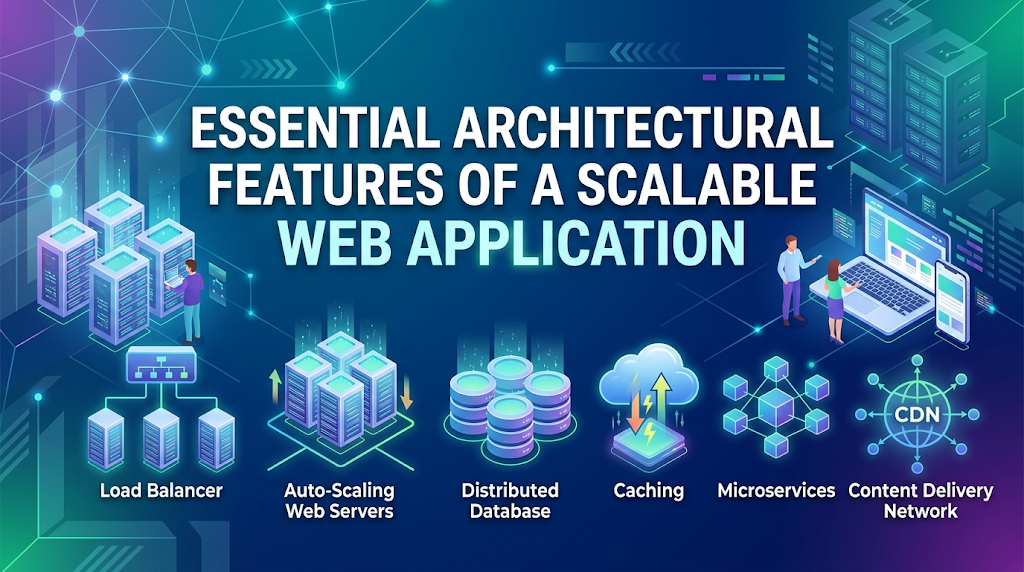
Scalability means a system can take on much higher workloads simply by adding more computing resources, rather than forcing engineers to rebuild the entire application from scratch. Waiting to think about scalability until after traffic overwhelms your service leads to downtime, lost revenue, and hurried fixes under immense pressure.
Understanding the foundational features of scalable applications helps teams build resilient platforms that grow seamlessly alongside user demand.
What Does Scalability Actually Mean?
Scalability represents a system’s ability to maintain high performance and responsiveness as its workload increases. Workload can expand in several forms:
- More active visitors using the app at the exact same moment
- A steadily growing catalog of saved customer records and history
- Larger file transfers, image uploads, and media processing
- More simultaneous computations and background tasks
When planning for higher workloads, engineering teams generally choose between two scaling paths: vertical scaling and horizontal scaling.
Vertical Scaling (Scaling Up)
Vertical scaling means increasing the capacity of your existing server. You pay for a larger virtual machine with more processor cores, more working memory, and faster storage drives.
- Why it seems simple: It requires zero changes to the underlying application. The software continues running on a single computer exactly as before.
- The drawback: Physical machines have hard limits. Once you rent the largest server available, you cannot expand further. Furthermore, relying entirely on one server creates a single point of failure—if that computer crashes or undergoes maintenance, your whole application goes offline.
Horizontal Scaling (Scaling Out)
Horizontal scaling means running multiple identical copies of your web application across many independent servers. Rather than running your site on one massive server, you might run it across five, ten, or fifty moderate-sized servers.
- Why it matters: Horizontal scaling has virtually no ceiling. When traffic spikes, you add more machines. When traffic drops late at night, you turn excess machines off to reduce hosting costs.
- The challenge: Running software across separate machines requires an architecture that does not depend on a single machine’s local memory.
1. Stateless Application Tier
The single most critical requirement for horizontal scaling is statelessness.
Professional Term: Stateless Architecture
In a stateless design, an application server does not retain user session details—such as whether a person is logged in or what items sit in their shopping cart—inside its own temporary memory between page clicks. Instead, each incoming request delivers all the necessary verification details, or points to a shared storage system accessible by every server.
Why It Matters
When an application server stores a visitor’s login status strictly in its own local memory, that visitor must remain glued to that exact machine for every subsequent action. If that server experiences high load or crashes, the visitor gets logged out immediately and loses their progress.
When your servers are stateless, a visitor can reach Machine A on their first click, Machine B on their second click, and Machine C on their third click without noticing any change. This flexibility allows engineering teams to add or remove servers instantly without disrupting active visitors.
Practical Implementation
To keep application servers stateless:
- Store session tokens and shopping cart items in a dedicated, high-speed in-memory database shared across the fleet.
- Use securely signed identity tokens that the visitor’s web browser automatically passes along with every action, allowing any server to verify user identity instantly.
2. Intelligent Load Balancing
When an application runs across five or ten servers, incoming web traffic must be distributed across those machines smoothly. This task belongs to the load balancer.
How It Works
A load balancer sits between public web traffic and your private application servers. When a user navigates to your site, their request reaches the load balancer first. The load balancer reviews the health and current load of all available servers, picks the most appropriate machine, and forwards the request.
Common ways load balancers distribute traffic include:
- Round Robin: Delivers requests sequentially across the fleet, sending request one to Server A, request two to Server B, and repeating through the list.
- Least Connections: Automatically checks which machine is handling the fewest active users and sends the newcomer there.
- IP-Based Distribution: Routes visitors based on their network address to help maintain predictable routing when strictly necessary.
Automated Health Checks
Modern load balancers continuously run automated health checks against every server in the pool. If Server B stops responding or runs out of memory, the load balancer removes it from rotation within seconds. Traffic continues flowing to the healthy servers, preventing visitors from seeing broken screens.
3. Multi-Layered Caching Strategy
Fetching data from computer memory is vastly faster than reading data from persistent storage drives. Caching means keeping temporary copies of frequently requested information in fast memory so systems do not have to recalculate or look up the same data repeatedly.
A scalable web platform deploys caching across three distinct levels:
Edge Caching Through Content Delivery Networks
A Content Delivery Network consists of a worldwide network of proxy servers positioned close to major population centers.
- How it works: Static website assets—such as company logos, stylesheets, JavaScript libraries, and product images—are saved on edge servers around the world.
- Why it matters: If your primary servers are based in North America, a visitor browsing from Asia downloads images directly from a local city edge server rather than waiting for data to travel across oceans. This drastically speeds up page loading and cuts origin server bandwidth usage.
Application In-Memory Caching
Web applications frequently request the exact same database records repeatedly, such as store hours, popular product descriptions, and user profile details.
- How it works: When the application needs information, it checks an in-memory key-value store first. If the record is found, it returns the result in a few milliseconds. If the record is missing, the application queries the main database, sends the result to the user, and saves a temporary copy in the memory cache for the next visitor.
Database Query Caching
Modern database engines reserve portions of their allocated memory to store results from recent search queries. Giving databases sufficient working memory prevents them from scanning physical storage repeatedly for identical requests.
4. Scalable Database Architecture
While web application servers are easy to duplicate because they are stateless, databases hold permanent business records. This makes the database the most common bottleneck when an application expands.
Scalable platforms maintain database performance using four core strategies:
Thoughtful Indexing
An index functions like an alphabetical index at the back of a reference book. Without an index, the database must review every single row in a table from first to last to find a specific record. Adding indexes to frequently searched fields allows the engine to jump directly to the target record in milliseconds.
Read Replicas
For most websites, users view information thousands of times more often than they create or modify information. A read-replica setup takes advantage of this imbalance:
- The Primary Database: Receives every record creation, update, and deletion.
- Read-Only Copies (Replicas): Mirror the primary database continuously and handle browsing, searching, and viewing queries.
When user traffic increases, you can attach additional read replicas to handle viewing demand without overwhelming the primary database.
Connection Pooling
Opening a fresh connection to a database requires processing power and time. A connection pool keeps a fixed group of open database connections ready and waiting. Application processes borrow an existing connection for a split second, run their query, and return it to the pool immediately.
Data Partitioning
When single tables grow to hundreds of millions of rows, searching through them can become slow even with indexing. Partitioning divides giant tables into smaller, logical chunks based on date ranges, regions, or identification ranges, keeping query sizes manageable.
5. Asynchronous Background Jobs and Message Queues
When a visitor clicks a button on a web page, the server should ideally respond in less than a quarter of a second. If an action takes several seconds to complete, the page feels sluggish, and the server thread remains blocked from helping other visitors.
Professional Term: Asynchronous Processing
Asynchronous processing means separating lengthy, resource-heavy operations from the visitor’s immediate web request. The server acknowledges the request instantly and offloads the heavy work to background systems.
A Practical Example
Consider an e-commerce checkout. When a customer confirms a purchase, multiple actions must happen:
- Deduct inventory and record the order (takes a few milliseconds).
- Generate an itemized PDF invoice (takes one to two seconds).
- Connect to a third-party email service to send a receipt (takes up to a second).
- Send an alert to the shipping department (takes half a second).
If the server tries to finish every task before responding, the customer stares at a loading wheel for several seconds. If the external email service experiences an outage, the customer’s checkout might fail entirely.
The Message Queue Solution
Using a message queue solves this problem:
- The web server saves the transaction, passes task instructions into a temporary queue, and tells the user: “Order placed successfully!”
- The entire browser interaction finishes in a fraction of a second.
- Separate background worker machines pull task instructions from the queue at their own pace, generating PDFs and dispatching emails behind the scenes. If the email service is down, the queue holds the job and retries it later without disrupting the customer.
6. Centralized Logging and System Observability
You cannot fix performance problems or unexpected crashes if you cannot see where they occur. Monitoring a single server is simple, but tracking behavior across a fleet of twenty servers requires centralized observability.
A scalable web application tracks system health through three essential mechanisms:
- Centralized Log Management: Application warnings, system events, and errors are sent from every server to a single searchable dashboard. When a bug occurs, engineers can review errors across all servers in one place.
- Hardware and Resource Metrics: Continuous monitoring of processor utilization, memory consumption, storage space, and network traffic.
- Application Performance Tracing: Monitoring tools that track the exact path of individual user requests as they travel through the load balancer, across application code, and into database queries. This reveals exactly which database query or external service slowed down a specific page.
7. Auto-Scaling and Automated Infrastructure
User traffic fluctuates throughout the day. An online educational platform might see high activity during afternoon hours and minimal visits at night. Maintaining enough active servers for peak demand around the clock wastes budget.
Scalable platforms manage this variability through Auto-Scaling:
- Automated rules monitor system load: if average processor usage across the fleet exceeds seventy percent for five minutes, the cloud provider launches two additional servers automatically.
- When traffic subsides and resource usage drops, the system powers down excess machines safely.
To ensure consistency, teams automate server creation using structured configuration files rather than manual dashboard setups. Every replacement machine launches with identical security configurations, software dependencies, and operating rules.
Common Mistakes That Prevent Applications From Scaling
Teams often run into avoidable scalability roadblocks due to early architectural missteps:
Storing Uploaded Files Directly on Application Servers
- What happens: Users upload avatars, receipts, or attachments, and the server saves them into a local hard-drive folder.
- Why it breaks: Once a second server is added, a visitor who uploads a document to Server A will see a missing file error when their next request gets routed to Server B.
- What to do instead: Direct all user-uploaded files to dedicated, scalable cloud storage services designed specifically for files. Application servers only save and reference the resulting web address.
Neglecting Database Query Performance
- What happens: Search queries perform quickly during development testing with a few hundred sample rows.
- Why it breaks: Once production data reaches hundreds of thousands of entries, unindexed searches force the database to examine every single row sequentially, causing high CPU usage and long wait times.
- What to do instead: Regularly review slow query reports, add indexes to frequently filtered columns, and avoid asking the database for all columns when only a few are needed.
Running Heavy Calculations Synchronously
- What happens: An administrative user clicks a button to generate an annual accounting report across millions of transactions, running the entire calculation directly inside an active web browser request.
- Why it breaks: The massive calculation ties up database resources and locks tables, slowing down routine activities for every other person using the application.
- What to do instead: Move heavy analytical calculations to background workers or run reporting tasks against a separate read replica.
Key Terms Explained
- Throughput: The total volume of requests or transactions an application can process successfully over a specific timeframe.
- Latency: The delay between a visitor performing an action and receiving a response from the system.
- Statelessness: An architectural approach where servers treat every incoming request independently, without depending on saved memory from previous interactions.
- Cache Invalidation: The process of clearing or refreshing outdated stored data when the primary information updates.
- Database Index: A specialized lookup structure that enables database engines to find specific records quickly without reading an entire table.
- Connection Pooling: A maintained group of pre-established database connections shared among web processes to avoid constant connection overhead.
- Single Point of Failure: Any critical individual element whose breakdown causes the entire platform to stop working.
- Message Queue: A system that temporarily stores background tasks until worker servers are ready to execute them.
Frequently Asked Questions
When should a team start preparing for scalability?
Foundational practices—such as keeping application servers stateless, storing files in dedicated object storage, and indexing database tables—should be implemented from the beginning. However, highly complex patterns, such as breaking an application into dozens of microservices or splitting databases across separate clusters, should wait until sustained user volume demands them.
What is the difference between speed and scalability?
Speed measures how quickly a system completes an individual task under light traffic. Scalability measures whether the system can maintain that speed when handling thousands of tasks simultaneously.
Does adding a cache solve all database slowdowns?
No. Caching works well for data that is viewed frequently and updated rarely. It does not resolve bottlenecks caused by intense write activity, poorly structured database tables, or inefficient search queries.
How do stateless servers remember logged-in users?
Stateless systems rely on secure verification tokens passed by the user’s browser or session identifiers saved in a fast, shared in-memory database. Any server in the fleet can verify the incoming token without needing local session records.
Is vertical scaling always worse than horizontal scaling?
No. Upgrading an existing server to a faster model is often the simplest and most economical option for early-stage platforms. It requires no code redesign and minimal administration. Horizontal scaling becomes essential once an application outgrows single-machine limits or requires uninterrupted uptime.
What causes a cache stampede?
A cache stampede occurs when a heavily visited cached record expires, and hundreds of incoming visitors simultaneously discover that the cache is empty. All those requests hit the primary database at the exact same moment to recalculate the information, creating a sudden performance spike.
Why are microservices commonly discussed alongside scalability?
Microservices split an application into smaller, focused programs running independently. This allows teams to scale specific, high-demand functions without duplicating the entire platform. However, microservices introduce notable networking overhead and administrative complexity.
What is the primary purpose of database read replicas?
Read replicas take over browsing and search queries from the primary database. By separating read operations from write operations, the system can handle substantial viewing traffic without degrading the performance of incoming updates and purchases.
Conclusion
Building a scalable web application does not require massive spending or overwhelming infrastructure complexity at the start. It relies on making sensible foundational decisions early:
- Keep web servers stateless so new machines can be added behind a load balancer without dropping visitor sessions.
- Move uploaded files to cloud storage rather than saving them on individual server disks.
- Use caching strategically at the network edge and within application memory to protect your databases from unnecessary strain.
- Index database columns carefully and route read traffic to replicas as demand increases.
- Move lengthy tasks to background message queues so web pages remain fast and responsive for users.
By implementing these core features, your web application will remain responsive, dependable, and cost-effective as your user base expands.
