
Introduction
Many service professionals enter the digital space with excitement, but they often feel confused when deciding which features, platforms, or tools their website actually needs to attract clients. Choosing the right web solution is essential because a poorly planned site can fail to generate leads, waste valuable budget, and damage brand credibility before a client even makes contact. This blog will clearly explain the best web solution ideas for service-based businesses, detailing how to evaluate options, structure your site effectively, and avoid common technical pitfalls. Whether you are a consultant, agency owner, or local service provider, this guide offers practical insights to help you build a trustworthy digital foundation without getting overwhelmed by unnecessary complexity.
Understanding Best Web Solution Ideas for Service-Based Businesses in Simple Words
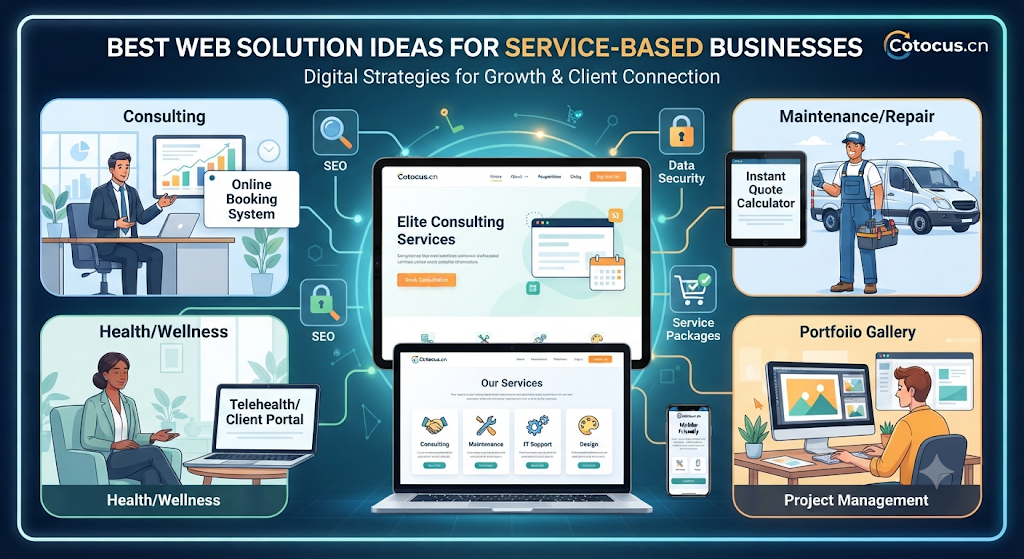
A web solution for a service-based business refers to the combination of digital tools, website architecture, and functional features designed to showcase expertise, book appointments, and convert visitors into paying clients. Unlike e-commerce websites that focus on selling physical products, service websites focus on building trust, explaining intangible offerings, and streamlining communication. People search for these ideas because they want to know how to set up online booking systems, client portals, and contact workflows that save time. In real life, these solutions are used by consultants, cleaning services, legal practices, and marketing agencies to automate client onboarding. One beginner-friendly example is a local cleaning service website featuring an integrated booking calendar and instant quote calculator. A common misunderstanding is thinking that a service website only needs a homepage and a phone number, ignoring how interactive features drive conversions. The practical takeaway is that your web solution should actively guide visitors toward scheduling a consultation or requesting a quote.
Why Best Web Solution Ideas for Service-Based Businesses Is Important
Selecting the right web solution directly affects client acquisition, operational efficiency, and long-term business growth. Without a structured approach, businesses often waste money on overly complex custom development or end up with rigid templates that cannot scale.
- Client Acquisition: A clear web solution makes it easy for potential clients to understand your services and book a call immediately.
- Operational Efficiency: Integrating scheduling and intake forms reduces manual back-and-forth communication.
- Brand Trust: Professional design and clear service descriptions reassure visitors of your expertise and reliability.
- Risk Awareness: Understanding technical requirements prevents security vulnerabilities and data leaks from client forms.
- Budget Control: Proper planning prevents unexpected development costs and scope creep.
- Long-Term Discipline: A modular website allows you to add features like client portals only as your business grows.
Consider a boutique consulting firm that launched a simple site without a booking tool, forcing clients to email back and forth for days to schedule a meeting. By implementing a streamlined web solution with automated calendar scheduling, they reduced friction and increased consultation bookings by forty percent within the first month.
The Real Problem Readers Face With Best Web Solution Ideas for Service-Based Businesses
Service business owners often struggle with conflicting advice, overwhelming technology choices, and a lack of clear direction. Many fall into the trap of buying expensive all-in-one software packages they do not need, or conversely, relying on fragile, unoptimized setups that crash under traffic. Another major issue is emotional decision-making, such as choosing a web designer purely based on flashy visuals rather than conversion capability and mobile responsiveness. Furthermore, ignoring mobile optimization or failing to test contact forms regularly leads to lost inquiries. Recognizing these hurdles is the first step toward building a functional, resilient web presence that supports your business goals.
How Best Web Solution Ideas for Service-Based Businesses Works Step by Step
Step 1: Define Service Offerings and Target Audience
What it means: Clarifying exactly what services you offer and who your ideal client is before writing code or choosing templates. Why it matters: Ensures your website structure speaks directly to the people most likely to hire you. How to apply it: List your top three core services and map out the specific questions your clients ask before buying. Practical example: A freelance accountant outlining tax preparation and bookkeeping pages separately. Common mistake: Listing every minor task you can possibly do without a clear hierarchy. Better approach: Group services into clear, benefit-driven categories.
Step 2: Choose the Right Content Management System
What it means: Selecting the underlying platform that powers your website, such as WordPress, Webflow, or Squarespace. Why it matters: Determines how easily you can update content, optimize for search engines, and integrate third-party tools. How to apply it: Evaluate platforms based on your technical skill level and long-term expansion goals. Practical example: A marketing consultant choosing WordPress for its robust blogging and SEO capabilities. Common mistake: Picking an overly complex custom-coded platform when a flexible template suffices. Better approach: Match platform flexibility with your actual technical maintenance capacity.
Step 3: Implement Strategic Lead Capture Mechanisms
What it means: Setting up contact forms, lead magnets, or newsletter sign-ups to collect visitor information. Why it matters: Transforms casual website traffic into actionable sales leads you can nurture over time. How to apply it: Place clear call-to-action buttons on every major service page. Practical example: Adding a free downloadable pricing guide in exchange for an email address. Common mistake: Hiding contact forms deep within obscure subpages. Better approach: Keep calls-to-action visible and friction-free across all primary pages.
Step 4: Integrate Online Scheduling and Booking
What it means: Connecting tools like Calendly or Acuity directly to your website so clients can book appointments seamlessly. Why it matters: Eliminates email friction and accelerates the sales pipeline. How to apply it: Embed a scheduling widget on your contact or service pages with clear availability hours. Practical example: A business coach allowing prospective clients to book a discovery call instantly. Common mistake: Forgetting to sync your calendar timezone, leading to missed appointments. Better approach: Test booking workflows thoroughly from a mobile device before launching.
Step 5: Optimize for Mobile Devices and Speed
What it means: Ensuring your website loads in under three seconds and displays perfectly on smartphones and tablets. Why it matters: Over half of all web traffic originates from mobile devices, and search engines penalize slow sites. How to apply it: Compress images, use reliable hosting, and test responsiveness across multiple screen sizes. Practical example: A local plumbing service ensuring emergency contact buttons remain thumb-friendly on mobile. Common mistake: Using oversized image files that cause slow mobile loading times. Better approach: Prioritize lightweight design elements and minimalist layouts.
Step 6: Establish Security and Compliance Protocols
What it means: Securing your website with SSL certificates, secure hosting, and privacy policy pages. Why it matters: Protects sensitive client data and builds professional credibility. How to apply it: Install security plugins, enforce strong passwords, and publish a clear privacy policy. Practical example: A legal consultant ensuring all client intake form data is encrypted in transit. Common mistake: Neglecting regular software updates, leaving the site vulnerable to exploits. Better approach: Set up automated updates and routine website backups.
Key Factors That Influence Best Web Solution Ideas for Service-Based Businesses
- User Experience (UX): Clear navigation and intuitive design ensure visitors find information without frustration.
- Mobile Responsiveness: Flawless display across smartphones and tablets is non-negotiable for modern service seekers.
- Integration Capabilities: Seamless connection with CRM tools, payment gateways, and email marketing platforms streamlines operations.
- Search Engine Optimization (SEO): Proper site structure and keyword alignment help potential clients discover your services on search engines.
- Content Clarity: Concise explanations of your services, pricing transparency, and case studies build immediate authority.
- Loading Speed: Fast page performance reduces bounce rates and improves overall visitor engagement.
- Security Standards: SSL encryption and data protection measures safeguard user submissions and maintain client trust.
- Maintenance Ease: Choosing tools that allow you to update text and images without calling a developer saves time and money.
Detailed Breakdown of Best Web Solution Ideas for Service-Based Businesses
Building a successful web solution for a service-based business requires a deep understanding of how digital architecture translates into client relationships. Unlike physical stores, service websites rely entirely on digital trust signals, clear value propositions, and frictionless communication pathways.
When planning your web solution, you must first establish a logical page hierarchy. Your homepage should immediately communicate who you help, what problem you solve, and what action the visitor should take next. Service pages should dive deeper into specific methodologies, deliverables, and client outcomes rather than just listing technical features.
Another critical aspect is selecting the right set of integrated tools. For instance, combining a reliable content management system with a robust CRM ensures that every inquiry is tracked, labeled, and responded to promptly. Many beginners make the mistake of installing dozens of conflicting plugins that slow down the site, whereas a lean, purpose-built stack performs much better.
Furthermore, social proof integration—such as verified client testimonials, case studies, and industry certifications—must be strategically woven into your web layout. This transforms your website from a digital brochure into an active client acquisition engine. Prioritizing clarity, speed, and security guarantees a sustainable online presence that scales alongside your business.
Common Mistakes Beginners Make With Best Web Solution Ideas for Service-Based Businesses
- Overcomplicating Design: Adding too many animations and flashy graphics that distract from the core service message and slow down site performance.
- Ignoring Mobile Users: Designing exclusively on desktop monitors while neglecting how the site looks and functions on smartphones.
- Vague Call-to-Actions: Using ambiguous buttons like “Click Here” instead of clear, action-oriented text like “Book Your Consultation.”
- Missing Contact Options: Forcing users to dig through multiple menus just to find an email address or phone number.
- Neglecting Security: Failing to install SSL certificates or maintain regular software backups, risking data loss.
- No Clear Value Proposition: Failing to explain within five seconds what makes your service unique and valuable to the client.
Don’t Do This Checklist
- Do not launch a website without testing all contact and booking forms on a mobile device.
- Do not choose a web development platform solely because it looks trendy on social media.
- Do not hide your pricing or service scope entirely if your target market expects price transparency.
- Do not ignore basic SEO meta tags and clean URL structures during initial setup.
- Do not rely on free, unmaintained plugins that can compromise your website security.
Practical Real-Life Examples of Best Web Solution Ideas for Service-Based Businesses
- Independent Business Consultant: A consultant struggling to win clients added a dedicated case study page and a calendar booking widget, resulting in a streamlined intake process and higher conversion rates.
- Local Cleaning Service: A cleaning company transitioned from a static brochure site to an interactive quote calculator website, eliminating tedious phone calls and saving hours of administrative work weekly.
- Freelance Graphic Designer: A designer revamped their portfolio site with clear service packages and fixed-rate pricing options, attracting higher-quality clients and reducing haggling over project scope.
- Boutique Law Firm: A legal practice integrated secure client intake forms and an SSL-encrypted portal, boosting client confidence and ensuring adherence to data privacy standards.
- Digital Marketing Agency: An agency updated their slow, cluttered website with a minimalist design and fast hosting, dramatically reducing bounce rates and improving search engine rankings.
Table 1: Basic Web Solution vs. Advanced Web Solution Comparison
| Feature | Basic Web Solution | Advanced Web Solution |
| Primary Structure | Single-page or multi-page static site | Multi-page site with dynamic content areas |
| Booking Mechanism | Simple email contact form | Integrated real-time calendar scheduling |
| Client Management | Direct email inbox replies | CRM integration and automated follow-ups |
| Content Updates | Manual code or basic CMS editing | Advanced CMS with role-based permissions |
| Security Setup | Standard SSL certificate | Enhanced firewall, automated backups, and encryption |
Table 2: Web Design Mistake vs. Correct Approach
| Common Mistake | Why It Is Risky | Better Approach |
| Cluttered Navigation | Confuses visitors and increases bounce rates | Keep menus clean with four to five core options |
| Slow Loading Speed | Frustrates users and hurts search rankings | Compress images and use reliable, fast hosting |
| Generic Messaging | Fails to connect with the target audience | Use direct, benefit-driven headlines |
| Broken Forms | Results in lost client inquiries and revenue | Test all contact and booking forms weekly |
| Ignoring Analytics | Leaves you blind to visitor behavior and traffic sources | Install and monitor basic website traffic analytics |
Tools, Methods, and Frameworks Readers Can Use
- Content Management Systems (CMS): Platforms like WordPress or Webflow provide the flexibility needed to structure service pages, publish expert blogs, and manage client resources effectively.
- Calendar Scheduling Tools: Integrating tools like Calendly or Acuity Scheduling eliminates email friction by allowing prospective clients to book meetings directly into your available time slots.
- Wireframing Frameworks: Using tools like Figma or simple pen-and-paper sketches helps you map out your website layout before spending money on design or development.
- Speed Testing Utilities: Utilizing tools like Google PageSpeed Insights allows you to identify performance bottlenecks, oversized images, and loading lag.
- Basic SEO Frameworks: Implementing structured keyword research and clean URL structuring ensures search engines can easily crawl and index your service pages.
Expert Tips to Make Better Decisions
- Prioritize User Experience: Always design your website from the perspective of a busy client who wants answers quickly.
- Keep Navigation Simple: Limit your top navigation menu to essential pages like Home, Services, About, Case Studies, and Contact.
- Invest in Quality Hosting: Choose a reputable hosting provider to ensure your website remains fast, secure, and accessible twenty-four hours a day.
- Highlight Social Proof: Feature authentic client testimonials and success stories prominently on your homepage and service pages.
- Optimize for Mobile First: Check every single page on a smartphone to ensure text is readable and buttons are easy to tap.
- Include Clear Calls to Action: Every page should guide the visitor toward a specific next step, such as booking a call or requesting a quote.
- Protect Client Data: Install SSL certificates and ensure your contact forms comply with basic digital privacy guidelines.
- Regularly Test Workflows: Fill out your own contact and booking forms monthly to verify they function correctly.
- Maintain Content Freshness: Update your portfolio and case studies regularly to reflect your most recent and successful client projects.
- Avoid Unnecessary Add-ons: Only install plugins and tools that directly serve your business goals to keep your site lightweight and secure.
- Establish Clear Pricing Transparency: If applicable to your business model, providing clear pricing tiers helps qualify leads before they contact you.
- Consult Professionals When Needed: Partner with experienced web developers or designers if technical requirements exceed your in-house capabilities.
Case Studies: How Better Understanding Changes Decisions
Case Study 1: Streamlining Client Onboarding for a Independent Consultant
- Profile: A solo management consultant with a generic, text-heavy website.
- Situation: The website received steady visitor traffic, but very few inquiries converted into actual client meetings.
- Problem: Visitors had to read through dense paragraphs and send an unstructured email to express interest.
- Wrong Approach: Adding more lengthy descriptive text and complex industry jargon to the homepage.
- Better Approach: Redesigning the site with clear service pillars, prominent client testimonials, and an integrated booking widget.
- Result / Learning: Consultation bookings doubled within two months because the friction of scheduling was entirely removed.
- Key Takeaway: Simplifying the user journey and adding direct scheduling tools drastically improves conversion rates.
Case Study 2: Upgrading a Local Service Website for Mobile Performance
- Profile: A regional HVAC repair and maintenance service provider.
- Situation: High bounce rates on mobile devices and declining local search visibility.
- Problem: The legacy website took over seven seconds to load on mobile networks and lacked a mobile-friendly contact button.
- Wrong Approach: Purchasing expensive billboard advertising while ignoring the broken website experience.
- Better Approach: Migrating to a responsive, lightweight template with an instant click-to-call phone button and compressed images.
- Result / Learning: Mobile bounce rates dropped significantly, and emergency repair inquiries increased by thirty-five percent.
- Key Takeaway: Mobile responsiveness and fast loading speeds are critical for capturing urgent service inquiries.
Case Study 3: Restructuring Content for a B2B Creative Agency
- Profile: A boutique digital marketing agency offering diverse, overlapping services.
- Situation: Potential clients were confused about what specific packages the agency offered.
- Problem: The navigation menu had ten different dropdown categories, overwhelming site visitors.
- Wrong Approach: Continuing to add new subpages for every minor service variation.
- Better Approach: Consolidating services into three clear core offerings with transparent case studies and downloadable guides.
- Result / Learning: Client inquiries became more qualified, and sales calls required less time explaining basic service scopes.
- Key Takeaway: Clear categorization and focused content help prospects understand your value proposition instantly.
Risk Awareness: What Readers Must Check First
- Data Privacy Risk: Failing to secure client submission forms can lead to data breaches and loss of consumer trust. Reduce this risk by using encrypted connections and reputable form plugins.
- Platform Lock-In Risk: Building on proprietary, closed-source website builders can make it difficult or expensive to migrate your data later. Choose flexible, portable platforms when possible.
- Downtime Risk: Selecting unreliable hosting providers can cause your website to go offline during peak traffic hours. Always use established, reviewed hosting services.
- Compliance Risk: Ignoring basic terms of service or privacy disclosures can expose your business to legal vulnerabilities. Consult qualified legal professionals if you handle sensitive client data.
- Misinformation Risk: Following outdated web design trends can result in cluttered, ineffective sites. Verify technical recommendations through credible, current industry resources.
Checklist Before Taking Action
- Clearly defined your core service offerings and target audience.
- Evaluated and selected a suitable content management system or platform.
- Planned a clean, minimalist navigation menu structure.
- Integrated a friction-free contact or calendar booking mechanism.
- Verified that the website design is fully mobile-responsive.
- Ensured loading speed is optimized through image compression and reliable hosting.
- Added authentic client testimonials and social proof elements.
- Installed an SSL certificate and confirmed basic security protocols.
- Tested all interactive forms and booking widgets personally.
- Prepared a schedule for routine content updates and security maintenance.
Review this checklist thoroughly before committing budget or time to web development. Using a structured approach ensures that every element of your web solution serves a clear business purpose and supports long-term growth.
Strategic Insights for Better Decision-Making
- Scalability Planning: Build your web solution with future growth in mind, ensuring you can add new service pages or client portals without redesigning the entire site.
- Friction Reduction: Continuously analyze your user journey to identify where potential clients drop off, and eliminate unnecessary form fields or confusing navigation steps.
- Value-Driven Copywriting: Focus your website copy on the tangible outcomes and solutions you deliver to clients rather than just listing technical tasks.
- Data-Informed Adjustments: Use basic web analytics to track which service pages attract the most engagement, allowing you to refine your marketing strategy over time.
- Consistent Maintenance: Treat your website as a living business asset by scheduling monthly reviews of broken links, outdated information, and plugin updates.
Key Terms Explained for Beginners
- Web Solution: A combination of digital tools, design structures, and functional features designed to help a business achieve specific online goals.
- User Experience (UX): How a visitor feels and interacts while navigating through your website, encompassing ease of use and speed.
- Call to Action (CTA): A prompt on your website designed to encourage visitors to take a specific action, such as booking a call or signing up for a newsletter.
- Mobile Responsiveness: The ability of a website to automatically adjust its layout and design to fit correctly on smartphones and tablets.
- Content Management System (CMS): Software applications used to create, manage, and modify website content without requiring advanced programming skills.
- SSL Certificate: A digital security protocol that establishes an encrypted link between a web server and a browser, protecting user data.
- Bounce Rate: The percentage of visitors who navigate away from your website after viewing only a single page without taking further action.
- Lead Generation: The process of attracting and converting prospective clients into interested inquiries for your services.
- CRM (Customer Relationship Management): Software tools used to manage interactions with current and potential clients, tracking leads and communication history.
- Social Proof: Evidence such as reviews, case studies, and testimonials that demonstrates the value and reliability of your services.
Who Should Read This Blog
- Service-Based Business Owners: Individuals looking to build or revamp their digital presence to attract more clients.
- Freelancers and Consultants: Professionals wanting to establish personal authority and streamline appointment booking.
- Agency Founders: Growing teams seeking scalable web architectures to support expanding service offerings.
- Beginners in Digital Marketing: Anyone wanting to understand how web design and lead generation intersect.
- Local Service Providers: Planners, accountants, coaches, and legal professionals looking to improve online trust and client intake.
Frequently Asked Questions
What is a web solution for service-based businesses?
A web solution for service-based businesses is an integrated digital setup featuring a professional website, clear service descriptions, mobile optimization, and tools like contact forms or calendar booking systems designed to convert visitors into clients.
Why are the best web solution ideas for service-based businesses important for beginners?
They are important because beginners often waste time and money on complex features they do not need. A clear strategy helps you focus on essential elements like user trust, mobile responsiveness, and lead capture.
How can beginners start building a service website safely?
Beginners can start by defining their core services, choosing an intuitive content management system like WordPress or Webflow, keeping navigation simple, and testing all contact workflows before launching publicly.
What is the biggest mistake to avoid when designing a service website?
The biggest mistake is overcomplicating the design with slow animations and hiding contact or booking options, which frustrates visitors and drives them away.
Is this approach useful for solo consultants and freelancers?
Yes, solo consultants and freelancers benefit greatly because a streamlined web solution automates client onboarding and saves valuable time on administrative back-and-forth communication.
What risks should I know before choosing a web development platform?
Key risks include platform lock-in, poor mobile performance, lack of security updates, and data privacy vulnerabilities. Reviewing platform flexibility and security protocols helps mitigate these risks.
How often should I review and update my business website?
You should review your website monthly to check for broken links, update case studies, test contact forms, and ensure all software plugins are secure and up to date.
Should I take professional advice for building my business website?
Taking professional advice from experienced web designers or developers is recommended if your technical requirements involve complex custom integrations or advanced data security needs.
How do best web solution ideas for service-based businesses help with lead generation?
They help by placing clear call-to-action buttons, offering frictionless booking widgets, and presenting authentic social proof that encourages visitors to reach out.
What should I avoid before taking action on website development?
Avoid choosing platforms based purely on hype, ignoring mobile users, neglecting basic security certificates, and launching without testing your contact forms.
How does proper website planning support long-term business growth?
Proper planning ensures your website is scalable, allowing you to add new service pages, client portals, and advanced marketing tools as your business expands.
What is the best next step after reading this blog?
The best next step is to outline your core service offerings, map out a simple page structure, and review our checklist before selecting your web platform.
Conclusion
Choosing the right web solution is a foundational step for any service-based business aiming to build credibility and acquire clients online. By focusing on clear service structures, mobile optimization, friction-free booking tools, and robust security, you can create a digital presence that works reliably for your business. Remember to avoid common pitfalls like overcomplicated designs and neglected mobile user experiences, and always prioritize clarity over unnecessary complexity. Your next step should be to map out your core service pages, review your technical requirements using our checklist, and take a measured, planned approach toward building your online platform.
